8 | Moku:Go Laser Lock Box User Manual © 2023 Liquid Instruments. All rights reserved.
Upper user interface
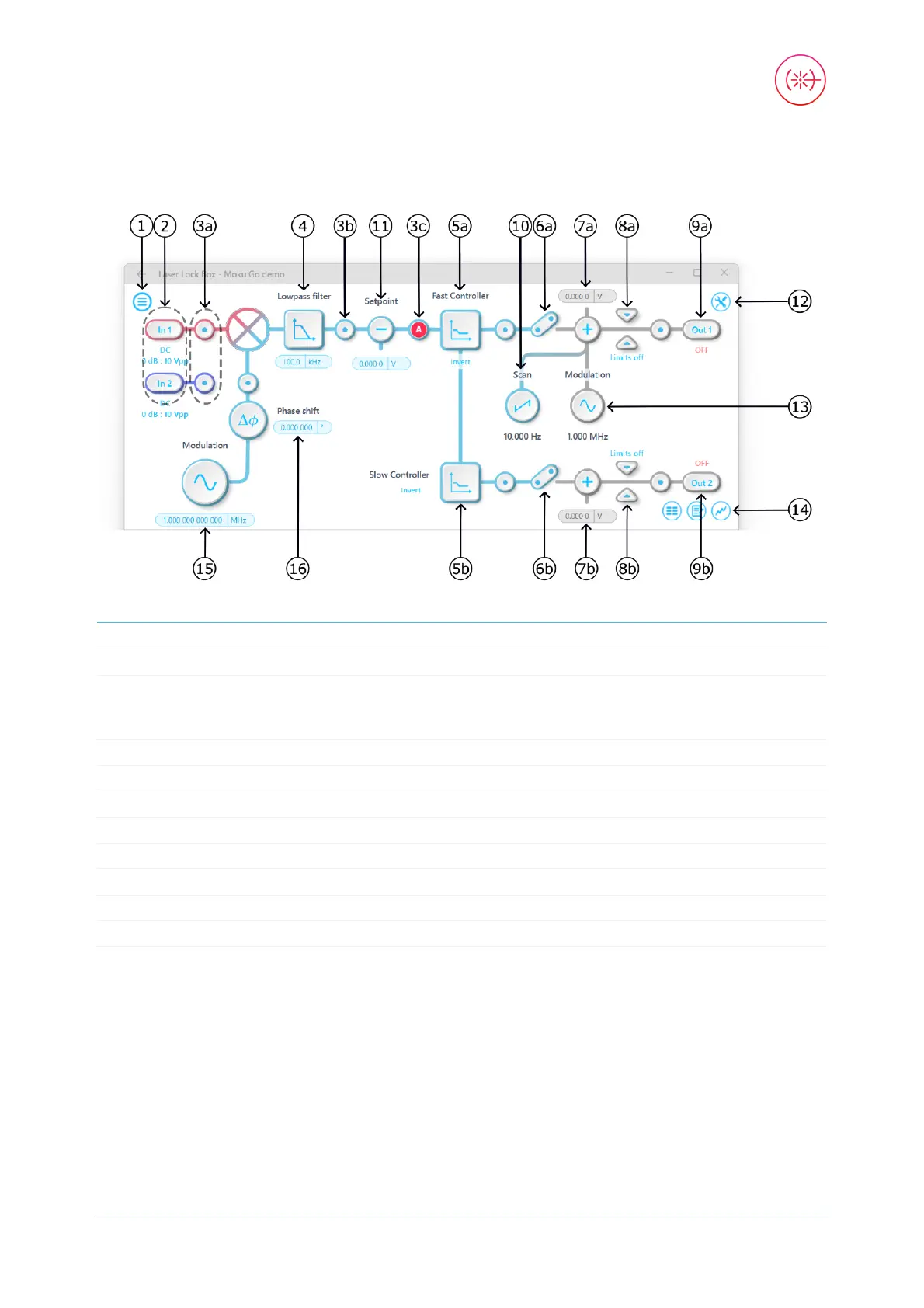
1
8b
Output limiter on slow PID chain
2 Input settings 9a Turn output 1 on/off
3a-c
Tap to drop oscilloscope probe points to
examine signals along the processing
chain
9b
4
Tap to configure the digital filter
10
Configure scanning signal*
5a Tap to configure fast PID controller 11 Apply input offset
5b
Tap to configure slow PID controller
12
Configure local oscillator
6a
Connect fast PID chain to output
13
Configure the modulation signal*
6b Connect slow PID chain to output 14 Tap to choose the control panel
7a
Apply output offset to fast PID chain
15
Control local oscillator frequency
7b
Apply output offset to slow PID chain
16
Control local oscillator phase
8a Output limiter on fast PID chain


 To Next Page