20 | Moku:Go Laser Lock Box User Manual © 2023 Liquid Instruments. All rights reserved.
Power Supply
The Moku:Go Power Supply is available on M1 and M2 models. M1 features a 2-channel power
supply, while M2 features a 4-channel power supply. The Power Supply control window can be
accessed in all instruments under the main menu.
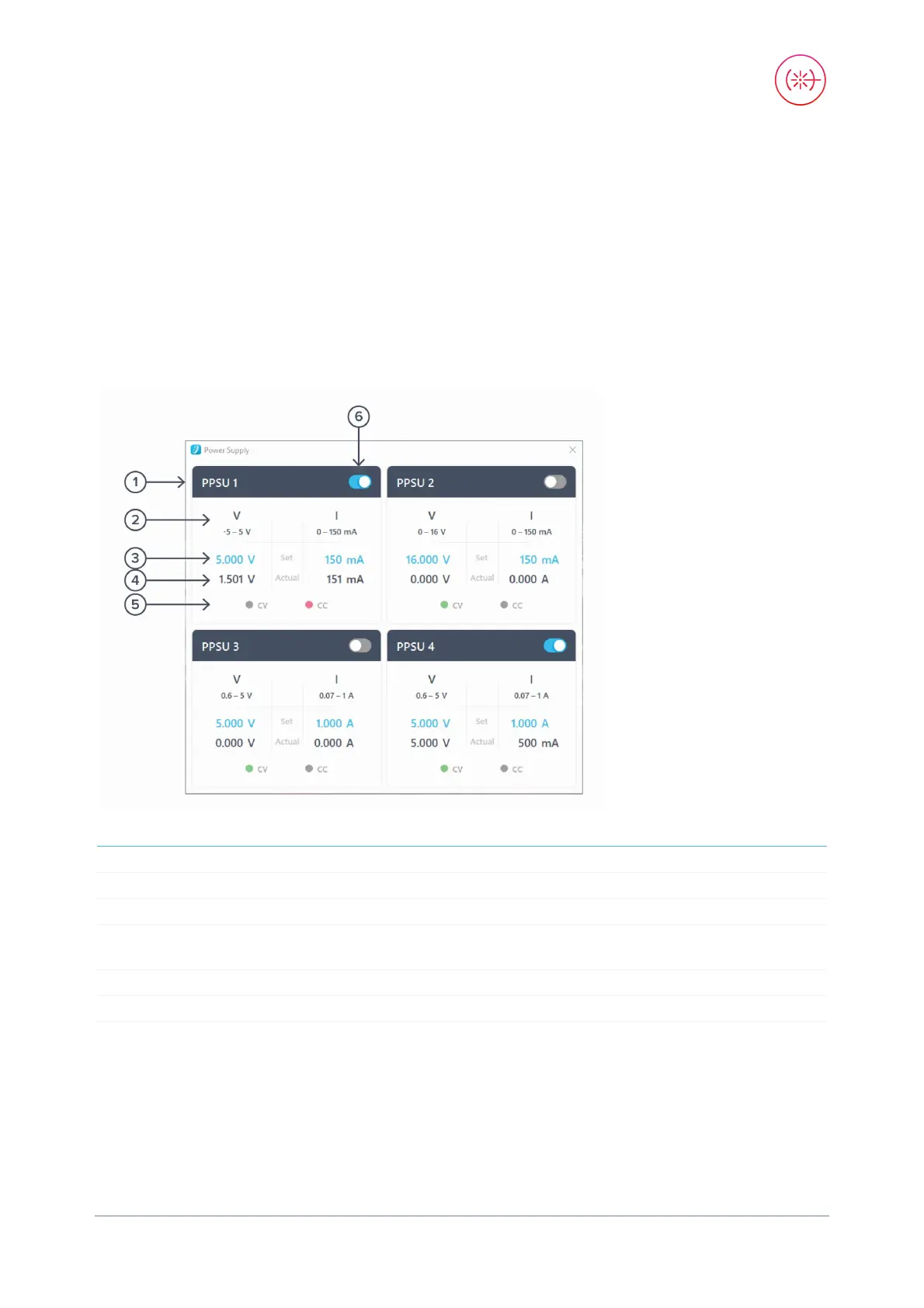
The Power Supply operates in two modes: constant voltage (CV) or constant current (CC) mode.
For each channel, the user can set a current and voltage limit for the output. Once a load is
connected, the Power Supply operates either at the set current or set voltage, whichever comes
first. If the Power Supply is voltage limited, it operates in the CV mode. If the Power Supply is
current limited, it operates in the CC mode.
1
Identifies the power supply being controlled.
2 Channel range Indicates the voltage/current range of the channel.
3
Click the blue numbers to set the voltage and current limit.
4
Voltage and current readback from the power supply, the actual
voltage, and current being supplied to the external load.
5
Indicates if the power supply is in CV (green) or CC (red) mode.
6 On/Off Toggle Click to turn the power supply on and off.


 To Next Page