2726
DVD player operation,continued
Program Mode
This function is applicable for DVD and CD audio. User can assign the playback sequence
according to his/her preference. For CD audio, user can assign the track sequence while for DVD
disc, user can assign both the Title and Chapter sequence.
• For CD
1. Press the PROGRAM button. The Program Se-
quence table will be shown on the screen.
2. Enter the track numbers according to the user
preference through the Number keys (0-9).
3. After assigning the playback sequence, move
the highlight cursor to the START option by using
the Navigation Arrows.
Press ENTER on the remote control to confirm.
To cancel the program move the highlight cursor to desire
Program By use the Navigation arrows then press the
clear button to delete the selected program.
PROGRAM
01
02
03
04
05
EXIT NEXT
06
07
08
09
10
PROGRAM
01
02
03
04
05
EXIT START NEXT
06
07
08
09
10
05
03
08
PROGRAM
06
07
08
09
10
05
03
08
01
02
03
04
05
EXIT START NEXT
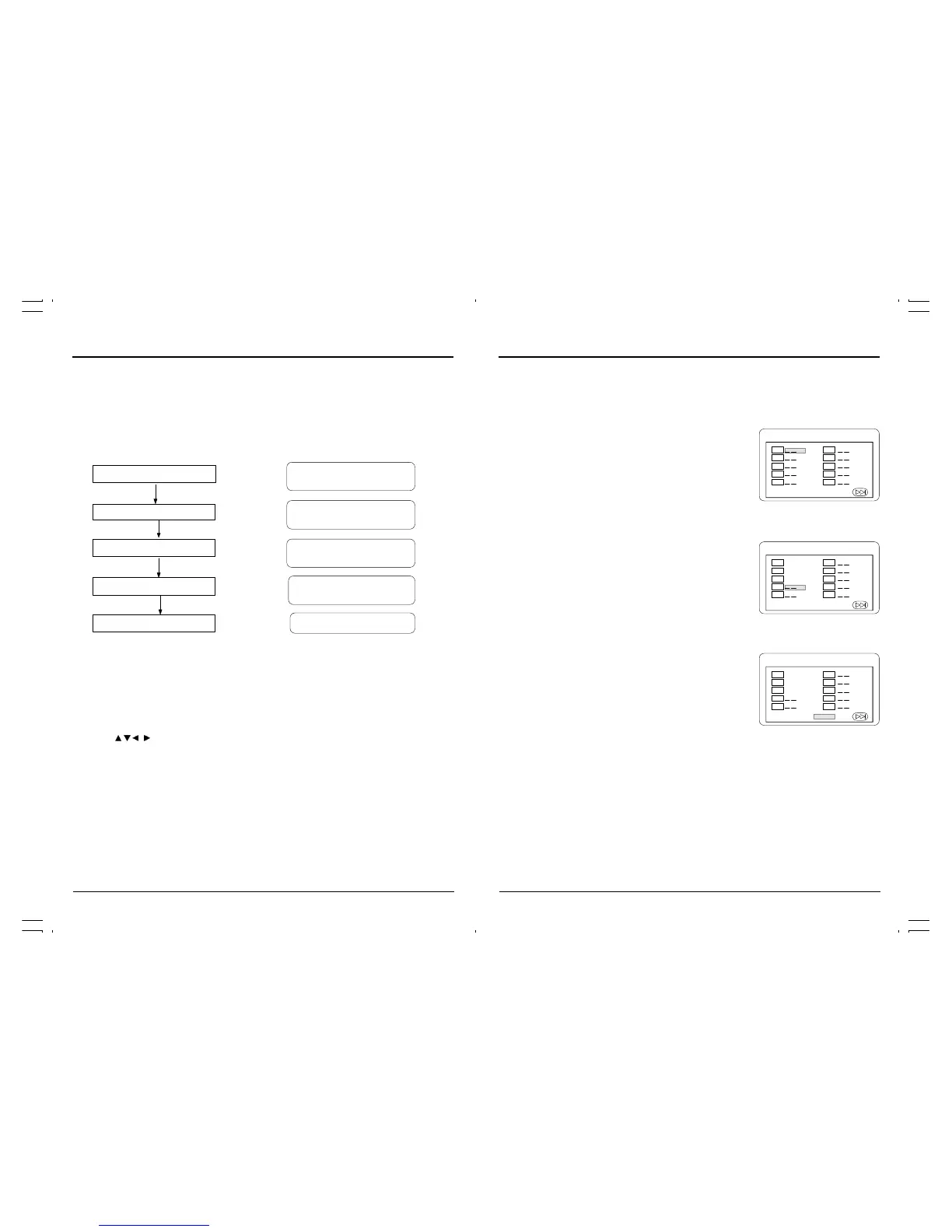
Display (Remain Time)
This function is applicable for DVD only. It will display the timing information of the playback on
the screen.
• For DVD playback, subsequent key Press on the “DISPLAY” button will show the Title
Elapsed Time, Title Remain Time, Chapter Elapse Time and Chapter Remain Time one by
one.
Zoom
This function is applicable for DVDs. User can enlarge a static picture or a moving picture by
pressing the “ZOOM” button. There are 6 levels of zooming (2x, 3x, 4x, 1/2, 1/3, 1/4) and they
can be achieved one by one through subsequent key presses on the “ZOOM” button.
NOTE: User can select the portion of the picture to be enlarged by using the “NAVIGATION”
buttons ( , , , ).
DVD player operation,continued
Press the DISPLAY Button
Press the DISPLAY Button
Press the DISPLAY Button
Press the DISPLAY Button
Press the DISPLAY Button
TITLE ELAPSED
T: 01/04 C: 01/12 0:02:13
TITLE REMAIN
T: 01/04 C: 01/12 1:33:30
CHAPTER ELAPSED
T:01/04 C: 01/12 0:02:15
CHAPTER REMAIN
T: 01/04 C: 01/12 0:02:18
DISPLAY OFF



 To Next Page