5
First Startup Zenit
+
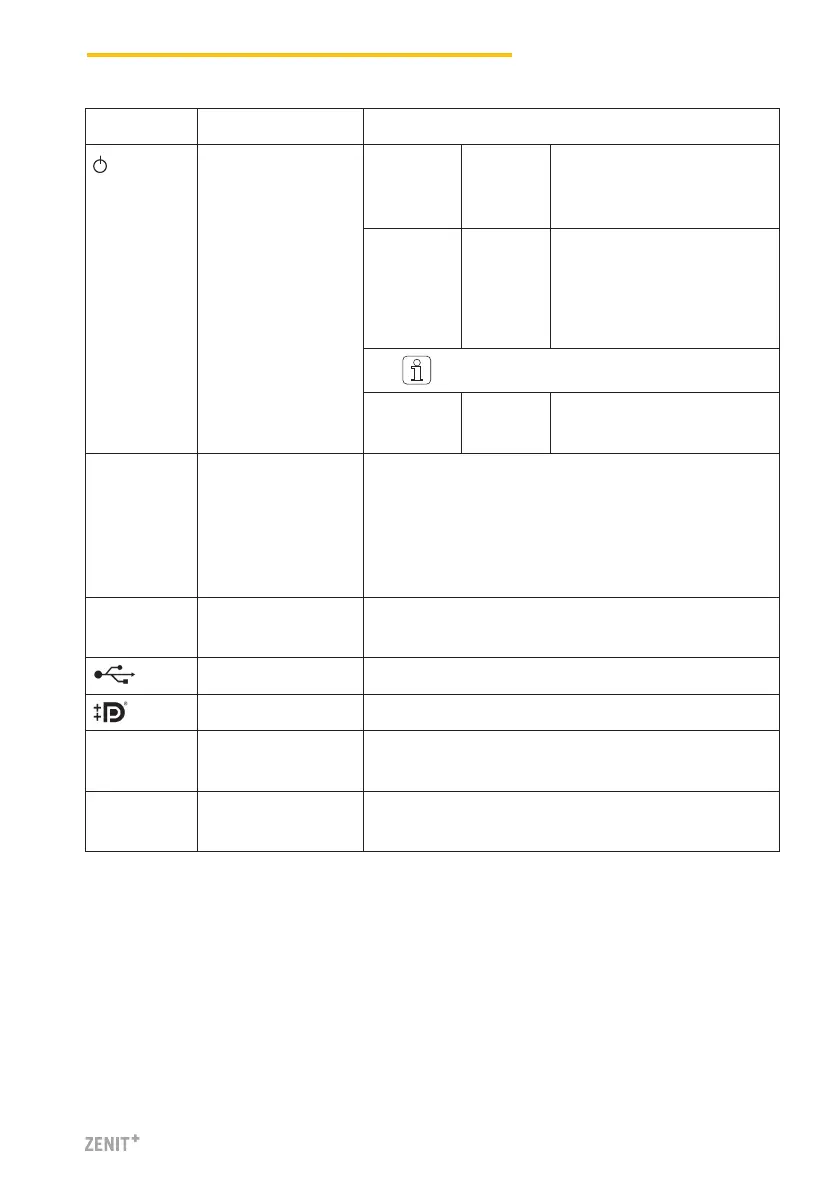
Marking Type Description
Microswitch
(Power ON/OFF)
LED green Tap
< 1 Sec.
Switch to standby mode con-
trolled by operating system
(LED becomes orange)
LED green Press
> 1 Sec.
Only in emergencies!
Forced, uncontrolled switch
to standby mode
(LED becomes orange)
Unsaved data are lost!
LED orange Tap
< 1 Sec.
Start
(LED becomes green)
LAN 1 RJ45 Dedicated connection for LZE-V Faceless
IP: 192.168.1.200 (Default)
Attention: Mistakenly changing the LAN 1 IP address
might cause the LZE-V to lose the required communica-
tion link to the Savio PC!
LAN 2 RJ45 Connection for network
IP: DHCP (Default)
USB 2.0 USB port
Display port (HDMI) DP, maximum resolution 1600 x 1200
COM 1 Sub-D,
9-pole connector
RS 485
COM 2 Sub-D,
9-pole connector
RS 232



 To Next Page