EasyManua.ls Logo

Loepfe YARNMASTER ZENIT+ - User Interface and Navigation Overview; Core Navigation and Menu Structure; Message and Status Indicators; User Access, Language, and Help

Loepfe YARNMASTER ZENIT+
16 pages
Print Icon
To Next Page IconTo Next Page
To Previous Page IconTo Previous Page
Loading...
First Startup Zenit
+
8
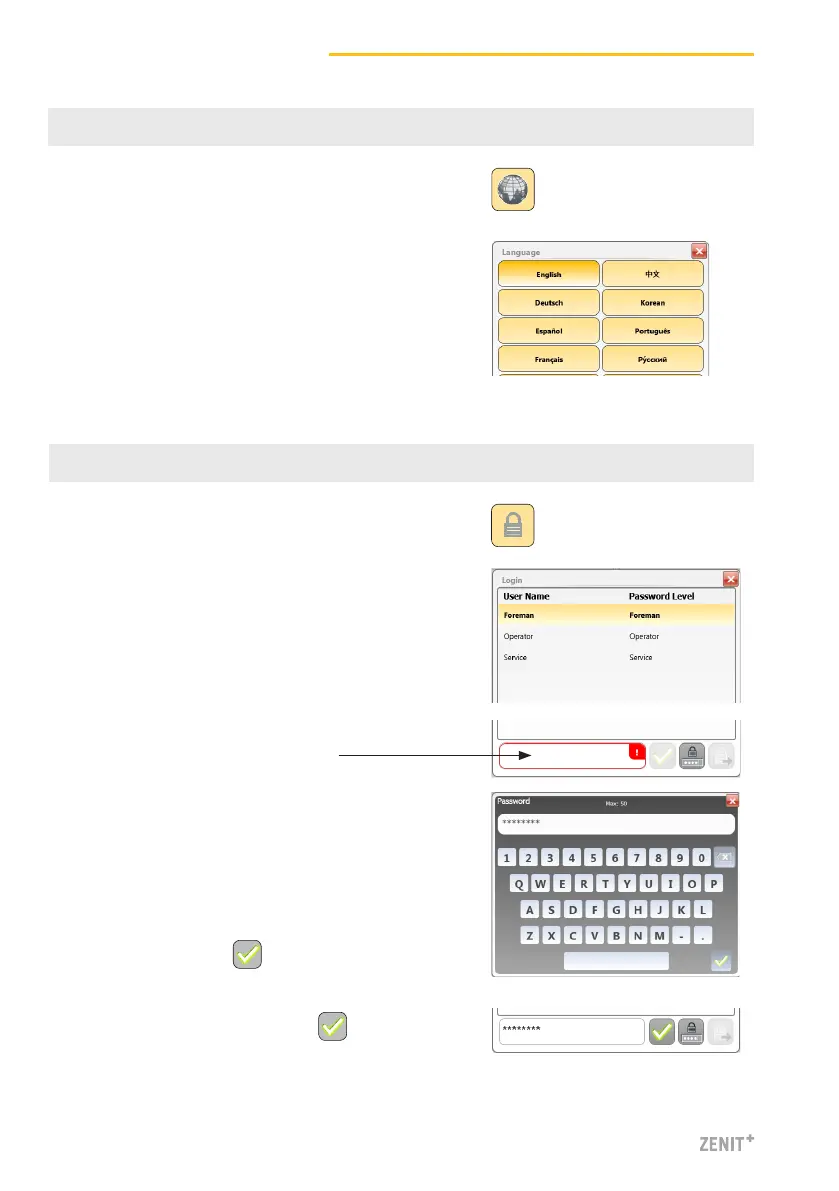
4 Language Selection
1. Tap Language button.
5 Login
1. Tap Login button.
3. Tap password input field.
5. Confirm entry with .
2. Select user “Foreman”.
(Foreman login is required for all settings during
initial start-up.)
4. Enter Foreman password (=12911291).
2. Select desired operator language.
6. Confirm password / Login with .


Other manuals for Loepfe YARNMASTER ZENIT+

Related product manuals