Connect ID 40-55 - 17 -
Quick guide
english
TV
Function list / AV selection
Function list
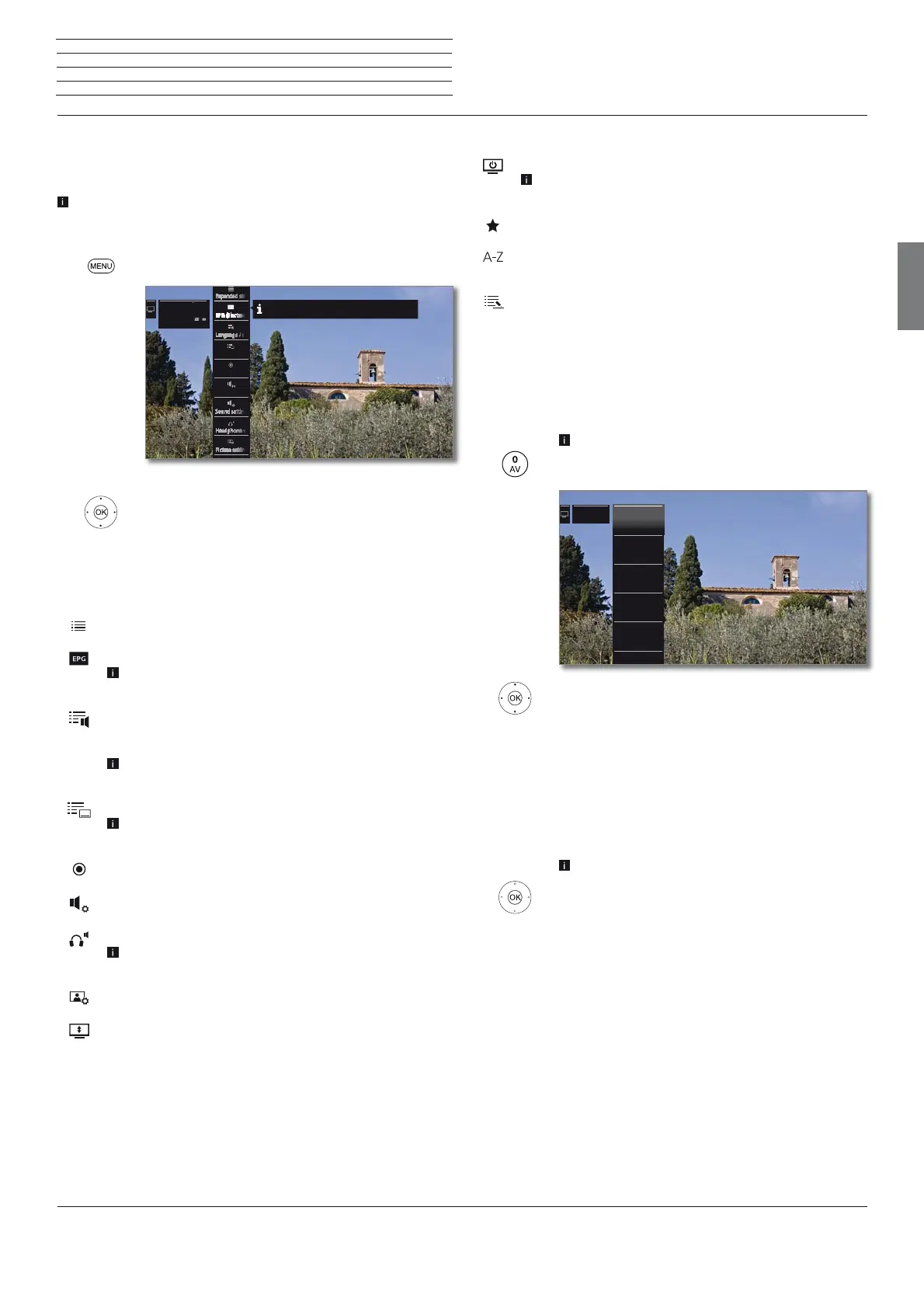
The function list contains settings and additional options. Die individual
List items will be briefly explained as follows:
The function list can be opened directly in TV mode or via the station
list. Depending on this, some list items may possibly not be available.
In TV mode:
MENU: Call function list.
Or:
OK Call station list,
call function list.
Mark function,
OK call.
Explanations of the symbols in the function list:
Open Expanded station list.
Call EPG (Electronic Programme Guide) wizard.
Menu item is only displayed as long as the EPG wizard has
not yet been executed.
Call up Language / sound. The available sound formats
and their designations depend on the programme being
broadcast.
Menu item will only be indicated when several languages/
sound tracks are available.
Call up Subtitles selection.
Menu item will only be indicated when subtitles are
available.
Open recording dialogue to programme a Recording.
Call up Sound settings.
Call up and adjust Headphone volume.
Menu item will only be indicated when a headphone is
connected to the TV set.
Call up Picture settings.
Move picture vertically up/down.
9 ZDF HD
20:15 - 21:45
Toskana
Recording
Subtitles
Sound mode
Here you can display your "Electronic Programme Guide".
Explanations of the symbols in the function list (continued):
Switch screen off
The menu item is only shown when DVB radio or an AV
source is active.
Add current station as Favourite to Home view.
Changes the Sorting between numerically and alphabe-
tically.
Call Change station list.
Delete stations, shift stations, restore deleted stations.
AV selection
Selecting the AV source via the AV selection
In normal TV mode, without other displays.
Open up the AV station list.
Select desired connection,
OK switch over.
If the selected AV source provides a signal (picture), it
should be visible now.
When selecting VIDEO, you switch to cable analogue,
channel E36. The TV set shows the signal of a provid-
er via antenna.
Selecting the AV source via the station list
In normal TV mode, without other displays.
OK call station list.
Call overview of station lists.
Mark AV list.
The AV list will be displayed.
Move to the AV list.
Mark desired AV source,
OK switch to AV source.
2 HDMI 22 HDMI 2
1 HDMI 11 HDMI 1
3 HDMI 33 HDMI 3
4 HDMI 44 HDMI 4
5 PC IN5 PC IN
6 AVS
AVAV






 To Next Page