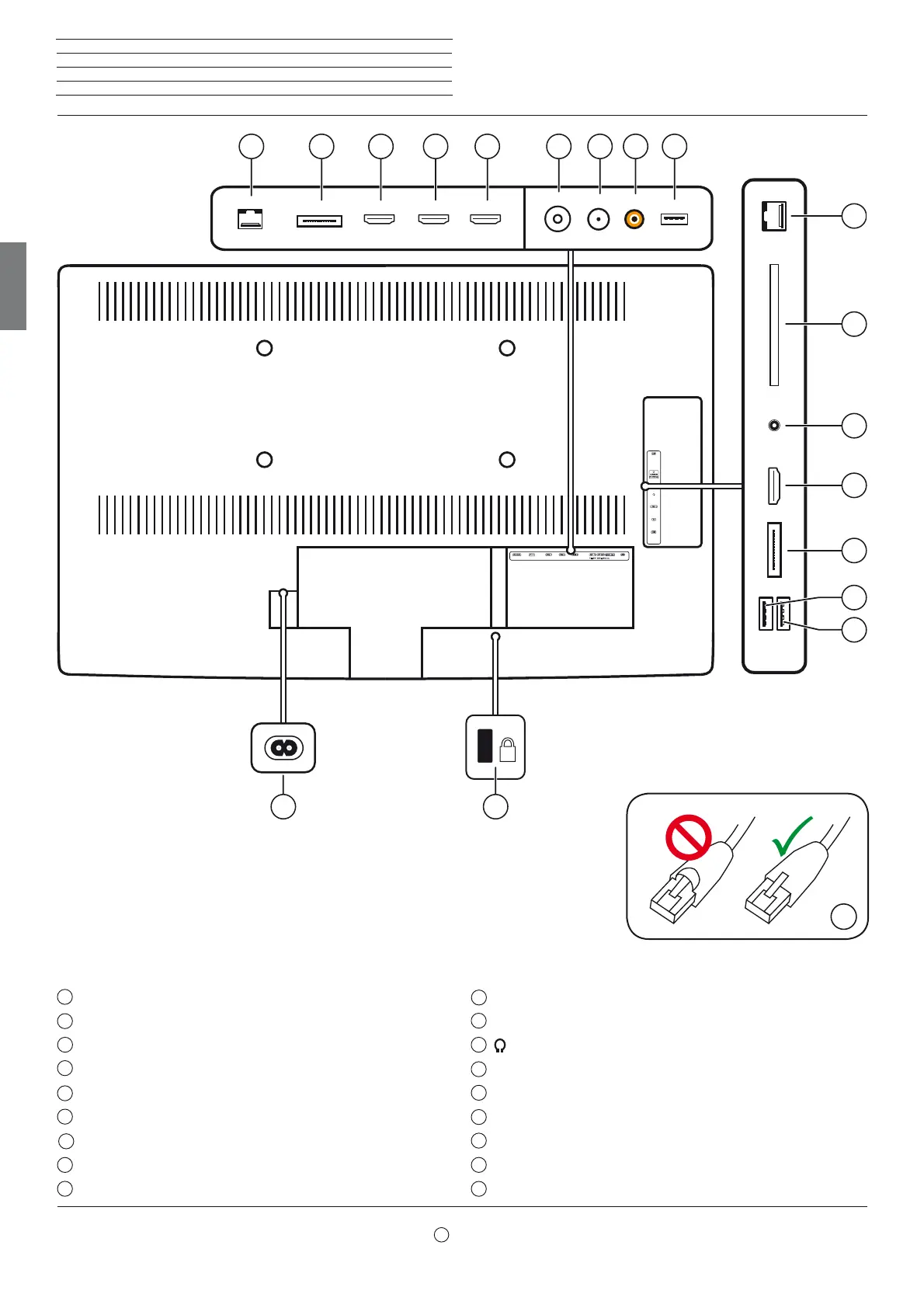
Connect ID 40-55 - 38 -
Quick guide
english
1
RS-232C - Serial interface
2
PC IN - Mini AV socket
(1
3
HDMI 1 - HDMI input 1 (with HDMI ARC support)
4
HDMI 2 - HDMI input 2
5
HDMI 3 - HDMI input 3
6
ANT TV - Antenna/cable analogue/digital
7
ANT SAT - Satellite antenna (sat tuner)
8
SPDIF OUT - Digital audio output
9
USB - USB connection
10
LAN - Network connection
(2
11
CI-COMMON INTERFACE - Common Interface (CI slot)
12
- Headphone connection
13
HDMI 4 - HDMI input 4
14
AVS - Mini AV socket
(1
15
USB - USB connection
16
USB - USB connection
17
Socket for Kensington lock
18
AC IN - Mains connection
Connections rear side of the device
(1
The adaptor set is available as an accessory from your dealer.
(2
Only use a LAN cable without a cap over the locking mechanism (see image
A
). LAN cables with caps may cause problems when the cable is being disconnected.
K
1 2
11
12
13
15
4 5 3
8
6 7
14
17
16
18
A






 To Next Page