Connect ID 40-55 - 7 -
Quick guide
english
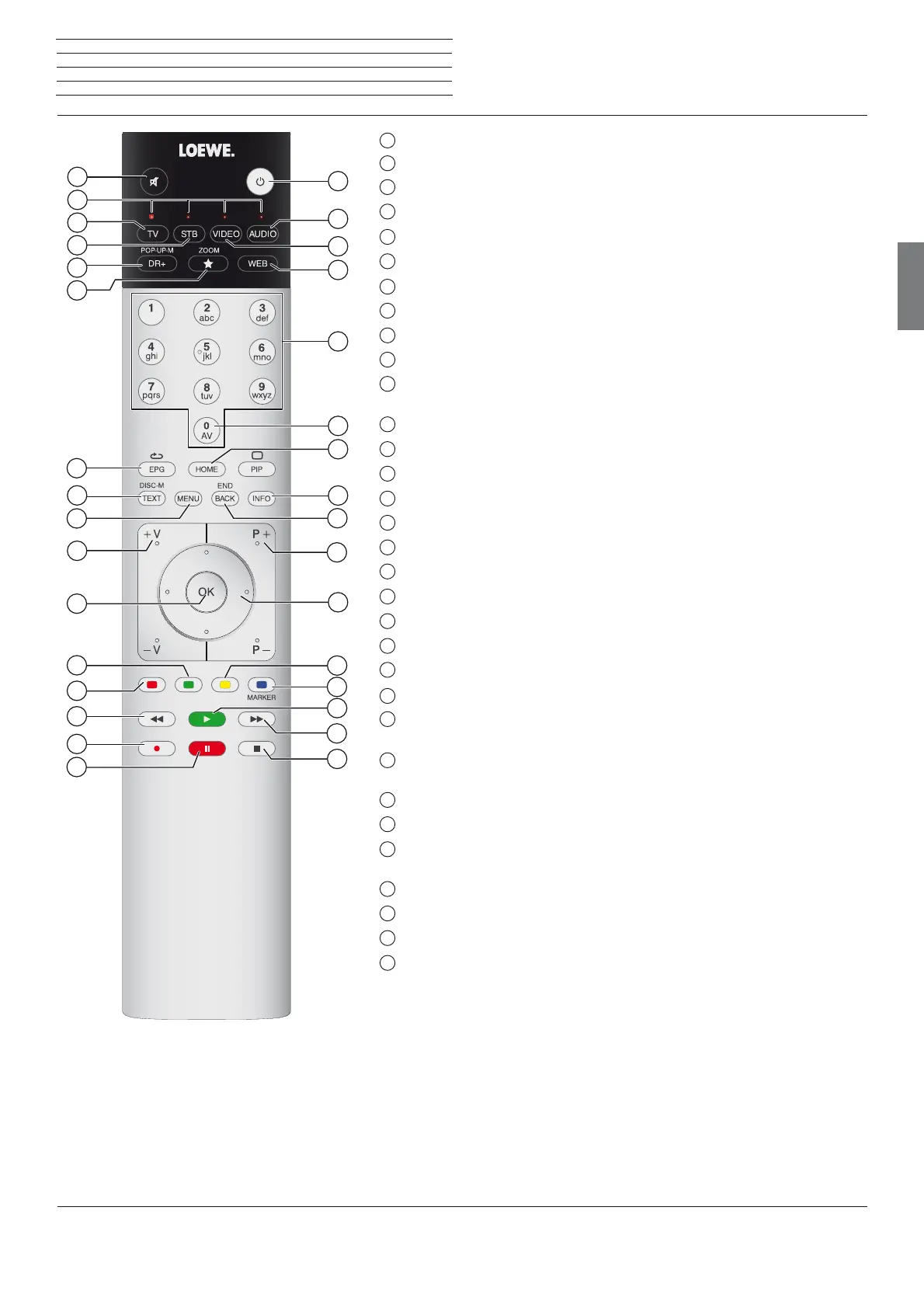
Remote control
(1
The assignment of these keys can be changed. The description refers to the standard setting.
(2
Depending on the corresponding settings.
1
Sound mute/on
2
LED display for currently operated device
3
Switching to TV mode
4
Reassign remote control to SetTop-Box (PACE DS440N)
(1
5
DR+ archive on/off
6
Define active object as favourite
7
Electronic Programme Guide on/off
8
Teletext/MediaText
(2
on/off
9
Call function list
10
V+/V- increase/reduce volume
11
Call station list / expanded station list
in the menu: confirm/call up
12
Green coloured key: screen on/off
13
Red coloured key: call preferred value-added network service
(
2
14
Jump / Wind
15
One Touch Recording
16
Start / interrupt timeshift television
17
Finish timeshift
18
Jump / wind
19
Start / continue timeshift television
20
Blue coloured key: call station function list with subfunctions
21
Yellow coloured key: switching to previously received station
22
In menu / in lists: selecting/setting
23
P+/P– select stations up/down
24
Press briefly: back to previous window (step back)
press long: close all displays
25
Status display on/off
In menu: context-relevant Info on/ off
26
Open/close Home view
27
AV selection
28
Select station directly
in the menu: enter numbers or letters
29
Call MediaNet
30
Reassign remote control to BluTech Vision 3D
(1
31
Switch to radio mode
(1
32
Switch ON/OFF to standby mode
System standby
1
2
3
4
5
6
7
8
9
10
11
12
13
14
15
16
32
18
19
20
21
22
23
24
25
26
27
28
29
30
31
17
The key assignment displayed here is valid for the main level of the TV set. The key assignment may vary in certain operating modes (see the cor-
responding chapter in this quick guide).






 To Next Page