Connect ID 40-55 - 8 -
Quick guide
english
6
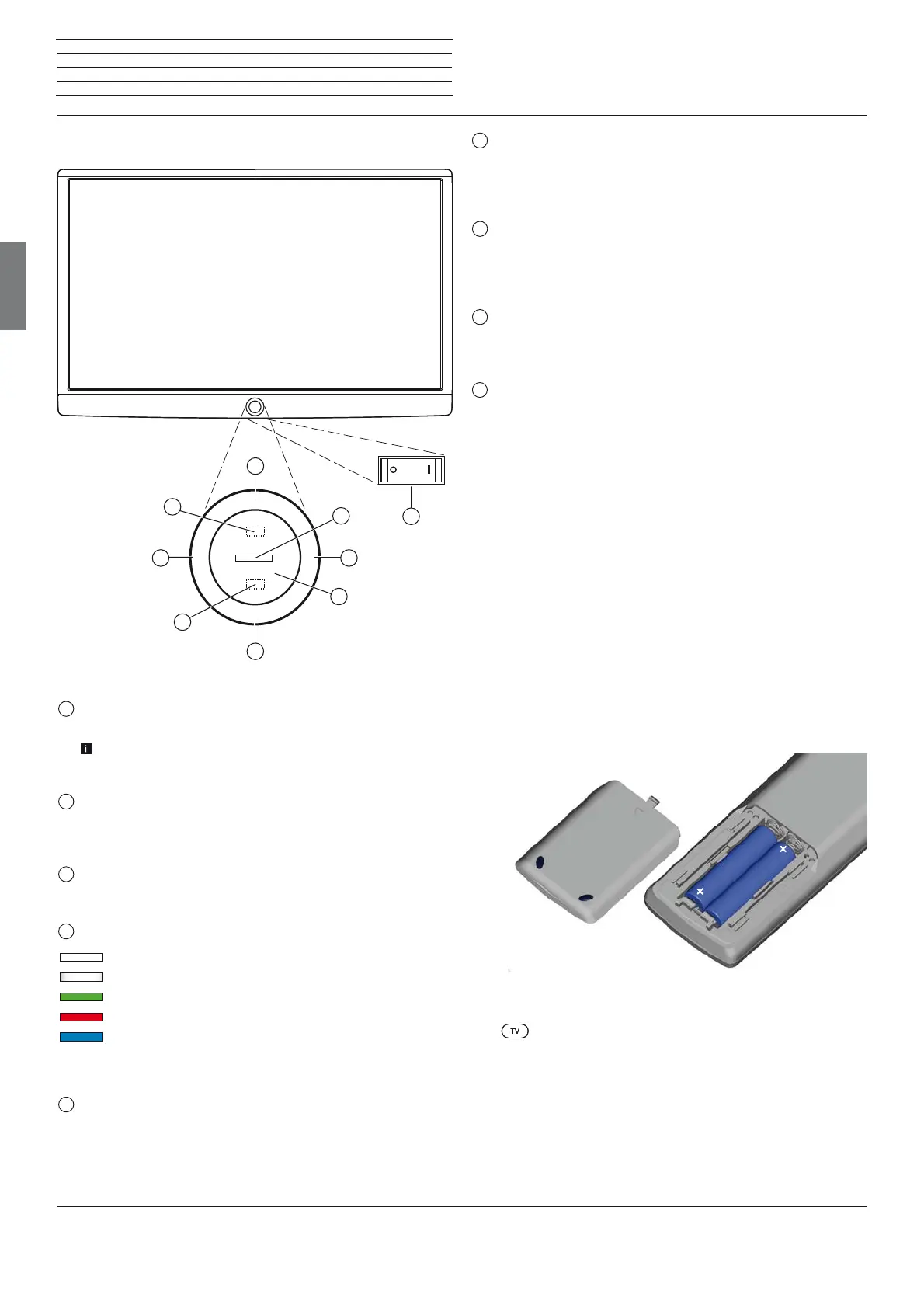
Key M:
TV set in standby mode: switch TV set on in TV mode
TV set switched on: call direct control on TV set
in direct control on TV set: up
7
Key R:
TV set in standby mode: switch TV set on in radio mode
TV set switched on: toggle TV mode and radio mode
Direct control on TV set: down
8
Key +:
increase volume
Direct control on TV set: to the right
9
Key – :
reduce volume
Direct control on TV set: to the left
Preparing the remote control unit
Inserting or replacing batteries
Press on the embossed arrow whilst pushing the battery cover down.
Only use leak-proof micro-cells of the LR 03 (AAA) Alkali-Manganese
type. Do not use different types of batteries and old and new batter-
ies together.
The batteries used must not be exposed to excessive heat such as
sunlight, fire or similar!
Pay attention to the correct polarity of + and – when inserting the
batteries.
If the batteries are too weak after longer use, the TV set prompts you
to change the batteries. Dispose of used batteries in an environmen-
tally friendly way (see chapter Environment / Legal information).
Push the cover back on from below after having inserted the batteries.
Adjusting the remote control unit for operating the TV set
Press the TV key.
AAA LR03
AAA LR03
Operating controls on the TV set / Preparing the TV set
Functions of the operating controls
1
Mains switch:
The mains switch is located on the bottom of the set.
The TV set will be completely separated from mains only when
you unplug the mains cable.
2
On/Off key:
Switching on in standby mode
Switching off to the standby mode
3
IR receiver:
Infrared receiver for receiving the remote control commands.
4
Display:
white: Standby
white, intermittent: TV set starts
green: TV set switched on
red: timer recording active
blue: TV set in standby, background operation
active (EPG data updating or software
update)
5
Infrared transmitter:
When showing 3D content, the 3D glasses Loewe Active
Glasses 3D are controlled via the infrared sensor.
M
R
+
-
4
1
8
9
2
3
7
6
5






 To Next Page