1 - 20
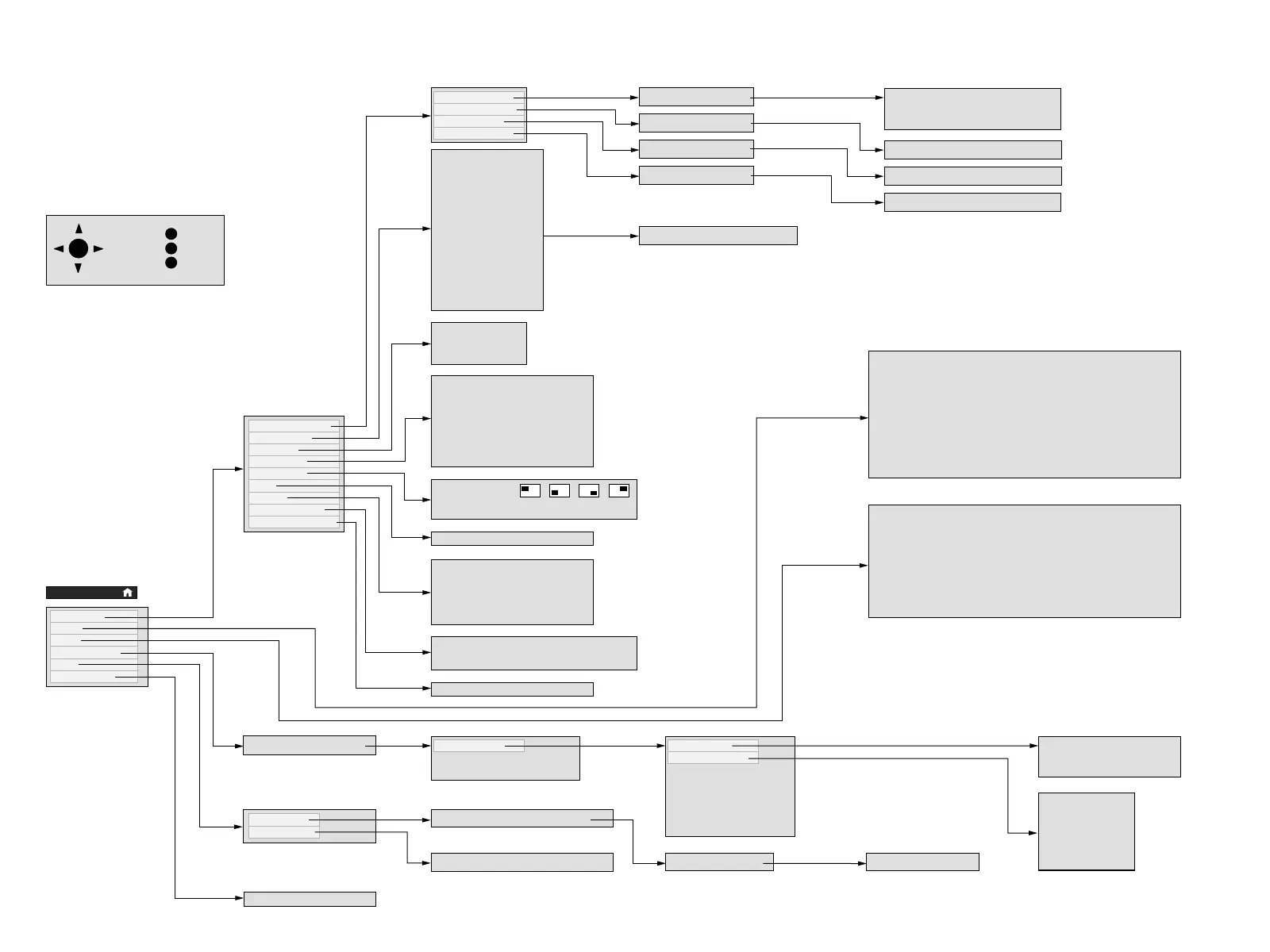
TV Menu (A 2400)
info
back
end
OK
M
i
E
Channel Search
Add/Del Channel
Edit Ch Name
Add/Del Fav Ch
Antenna/Cable
Cable Box
VCR
VCR + Cable Box
Camcorder
Laser Disc
DVD Player, C-Video
DVD Player, S-Video
Satellite
VGA / 480p
HD RGB 1080i
HD RGB 480p
DVD Player 480p
Antenna/Cable A B
Antenna/Cable A B
Antenna/Cable A B
Antenna/Cable A B
1 - Indoor/outdoor antenna
2 - Cable (CATV) without cable box
3 - Cable (CATV) with cable box
ADD/DEL CHANNELS
EDIT CHANNEL NAME
ADD/DEL FAV CHANNELS
Shows you detailed instructions
Treble -12 … 2 … 12
Bass -12 … 8 … 12
Balance -15 … 0 … 15
Maximum Vol 0 … 40 … 63
Sound Settings none pop classic speech
MTS Sound stereo mono SAP
Enhance Sound off on
Auto Vol Control off on
Audio Output fix var
Speaker on off
English
Español
Français
Display Duration 2 ……9
Display Bar Size small big
Welcome Screen off on
Time off on
Alarm off on
Sleep off on
Sound Status off on
Channel Set-Up
Connections
Language
TV Display
PIP Display
Time
Timers
Closed Caption
Connections Reset
Position
PIP Size small big
Contrast 0 … 50 … 63
Color 0 … 32 … 63
Brightness 0 … 23 … 46
Sharpness 1 … 3 … 5
Tint -15 … 0 … 15
Film Mode off normal super
Picture Settings night normal day
Color Temperature low medium high
NTSC Standard no yes
TV Set-Up
Audio
Video
Parental Lock
Help
Input Reset
Time
**
:
**
am
no yes
yes no
Sleep-Once no ……60 min
Sleep-Daily no yes
Alarm-Once no yes
Alarm-Daily no yes
Alarm-Volume 0 ……39
Caption Content CC1-4 Text 1-4 XDS
Caption Mode off on auto
Password
* * * *
Parental Lock
Change Password 3 0 0 1
Delete Password no yes
All Channels
Lock by Ratings
DVS S-Video off on
VCR off on
Satellite off on
Camcorder off on
C-Video off on
VGA 480p off on
Lock Immediately no yes
Lock Daily no yes
Lock Once no yes
TV-Y G
TV-Y7 PG
TV-G PG-13
TV-PG R
TV-14 NC-17
TV-MA X
All help items in alpabetical order
Index / Help
Remote Help
Help for your remote controll functions
Dealer Demo Mode
automatic explanation
MAIN MENU






 To Next Page