To Next PageTo Next Page
 Need help?
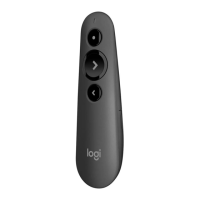
Do you have a question about the Logitech R500 and is the answer not in the manual?
Explains the remote's auto-sleep and lack of an ON/OFF button.
Details battery duration, power-saving mode, and inactivity shutdown.
Instructions on how to interpret LED indicators for battery status.
Steps for changing the battery in the Logitech R500 remote.
Lists OS compatible via the USB receiver.
Lists OS compatible via Bluetooth connection.
Details software functions and OS/app compatibility.
Explains timer, Next, and Blank Screen button customization.
Describes how the battery level is displayed.
Explains Swiss law impact on laser presenters, including R500.
Details how to identify the laser class on Logitech devices.
Troubleshooting Bluetooth connectivity with Windows 7 and LE technology.
Steps to connect the R500 using the included USB receiver.
Instructions for pairing the R500 with devices using Bluetooth.
Specifies the maximum operating range for the R500 presenter.
Troubleshooting guide for Logitech Bluetooth devices not connecting.
Explains macOS Mojave permission requirements for presentation software.
Step-by-step guide to granting necessary permissions in System Preferences.
Instructions to manually allow access in System Preferences if needed.
Explains the remote's auto-sleep and lack of an ON/OFF button.
Details battery duration, power-saving mode, and inactivity shutdown.
Instructions on how to interpret LED indicators for battery status.
Steps for changing the battery in the Logitech R500 remote.
Lists OS compatible via the USB receiver.
Lists OS compatible via Bluetooth connection.
Details software functions and OS/app compatibility.
Explains timer, Next, and Blank Screen button customization.
Describes how the battery level is displayed.
Explains Swiss law impact on laser presenters, including R500.
Details how to identify the laser class on Logitech devices.
Troubleshooting Bluetooth connectivity with Windows 7 and LE technology.
Steps to connect the R500 using the included USB receiver.
Instructions for pairing the R500 with devices using Bluetooth.
Specifies the maximum operating range for the R500 presenter.
Troubleshooting guide for Logitech Bluetooth devices not connecting.
Explains macOS Mojave permission requirements for presentation software.
Step-by-step guide to granting necessary permissions in System Preferences.
Instructions to manually allow access in System Preferences if needed.
 General
| Brand | Logitech |
|---|---|
| Model | R500 |
| Category | Accessories |
| Language | English |