Logitek
5
Operation
Artisan Fader Modules
MTK-FADER (Fader Module)
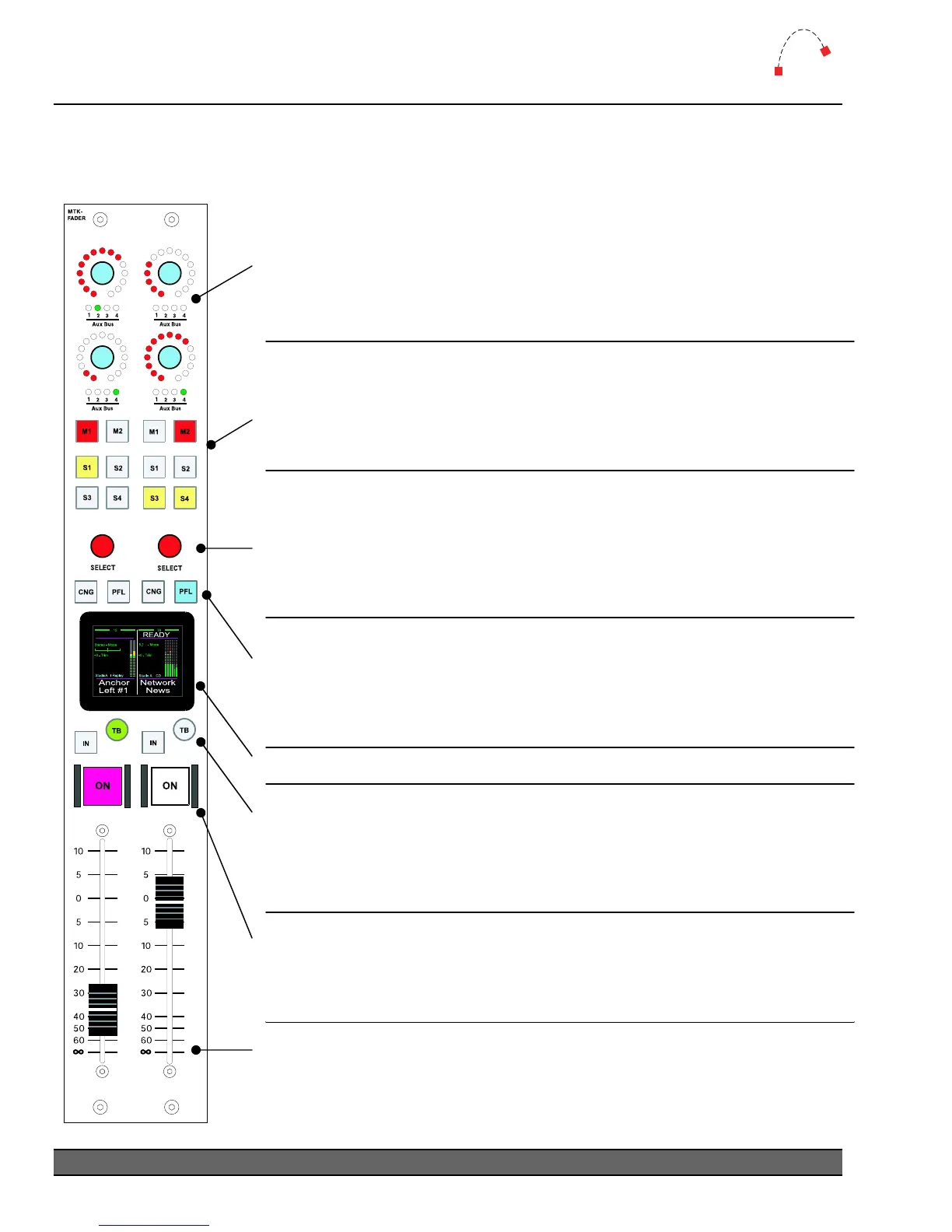
The M1, M2, S1, S2, S3 and S4 buttons provide direc
access to the two
Master (M1 & M2) mix busses and four Sub-master (S1 - S4) mix busses.
Sub-master busses 5 through 8 can be accessed via the CNG function.
The controls for any bus can be de-activated in the system configuration
to prevent changes by the operator.
The SELECT stick and the CNG button along with the LCD screen are
used to change most fader settings.
Rotate the
SELECT stick to scroll through available inputs.
Press the
SELECT stick to “take” the current input or exit CNG mode.
Toggle the
SELECT stick to move the menu cursor up & down through the
LCD menu selections. Rotate while in a menu to adjust parameters.
Press the PFL button to hear the input on either the cue speaker (PFL
MON
off) or Control Room Monitor (PFL MON on). Press again to turn
PFL off for that fader. Press CNG to enter/exit the screen menu. When
you press
CNG, that fader will also be selected on the Effects Module and
will pop-up on the console VGA screen.
See the following page for more information on the
rtisan fader screen.
Moving the FADER up or down will increase or decrease respectively the
level of the assigned source. Fader range is from infinity to +10dB.
When the fader level has been changed by recalling a snapshot, the
current level will be displayed to the right of the
S8 indicator. Moving the
fader will not alter the level until the fader passes through that value.
Each fader has an illuminated ON push button for that channel. This is a
toggle switch and is illuminated when the channel is on.
The
ON button can have GPI remote control of sources, if configured in
your
Audio Engine. The button color is programmable via software.
Pressing TB sends the talkback mic to any Mix Minus output associated
with the source. Press the button momentarily to lock on, or hold it down
for Push-to-talk.
The
IN button will, by default, swap between the current and previously
selected sources, but can also be programmed to select a default source.
Each input can simultaneously feed any two of the four Aux Mix busses.
Press down on an Aux Bus wheel to cycle between the five options;
Offline, Aux 1, Aux 2, Aux 3 or Aux 4.
Turning the wheel will adjust the level being sent to the selected bus.
The level is depicted by the
Ring of Fire LEDs.
Independent bus switching (pre-ON/pre-FADER) is set at Master Module.
Logitek Artisan Reference Manual
24



 To Next Page