Logitek mixIT Audio Console System/JET67 Manual
Creating or Editing a Microphone Input
To create a new input, click Add Input in the Mic In column. To edit an existing input, click the
box for the input. You will be taken to the input editor.
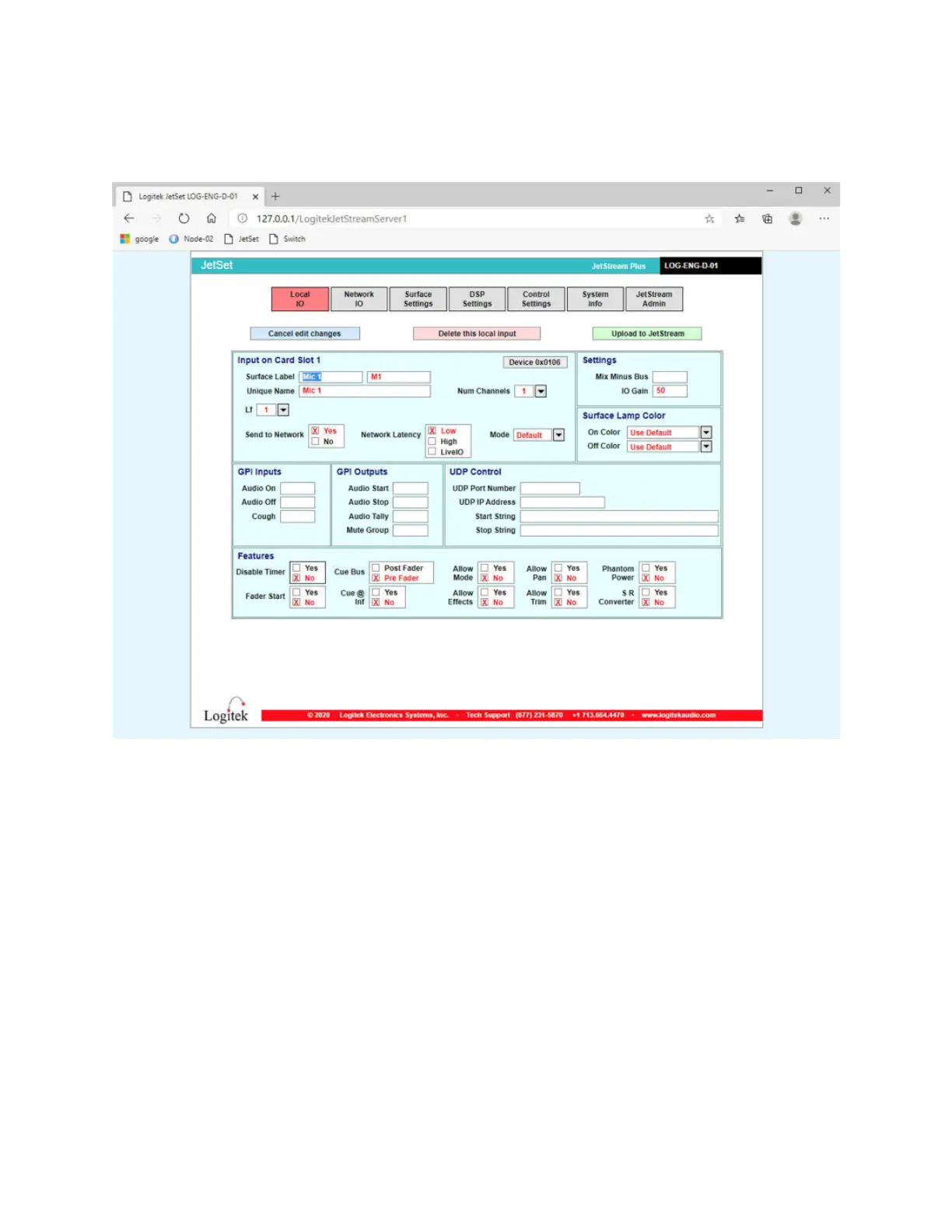
Figure 11 - The Local Input editor
You will need to fill in the following information:
1. The Surface Label is what the operator will see on the console. There are two fields of 8
characters for the top and bottom line on the display.
2. Enter a Unique Name to identify the input.
3. Set the Number of Channels to 1.
4. Set the Lf channel to the input number. Valid numbers on a mixIT-12 are 1-4. Valid
numbers on a mixIT-6 are 1-2.
5. If you are using a GPI Input to turn the microphone on or off, enter the GPI input
number in the start or stop box. If you are using a momentary cough switch, enter the
GPI input number in the Cough box. Valid numbers are 1-4.
6. For a tally light that will turn on and off ONLY for this microphone (example, a tally light
ring on a microphone arm) enter the GPI Output number in the Audio Tally box. Valid
GPI output numbers are 1-8.
7. Assign the microphone to a mute group if desired to set up studio muting and a on air
light tally that will turn on when the first microphone turns on and off when the last



 To Next Page