Enter Trap Number and Channel
This is the link mode screen, from here you
can set any Channel and/or Trap Number.
The Channel the MT4300 is currently set to is
displayed on the screen, but can be changed
to any Channel. The cursor is blinking on
the Trap Number, default is 1. Change the
Trap Number by pressing the corresponding
number on the keypad. Press NTR to move
the cursor move to Channel. Again, you can
change the Channel by entering it on the
keypad.
1
2
Link Mode
Select Trap/ Chn
Tr ap
Chn
Enter to Link
5
• The MT4300 is now ready to link to the R4300 Receiver.
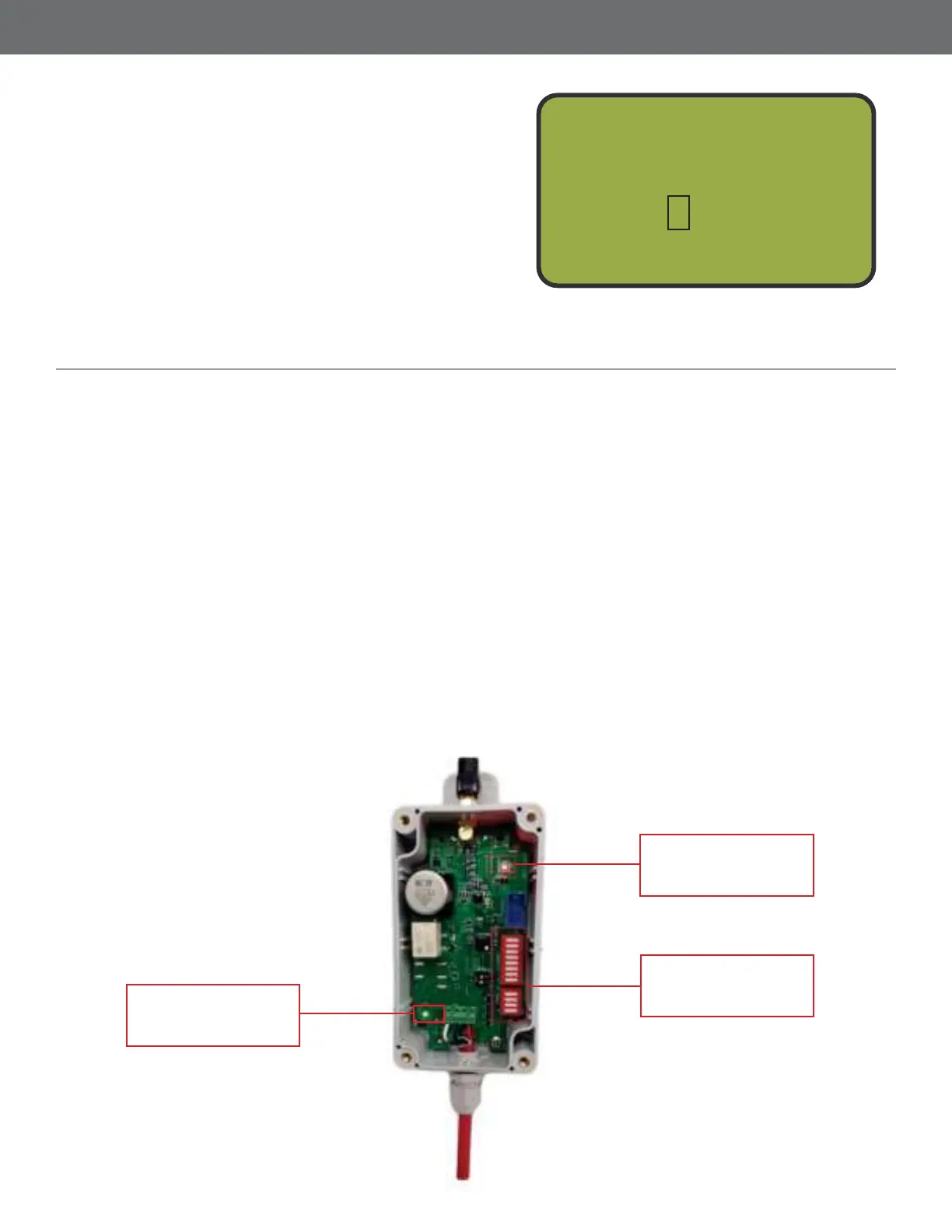
• nsure the dip switches for channel and trap are in the OFF Open position.
• Replace the clear cover, dont over tighten.
• Connect any R4300 to a trap. Power on the machine or connect power to the receiver as you
normally would.
• With power ON you will now see a R blinking L. The link Led will blink for 15 seconds while
the receiver remains in link mode See below. ou will be unable to re a target during this 15
seconds. This is the period when the R4300 receiver waits to see if the channel and trap number
are to be changed. After 15 seconds the previous channel and trap number are used. The default is
channel 1, trap 1.
Link LED
Will blink for 15
seconds
Set to OFF Open
position
Indicates power
is on
Dip Switches
Power LED
27
Prepare the Receiver for Link Mode



 To Next Page