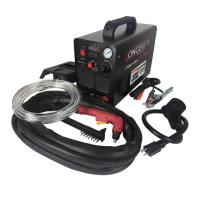
Plasma Cutters www.LWELD.com
www.longevity-inc.com 19
Basic Operation
1. Ensure that all cables are connected to the machine.
2. Ensure that the machine’s OFF/ON switch is set to OFF, and plug the machine
into the electrical outlet.
3. Connect the air compressor supply line to the input side of the air regulator/filter.
4. Turn the ON/OFF switch to ON. The cooling fans should operate and the ON
indicator LED or power switch (if applicable) should illuminate.
5. Clean the contact point on the work piece to ensure a good electrical connection.
Ensure that no rust of paint is present that could create an open circuit.
6. Connect the ground clamp to the work piece to be cut.
7. Bring the torch tip into contact with your work piece edge or, if cutting thick
material, over a pre-drilled pilot hole. See Cutting Guideline Table below.
8. Depress the button on your torch to start the arc and begin cutting.
9. The 2.5S and 5.0S (if applicable) on your is an air blow switch. If you are cutting
for short periods of time, leave the switch on 2.5s to allow a 2.5 second air delay
to pass through the torch. If you are cutting for long periods of time, leave the
unit on 5.0S to allow more air to pass through the torch. This feature protects the
torch from over heating. Some LONGEVITY® plasma cutters have automatic air
flow adjustments so the switch may not be required.
10. If necessary remove slag from the under part of the cut using a grinder or chisel.


 To Next Page