Optional Equipment 45
© Travis Industries 4/20/2020 - 1510 Answer
Surround Panels
Height Width
Custom Panel – sku# 96100593 Custom Custom
Small Panel – sku# 96100440 28-1/2” 40”
Medium Panel - sku# 96100441 30-1/2”” 42”
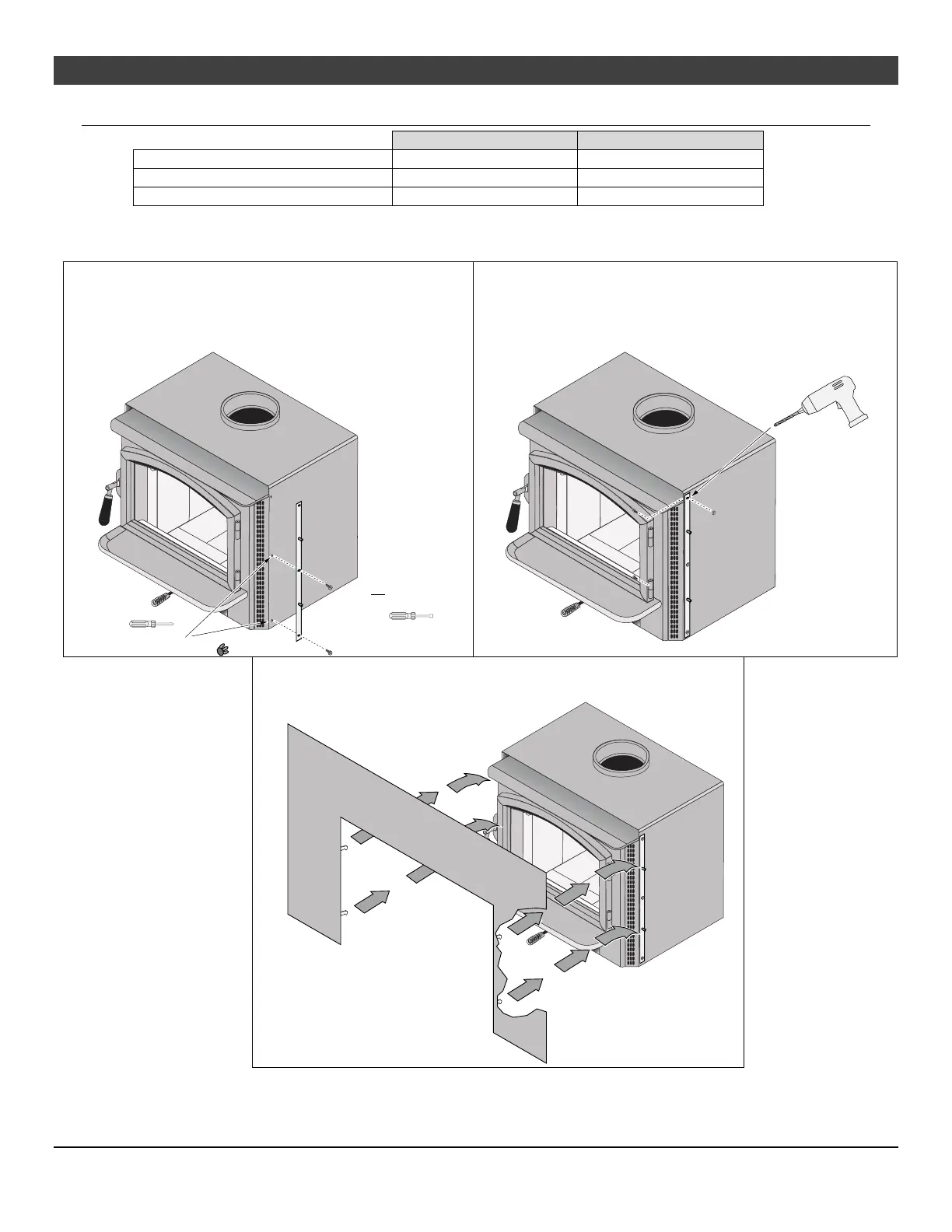
1. The insert should be in position, but pulled out slightly to allow access to the sides and top of the insert.
2. Attach the side brackets to the side of the insert
using the included 10-24 thread forming screws (see
illustration below).
3. Use the included drill bit to drill a hole into the top
convection channel as shown in the illustration below.
Use the included pan head screws and nuts to fully
secure the side brackets.
4. Place the insert into position (flue attached). Attach the surround
panel as shown below
.
Remove Button Plugs
(pry out with a screwdriver)
5/16" Nutdriver
Attach the brackets with the
included screws.
Hint: pre-thread the holes
prior to installing the brackets.
IDB1158
Use the bracket as a template t
drill the upper mounting hole
(use included drill bit ). Secure
the bracket using the pan head
screws and nuts.
IDB1159
IDB1160


 To Next Page