5
USING YOUR DISHWASHER
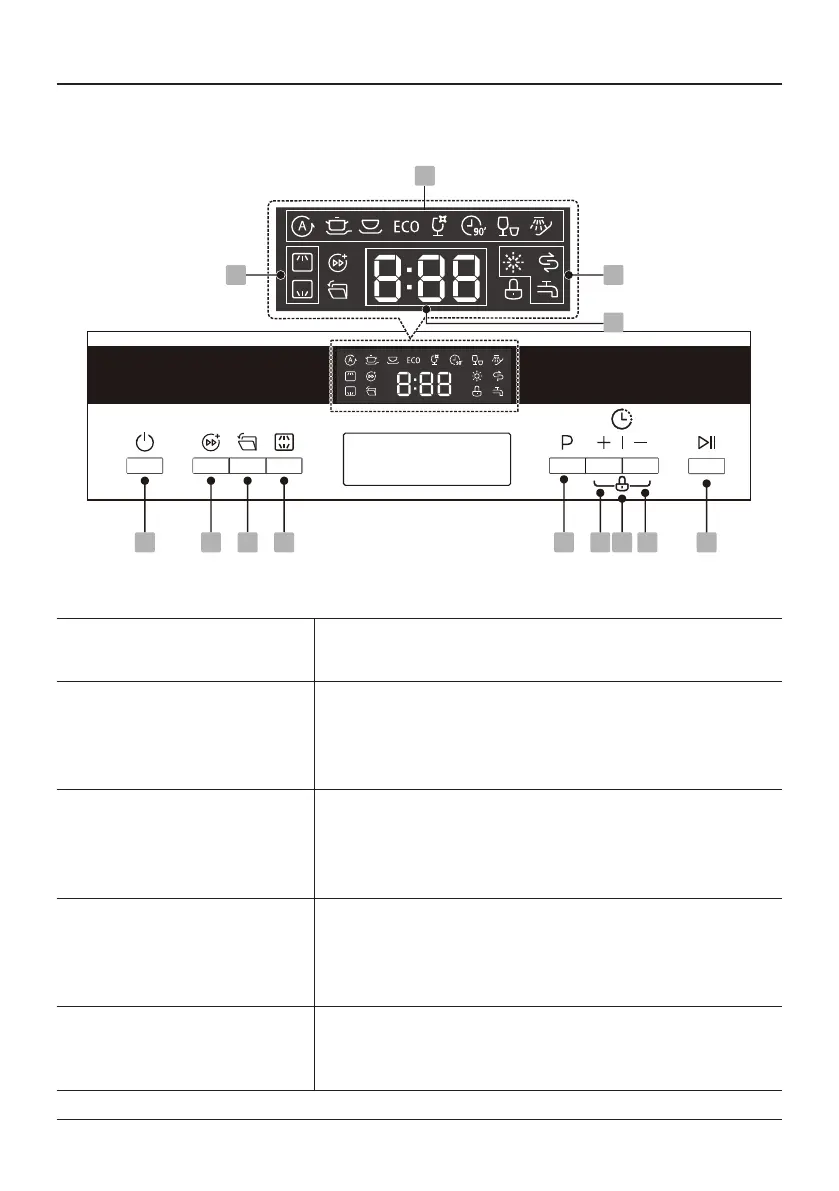
Control Panel
) 6 6 7
;
<
Operation (Button)
1
Power Pressthisbuttontoturn1onyourdishwasher.
2
Turbo speed+
Toreducethewashingtime.(Itcannotbeused
withAuto,Rapid,Soak)Whenpressingthisbutton,
correspondingindicatorwillbelit.
3
Auto open
Thedishwasherdooropensautomaticallyattheend
oftheprogram,whichimprovesthedryingresults.
ItcannotbeusedwithRapid,Soak.
4
Alt
Pressthebuttontoselecteitherupperbasketorlower
basketloaded,andthecorrespondingindicatorwill
lightup.
5
Program
Selecttheappropriatewashingprogram,theselected
programindicatorwillbelit.



 To Next Page