16
17
Pages | HOOK series
Pages | HOOK series
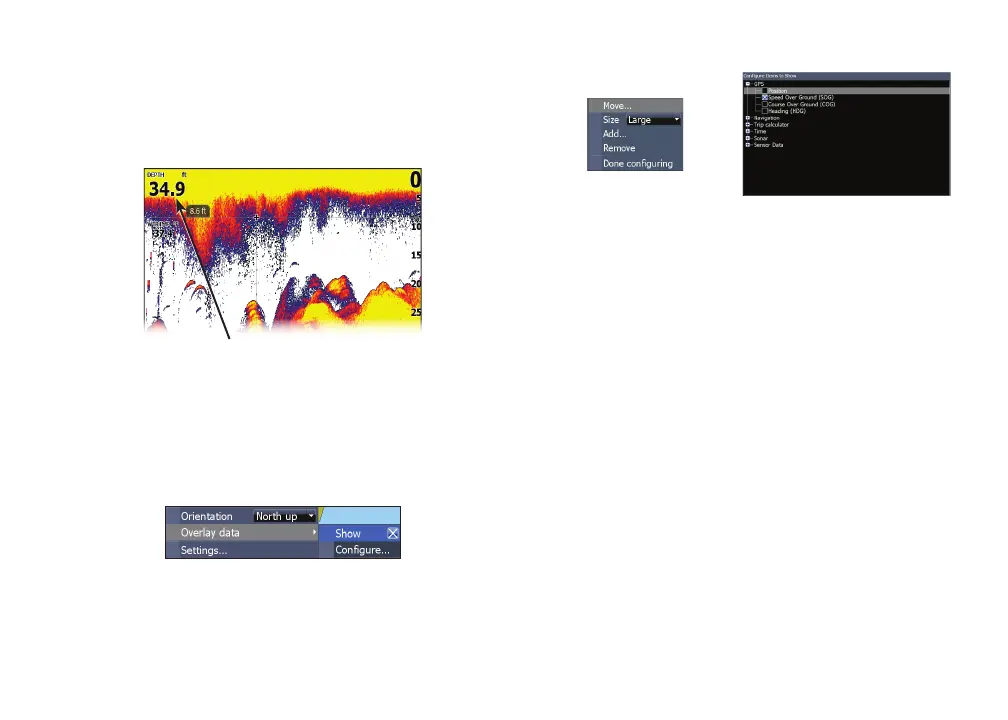
To add overlay data:
1. From the Sonar, Chart or DownScan
page, press MENU.
2. Select Overlay data and press ENTER.
3. Select Congure and press ENTER.
4. Press MENU and select Add. Press
ENTER.
5. Select a data category and press
ENTER.
6. Select the desired data and press
ENTER.
7. Press MENU and select Return to
Overlays. Press ENTER.
8. Press MENU, select Done Conguring
and press ENTER.
Overlay data
Used to select data shown on the Sonar, Structure
and Chart pages.
Show
Enables/disables the display of overlay data,
allowing you to remove overlay data from the
screen without deleting the current overlay data
conguration.
Congure
Allows you to select/customize overlay data.
Overlay data










 To Next Page