20
21
Sonar Operation | HOOK series
Sonar Operation | HOOK series
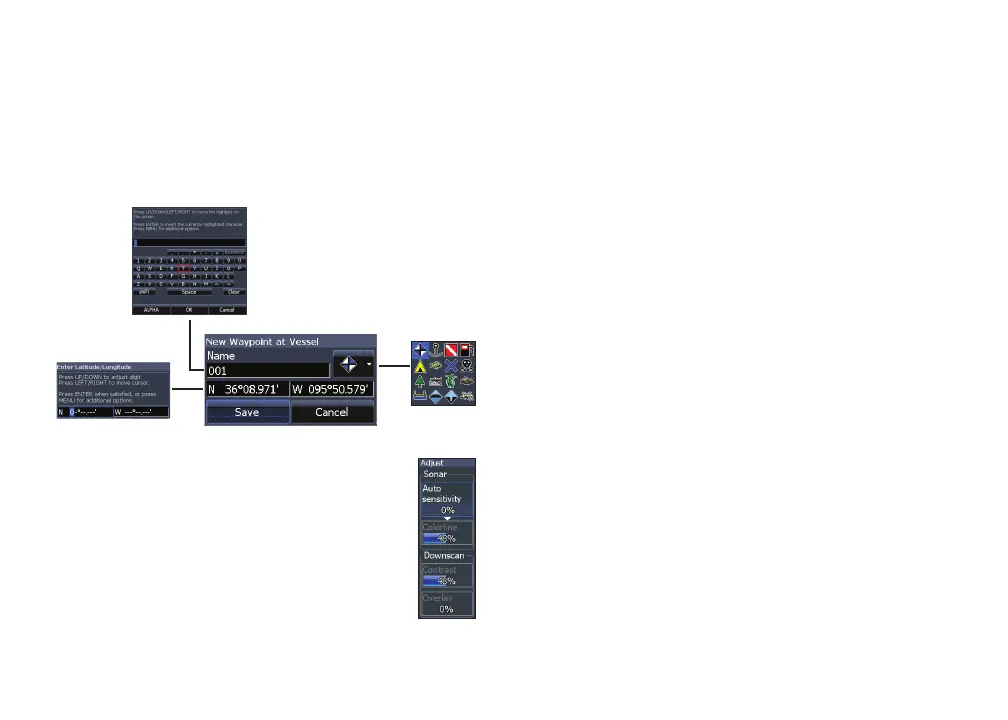
New waypoint
Places a waypoint at your current position or
at the cursor position. From the new waypoint
dialog, you can input a waypoint name, select an
icon and input a desired latitude/longitude.
Adjust
Used to make adjustments to Sensitivity
and Colorline.
New waypoint menu
Sensitivity
Controls the level of detail shown on the display.
Too much detail will clutter the screen. If Sensitivity
is set too low, desired echoes may not be displayed.
Colorline
Helps distinguish sh or structure from the
bottom by showing hard returns as light colors
and soft returns as darker colors. A lower colorline
setting will display only the hardest returns,
shown in light colors.
Auto sensitivity
Keeps sensitivity at a level that works well under
most conditions, reducing the needs for adjust-
ments. Auto Sensitivity is turned on by default.










 To Next Page