42
43
Chart Operation | HOOK series
Chart Operation | HOOK series
Waypoints, Routes and Trail displays
From the Chart Settings menu, you can turn on/
o waypoint, route and trail display properties.
Turning o display properties allows you to get
a better view of the map, if the screen becomes
cluttered with waypoints, routes and/or trails.
Waypoints, Routes, Trails
Accesses the Waypoints, Routes & Trails screen.
Waypoints, Routes and Trails are covered in the
Chart section.
Navigation settings
(Advanced mode only)
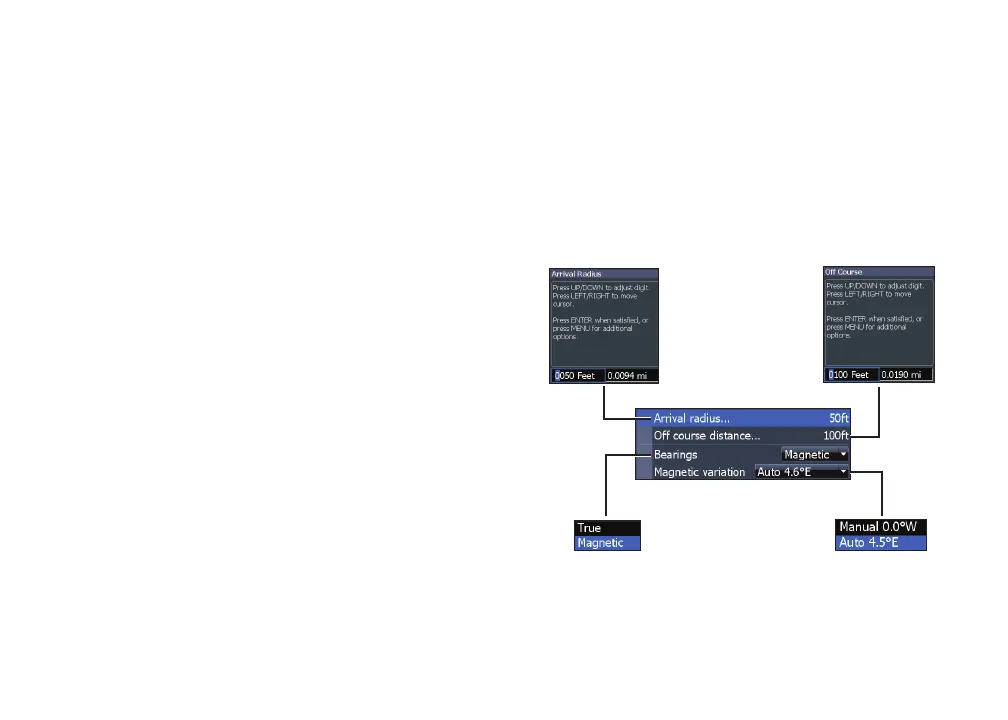
Controls Arrival Radius and O Course distance
settings and is used to turn on/o WAAS/MSAS/
EGNOS.
Navigation Settings menu










 To Next Page