LRAD 500X
14
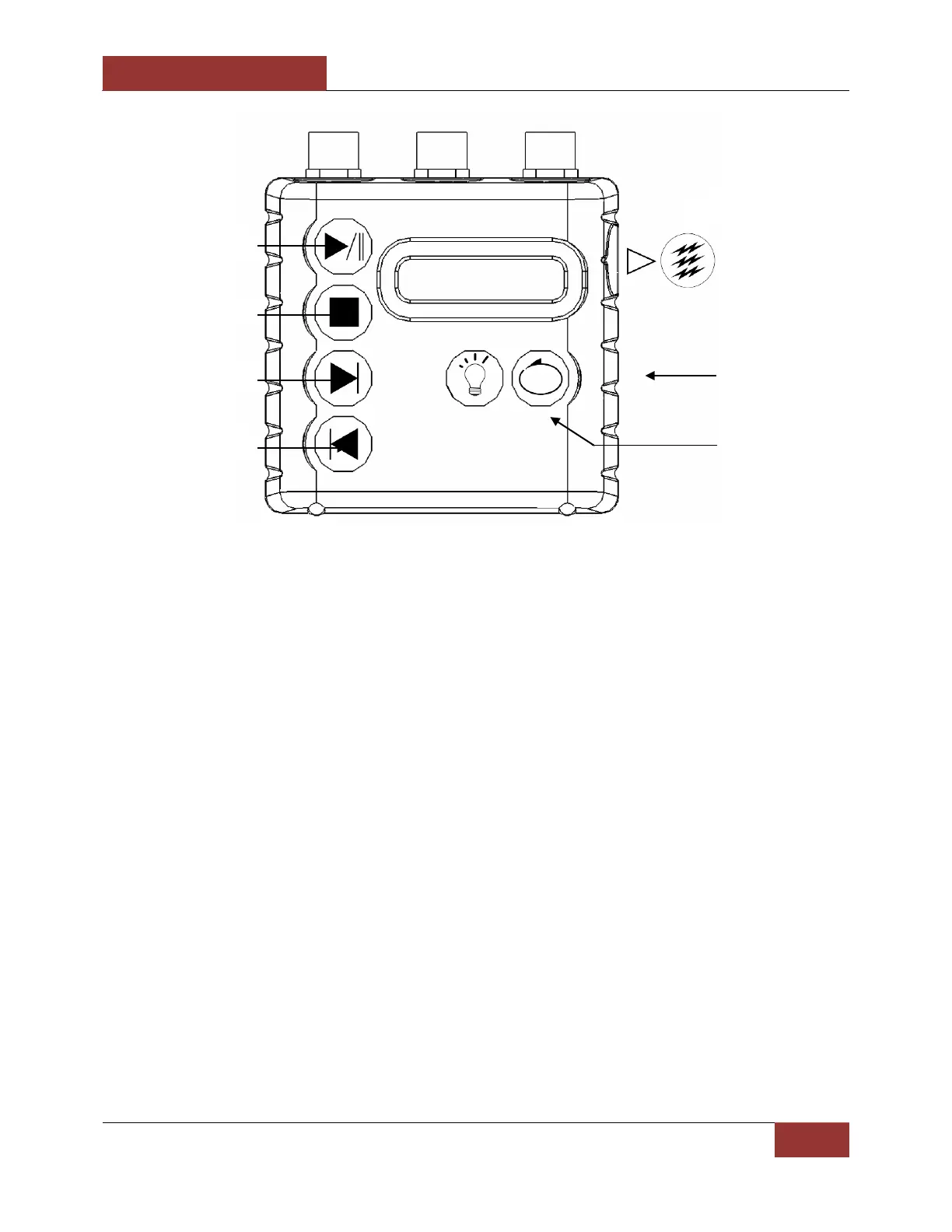
Figure 3: MP3 Player Controls
The LRAD-500X is supplied with a case hardened MP3 player. This MP3 player allows operators
to utilize prerecorded and approved messages in the field. This device supports MP3, WMA
and WAV file formats and has 1 gigabyte of built in memory. Some operators have found it
useful to record a message in several different languages to meet their communication needs.
The MP3 player is preloaded with a number of warning and test messages that may be freely
used as needed or deleted if not needed.
The MP3 player output cord is connected to the back of the LRAD-500X through the MP3 INPUT
port. Power is provided to the MP3 player from the LRAD-500X.
Note: There are 2 audio input jacks on the LRAD-500X, one labeled MP3 INPUT and the other
labeled MIC INPUT. Neither input has priority over the other. If broadcasting a recorded
message through the MP3 INPUT port and the operator prefers to use the microphone, the
MP3 player should first be put into the STOP mode. Failure to do so will broadcast both the
MP3 message and the spoken message through the LRAD-500X at the same time.
Audio File Playback:
1. Stop inputs from other audio input devices.
2. Select the desired track with the Skip Forward or Skip Reverse buttons.
3. Press PLAY to play the message.
4. The message will play until the end of the file or STOP button is depressed.
5. To repeat the message in a continuous loop, depress the Repeat button on the MP3
player.
Using the Tone Generator:


 To Next Page