7
. Press F1 (UP) to increase the level or F2 (DN) to lower the level.
8. Press F4 (Done) when finished.
Guest Message
The Guest Message is the default canned message sent to Guest Alpha Pagers. To change the message.
1. Press SETUP and enter Password.
2. Press 1 for 1) System.
3. Press F2 (DN) until 1)POCSAG-> is displayed.
4. Press 1 for 1)POCSAG->.
5. Press 3 for 3) Guest Message.
6. Type a number 00-99 for selected canned message and press ENTER.
Note: See pg. 16 for Creating Alphanumeric Messages.
Display the Guest and Staff Prompt
When paging Guest or Staff Alpha Pagers, the user is shown a prompt:
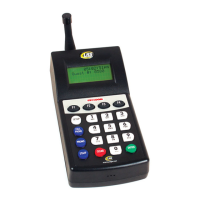
T7470 Transmitter screen Display
To Enable or Disable Seeing This Prompt While Paging:
1. Press SETUP and enter Password.
2. Press 1 (System).
3. Press F2 (DN) until screen shows 1 (POCSAG).
4. Press 1 (POCSAG).
5. Press F2 (DN) until screen show 1 (Msg Editing).
6. Press 1.
7. Press 1 to select Guest or Staff.
8. Press 3) Auto send.
9. Press F1 (Yes) or F4 (No).
If Display Prompt is disabled, the message sent will default to the Guest or Staff Message.
Using Canned Messages in Staff and Guest Display Prompt
The user has the option of how the Canned Message can be used as part of the Guest or Staff Display Prompt.
Default Canned
The user can type and edit the message, but the message starts with a precanned message.
1. Press SETUP and enter Password.
SelectPageMode
MSG:035----
Out:TableReady
Exit
Long Range Systems 19 T7470 User Manual


 To Next Page