Need help?
Do you have a question about the Ltech Super Panel and is the answer not in the manual?
Prepare the power cord by turning off the circuit breaker and trimming it to 10cm.
Attach lines to sockets and fix the base plate securely to the wall box.
Insert expansion bolt, use screw to secure base plate, then mount and secure the panel cover.
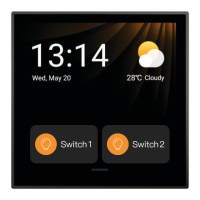
Control the panel using swipe gestures for navigation and accessing features.
Utilize the eight physical buttons for device actions or scene activation.
Scan QR code to download App, install, register, and log in for device management.
Connect panel to Wi-Fi and scan its QR code to complete configuration and link to your account.
Manage individual devices, groups of lights, and appliances via the Super Panel interface.
Create custom scenes and assign actions to physical buttons for personalized smart home control.
Activate and use the music playback feature by logging into a music service through the App.
Answers common questions regarding network configuration and account management for the Super Panel.
Details warranty periods, exclusions, and the terms of repair or replacement services.
 General
| Brand | Ltech |
|---|---|
| Model | Super Panel |
| Category | Control Panel |
| Language | English |

 To Next Page