4
3. INTELLIGENT DEVICE SETTING
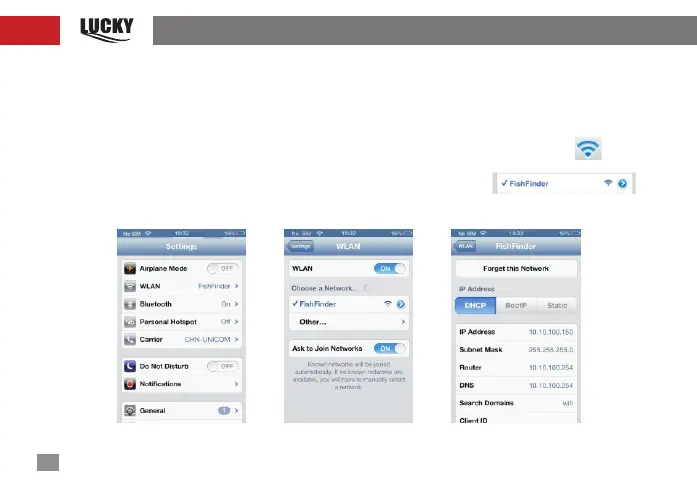
After the WIFI transducer is guaranteed to be powered on and last 10 seconds, the device can
be connected to the WIFI transducer, as shown in Figure 6; click on the setting, Wi-Fi will enter
into the Wi-Fi network(WIFI Pass Word:12345678); then select Fish Finder in the network,
as shown in Figure 7; about 20 seconds later, it can be seen that the signal icon will
appear on the top left corner of the device, it represents that WIFI transducer has been
connected. At the moment, APP can be used. Click on the right arrow
of Fish Finder in Figure 7, the detailed IP address information can be viewed, as shown in
Figure 8.
fig-6 fig-7 fig-8


 To Next Page