2.0 Player
/ Operations Manual
23
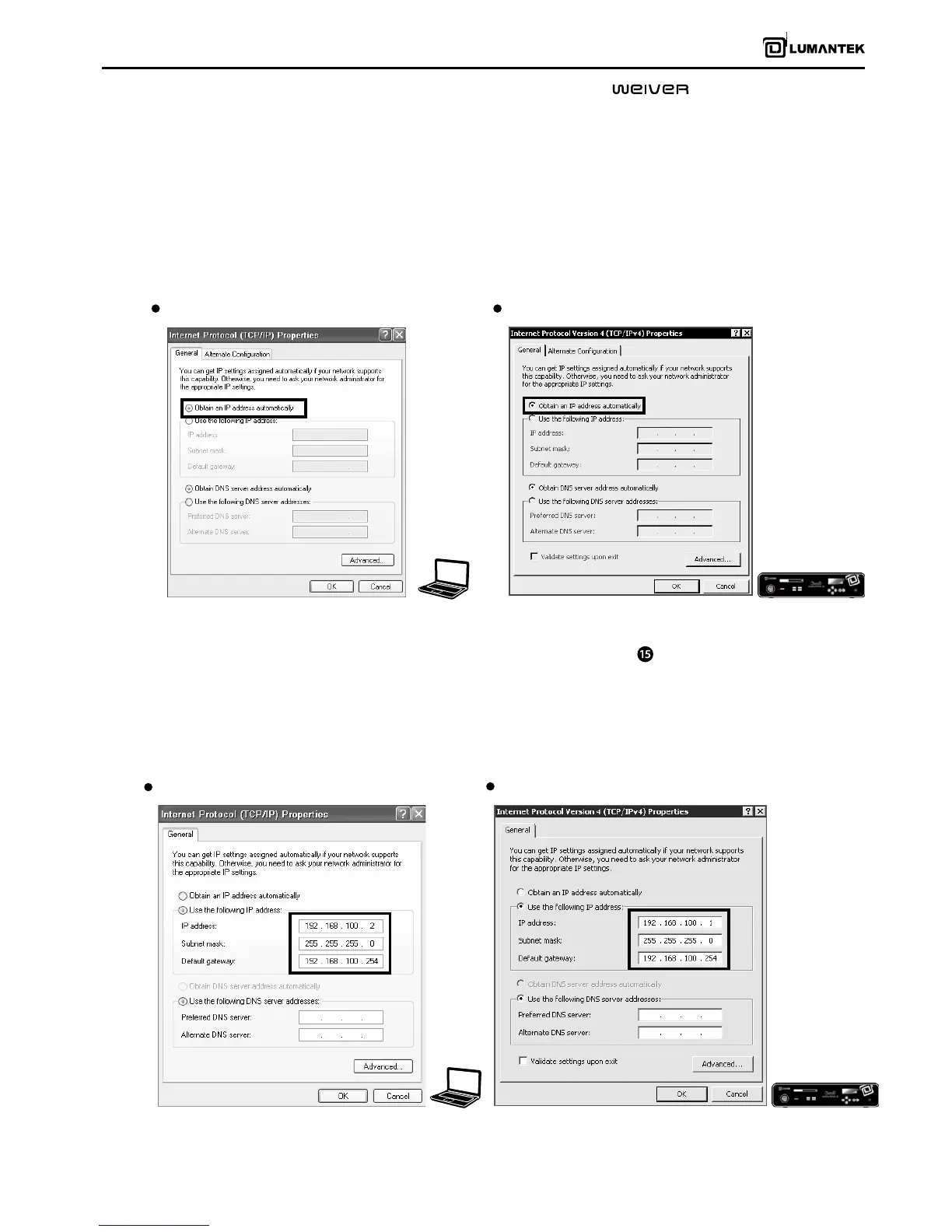
- DHCP is default settings for the WEIVER 2.0 Player’s LAN connection. The WEIVER 2.0 Player automatically receives the IP
address from the Network immediately.
- Please access to the ‘Internet Protocol (TCP/IP) Properties’ menu in both PC and the player, make sure ‘Obtain an IP address
automatically’ has been selected
4.4 / Ethernet Connection Method
Laptop and Desktop PC: TCP/IP Conguration WEIVER 2.0 Player TCP/IP Congurations
This section is to show cross cable connection between PC and the Player by using static IP address. Please note that the
rst three columns of the static IP address for both PC and the player must be identical. To control WEIVER 2.0 Player using
xed IP, move to the WEIVER 2.0 Player network setting menu and set IP address manually.
Now, the Weiver_EX program can be initiated to access and monitor the WEIVER 2.0 Player operations
4.5 / Cross Cable Connection Method( use Gigabit LAN port : see page17-no. )
Laptop and Desktop PC Conguration WEIVER 2.0 Player Conguration


 To Next Page
 Loading...