12
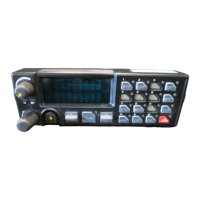
4.4 TONE REMOTE CONTROLLER
Tone Remote Controllers are used to control Remote Control base stations
from locations not near the base station. Remote operation is accomplished
over telephone lines or a continuously keyed radio frequency link.
Typical Tone Remote Controllers are capable of selecting up to four
predefined radio channels, systems, groups, or special call combinations. The
presets are programmed into the radio using PC Programmer.
The Controller and Desktop Station can operate as an intercom by setting the
Intercom switch to ON or M.
Remotes can be disabled by setting the Station Remote switch to OFF.
4.5 5-FUNCTION REMOTE CONTROLLER
The 5-Function Remote Controller is a versatile, full-function controller used
for operating and controlling a remotely located EDACS
®
base station.
Remote operation is accomplished over telephone lines or a continuously
keyed radio frequency link. The Controller is capable of selecting up to five
software defined radio systems, group, or special call combinations. The
presets are programmed into the radio using M/A-COM ProGrammer™
software.
The Controller and Desktop Station can operate as an intercom by setting the
Intercom switch to ON or M. Remotes can be disabled by setting the Station
Remote switch to OFF.
4.5.1 Making a Call from a Remote Controller
1. Select the desired function/frequency switch on the Controller.
2. Use the Monitor function (if equipped) and wait for a clear channel to
proceed.
3. Key the Mic PTT to make a call. For EDACS wait for a short beep
before beginning to speak. Release the PTT when finished.
4. Adjust the Volume as necessary while receiving a call.



 To Next Page