2.2.3 Remote/Intercom/VU Meter/Clock Option
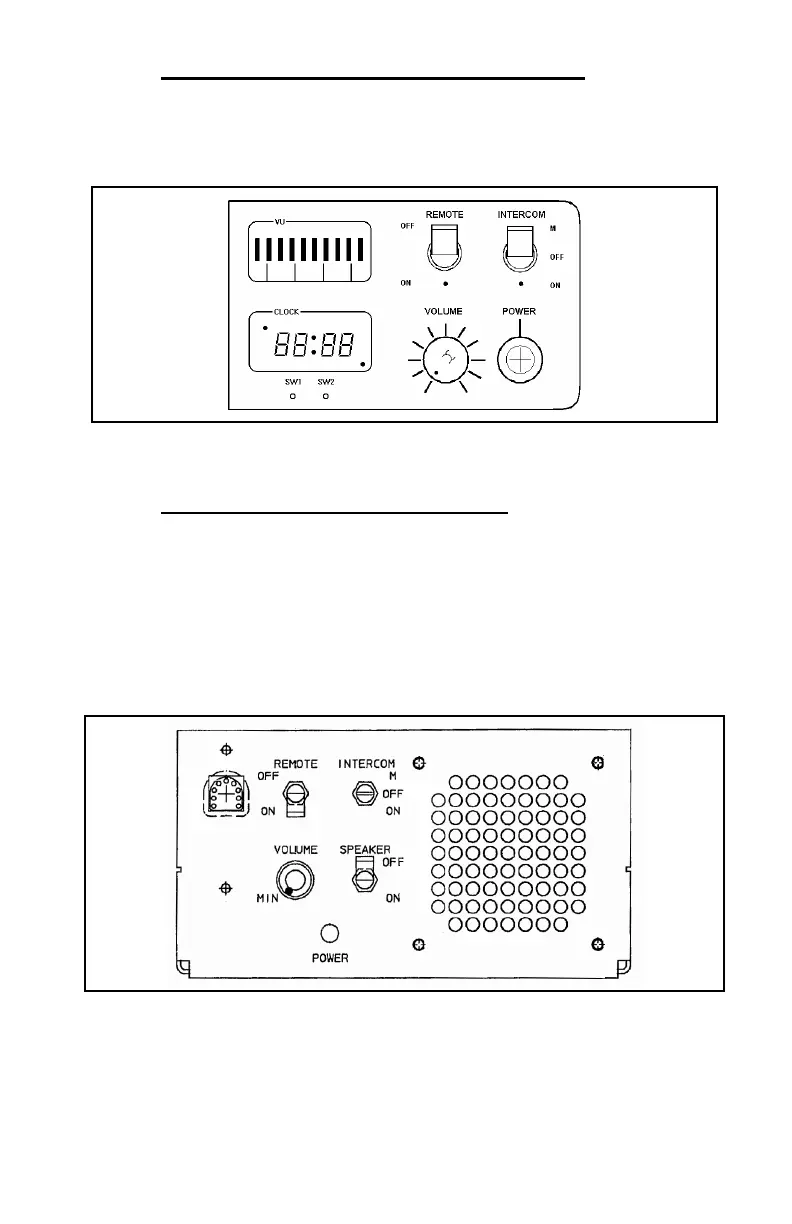
Desktop Stations with the Remote/Intercom/VU Meter/Clock option have the
full compliment of controls described in sections 2.2.1 and 2.2.2 (see
Figure
2-5
).
Figure 2-5: Remote/Intercom/VU Meter/Clock Option Control Panel
2.2.4 Wall Mount Station Control Panel
Wall Mount Stations include a basic control panel located inside the housing
(see
Figure 2-6). The Wall Mount control panel includes a volume control,
remote ON/OFF switch, intercom ON/OFF switch, microphone jack, power
indicator lamp, and speaker ON/OFF switch. The speaker is unique only to
the Wall Mount Station and is typically turned ON only during servicing. All
other features operate in the same manner as the Desktop Station.
Figure 2-6: Wall Mount Station Control Panel
7



 To Next Page