USER INTERFACE
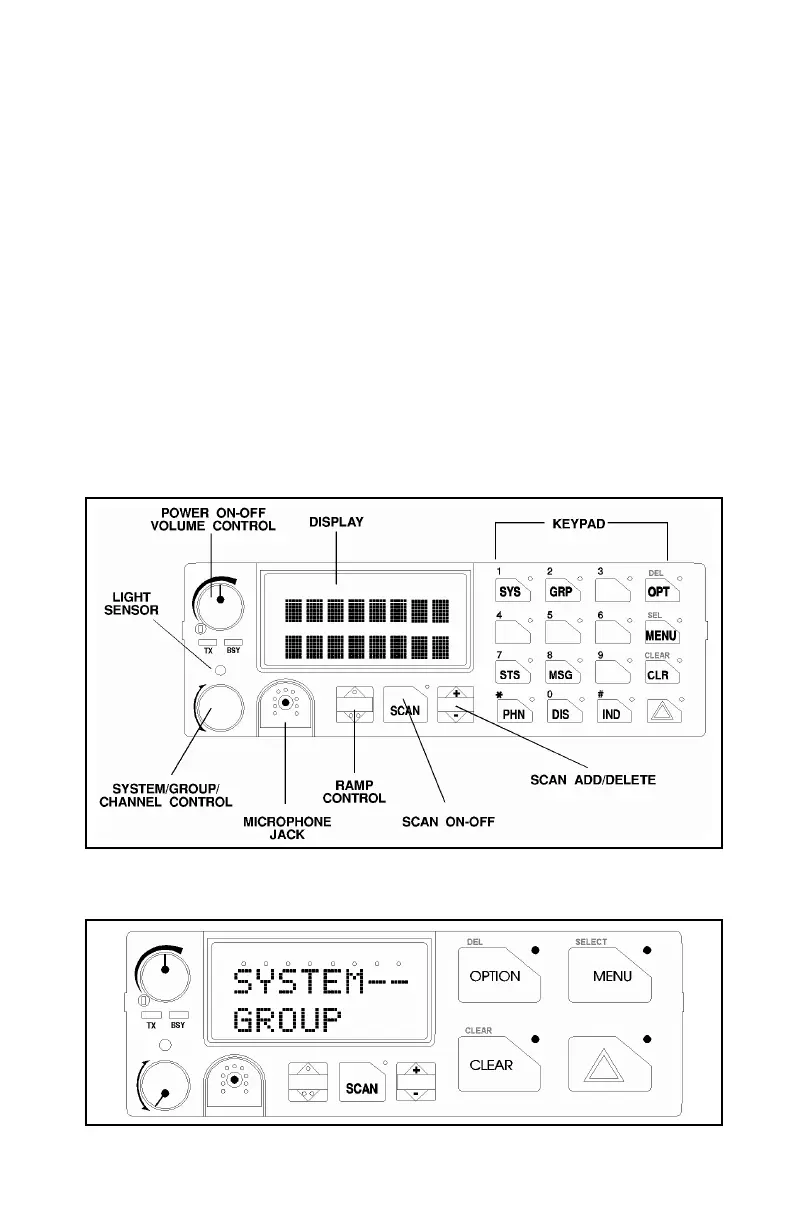
The Orion operating controls are located on the radio's front panel (See
Figures 1 & 2). A keypad, vacuum florescent display for radio status
information, and a microphone jack are on the front panel. The front panel
also provides a rotary SYSTEM/GROUP/CHANNEL knob, POWER ON-
OFF/VOLUME control, a ramp up/ramp down control, Scan add/delete
control, and a SCAN ON-OFF control for scan operation.
The keypad is used for manual number entry for individual calls, access to a
telephone interconnect system and activation of various EDACS or
conventional features such as menu selection. Each key has an associated
LED for status indication.
The display has two lines with eight alphanumeric-characters used to show the
operational mode of the radio. There is one LED for indicating transmitter ON
and one LED to indicate CHANNEL BUSY located below the POWER ON-
OFF/VOLUME Control.
Figure 1 - Orion Mobile Radio SYSTEM Model Front Panel
Figure 2 - Orion Mobile Radio SCAN Model Front Panel
7



 To Next Page