23
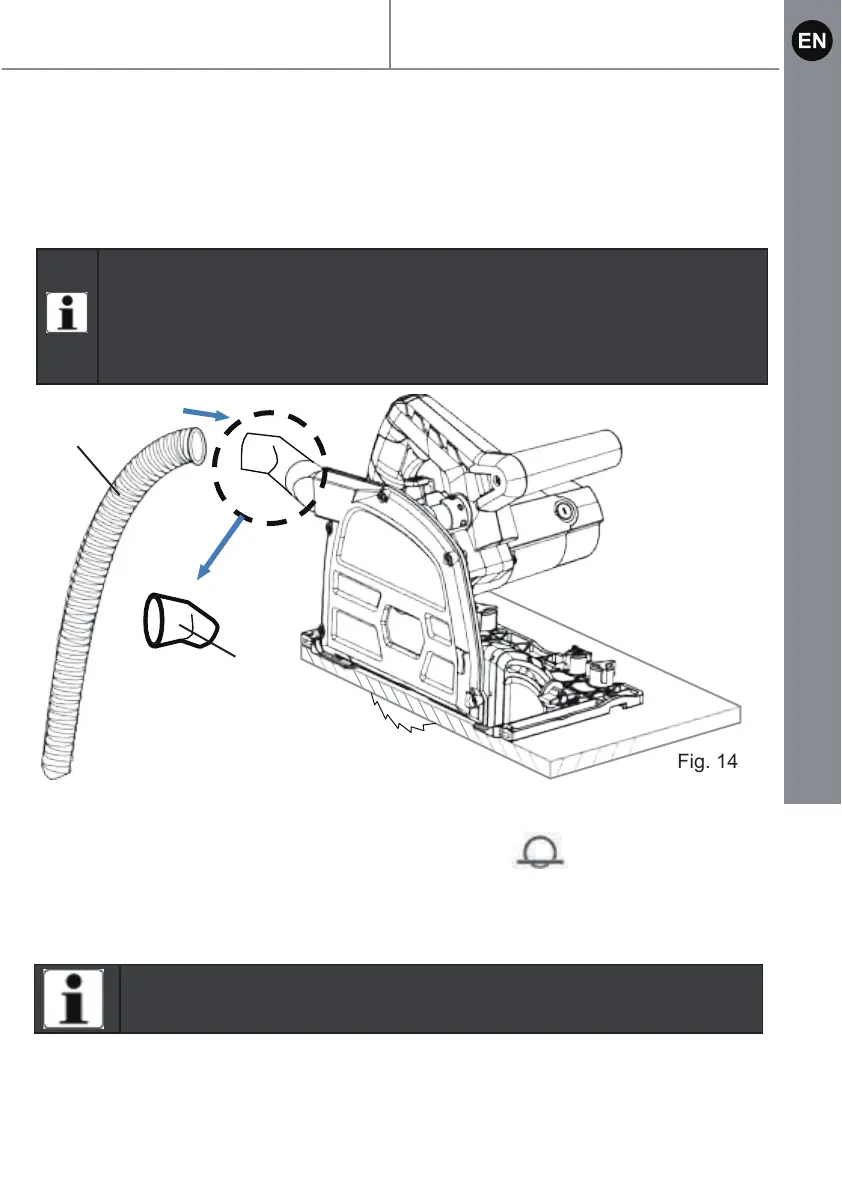
Put the connection adapter (29) onto the dust extraction outlet (24) and adjust it to
a suitable position which will prevent wood chips and dust being directed at the
body of the user.
Marked cutting
1. Turn the mode selector (18) to marked cut function .
( Refer to page 21 "Mode selection" section)
2. Press the plunge lock button (1) and push the motor down.
The casing stops in 2.5 mm cutting depth position.
NOTE : Check the adapter connects firmly before using the
v
Attach a vacuum pipe(a) to the universal vacuum adaptor to keep
the work environment clear of dust.
The adaptor can be rotated 360° to the most convenient position.
acuum cleaner.
Fig. 14
29
a
NOTE : The marking line should be aligned with cutting line
A 0 mark). (Refer to page 19 “Determine cutting line”section)
MSPS1200 by MACAllister
Product functions


 To Next Page