26
MSPS1200 by MACAllister
Product functions
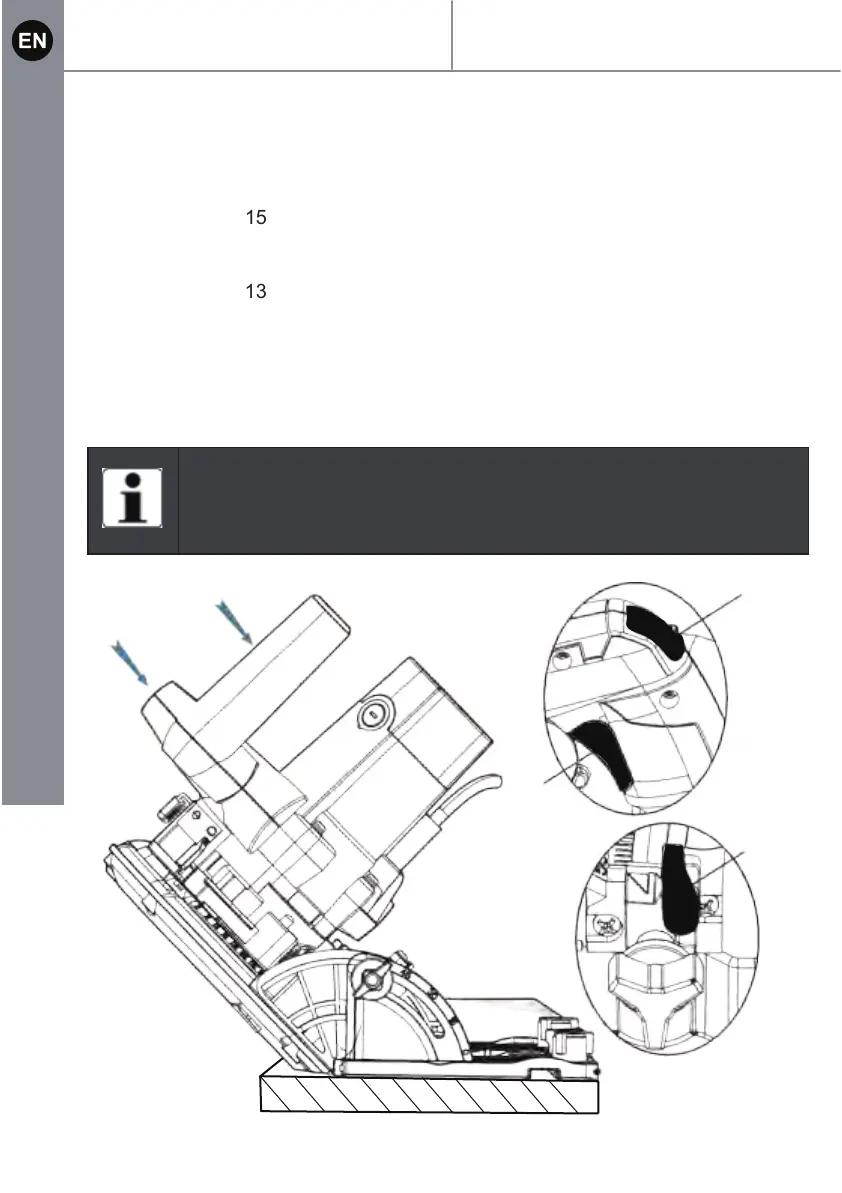
Mitre cut (Up to 48°)
1. First loosen the front and rear bevel lock knobs (4 and 12) and swivel the plunge
saw to the desired graduation. Tighten the both bevel lock knobs again.
(Refer to page 15 "Set cutting angle” section)
2. Set the desired plunge depth. Ensure that the guide rail track compensation (15)
is in up position when using the saw without track.
(Refer to page 13“Set cutting depth” section)
3. To switch the saw on press the plunge lock button (1) and the ON/OFF switch (2).
Allow the blade to reach full speed, pl
unge the blade to your set depth.
Guide the saw forward to cut.
4. After completing the cut, release the ON/OFF switch and allow the blade to come
to a complete stop before removing the saw from the workpiece.
1
2
15
Fig. 17
NOTE : The cutting width indicators(22) show the cutting path for 90
°
and 45
°
mitre cuts.
In more detail...


 To Next Page