EasyManua.ls Logo

MACDEV PRIME - User Manual

MACDEV PRIME
12 pages
Print Icon
To Next Page IconTo Next Page
Loading...
www.macdevpaintball.com
(c) Copyright 2017 Mac Developments Pty Ltd (MacDev).
MacDev - Proudly Australian
The Prime paintball marker is covered by the following granted patents as well as internaonal pending patents:
U.S. Patent Nos. 5,228,427; 5,755,213; 5,957,119; 6,260,821; 6,349,711; 6,494,195; 6,644,295; 6,644,296; 6,823,857;
6,694,963; 6,810,871; 7,017,497; 7,044,119.
PRIME
Owners Manual
Question and Answer IconNeed help?

Do you have a question about the MACDEV PRIME and is the answer not in the manual?

Summary

Know Your Prime

Quick Setup

Switching On and Off

Instructions for powering the marker on and off using the membrane pad.

Using Your Prime

Adjusting Velocity

Procedure for adjusting the marker's velocity using the integrated regulator.

Adjusting the Trigger

Details on adjusting trigger rest point, spring tension, and actuation point.

Advanced Setup

Tournament Lock System

Explanation of the tourney lock for tournament legality and how to manage its status.

Entering Program Mode

Steps to access the marker's programming interface via trigger and power button.

Finding and Changing Settings

How to navigate and modify marker settings using the OLED display and buttons.

Maintenance

Troubleshooting

Prime Specifications

Overview

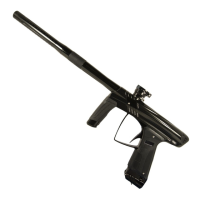
The MacDev Prime paintball marker is an electro-pneumatic marker designed for efficient, consistent, and accurate performance. It utilizes a spool valve drive powered by a high-precision, low-power solenoid valve, both manufactured in-house by MacDev. The entire system is controlled by a robust microprocessor running a proprietary operating system, offering advanced usability, quality, and reliability.

Function Description:

The Prime paintball marker is designed to propel paintballs at high velocities for recreational and competitive play. Its core function relies on an electro-pneumatic system where a solenoid valve controls the airflow to cycle the bolt and fire paintballs. The marker incorporates a visible light beam sensor system to detect the presence of a paintball in the breach, preventing accidental ball breakage due to misloaded paintballs. An OLED display provides real-time information on gun status, settings, battery level, cycle mode, cycle speed (max), sensor status, and rate of fire. The marker supports various firing modes, including semi-auto, Millennium, PSP, custom ramp, and full auto, making it suitable for different tournament rules and play styles.

Usage Features:

  • Power On/Off: The marker is turned on by pressing the power button on the membrane pad located at the rear of the frame. Holding the power button down until the OLED display goes blank turns the marker off.
  • Firing: Once powered on and a paintball is loaded, the marker can be fired by pulling the trigger. If no paintball is loaded, the beam sensor will prevent firing unless it is manually disabled.
  • Beam Sensor Management: The OLED display indicates the status of the beam sensor (ball loaded, no ball loaded, sensor disabled, sensor fault). For dry firing or when a loader is not used, the beam sensor can be disabled by holding the scroll button on the membrane pad until the "sensor disabled" icon appears. It can be re-enabled the same way.
  • Air System Installation: The Prime uses a high-quality venting ASA (Air System Adaptor) compatible with commercial air/nitrogen systems. Before installation, the ASA lever must be in the "off" position (flipped towards the front of the marker). The air system is then carefully screwed into the ASA until it stops. Users are cautioned against forcing the threads if they become tight, as this can damage the air system or marker.
  • Air On/Off: To pressurize the marker, the ASA lever is swung backward into place, depressing the pin on the air system and allowing air to flow. To depressurize, the lever is flipped forward, venting air from the ASA and making the air system safe to remove.
  • Loader Installation: The marker accommodates commercially available loaders. The feed clamp lever is opened, and the loader neck is inserted into the feed tube. If the loader doesn't fit, the cam lever can be loosened by rotating it anti-clockwise. Once the loader is fully inserted, the cam lever is closed to secure it. If the loader is loose, the cam lever can be tightened by turning it clockwise, but only one turn at a time to prevent overtightening and potential damage to the loader or clamp.
  • Loader Removal: Opening the feed clamp lever by swinging it on its hinge loosens the loader for easy removal. If it's difficult to remove, it indicates the cam lever was overtightened.
  • Velocity Adjustment: The Prime features a single regulator in the frame for velocity adjustment. An 1/8" allen key is used to adjust the regulator setting; turning it anti-clockwise increases velocity. Adjustments should be small and checked with a chronograph. Users are advised not to exceed 300 FPS and to comply with local laws.
  • Trigger Adjustment: The trigger has four adjustment screws located on its front and upper faces: trigger rest point, spring tension, actuation point, and stop point. These allow for personalized trigger feel. Caution is advised when adjusting the switch actuation screw to avoid overtightening and damaging the microswitch.
  • Battery Replacement: To replace the 9V alkaline battery (type 6LR61), two screws holding the left-hand grip frame are removed, and the battery is gently disconnected from its clip-on harness.
  • Tourney Lock: The marker board includes a tourney lock system to prevent on-field reprogramming, ensuring tournament legality. When locked, settings can be viewed but not changed, indicated by a red lock symbol on the OLED display. To unlock, the left-hand grip is opened to access the circuit board, and the black tournament lock button is pressed and held until the lock status changes on-screen.
  • Program Mode: To enter program mode, the trigger is held down while turning the marker on. A message on the display confirms entry into programming mode.
  • Setting Adjustment: In program mode, the scroll button advances to the next setting, and the power button returns to the previous setting. To change a setting, the trigger is pressed and held until the setting turns red. The scroll button increases the value/changes the option, and the power button decreases it. Once the desired value is set, pressing and holding the trigger again saves the setting (it returns to white).
  • USB Connectivity: The stock board has a mini USB connector for software updates via a standard USB/mini USB cable. Firmware updates require MacDev software MDFlash V4 or above. Users are warned to only download software directly from the MacDev website, as non-genuine software voids the warranty.
  • Programmable Settings: Detailed settings include:
    • Mode: Firing system type (semi-auto, Millennium, PSP, custom ramp).
    • ROF: Maximum rate of fire (only active if ROF cap is enabled).
    • ROF Cap: Enables/disables the ROF limit.
    • Dwell: Solenoid power duration (max 12ms, adjustable for cold weather).
    • Debounce: Trigger bounce filtering.
    • Ball Delay: Time for a paintball to settle in the breach (adjustable for unexplained ball breakage).
    • Eye Sensitivity: Sensitivity of the eyes to changes (default 10).
    • Forced Shot: Allows firing by holding the trigger even if eyes don't detect a ball (can be turned off).
    • FSDO Time: Time the software waits before correcting First Shot Drop Off.
    • FSDO Dwell: Extra dwell for the solenoid to overcome FSDO.
    • Ramp Semishots: Number of semi-auto shots before ramping is allowed (in Ramp firemode).
    • Ramp Rate: Shots per trigger pull in ramp mode.
    • Ramp ROF: Rate of fire to maintain in ramp mode.
    • Ramp Timeout: Time allowed below Ramp ROF before exiting ramping.
    • Sound: Turns sounds on/off.
    • Auto Power Off: Automatically turns the marker off after 30 minutes to save power.
    • Load/Save Profiles: Two profile slots to save and reload marker settings, including a factory defaults option.
    • Version Information and Shot Counter: Displayed on the final setting screen.

Maintenance Features:

  • Regular Maintenance: MacDev recommends 10 minutes of maintenance after every day of play for consistent performance. Basic cleaning should be done daily, drivetrain maintenance every 5 cases, and inline regulator maintenance every 20 cases.
  • Lubrication: Only MacDev Militia Lube should be used for lubrication.
  • Basic Cleaning: After use, clean old paint from the exterior, barrel, breech, and feed tube using a barrel swab. Proper storage in a dirt-free bag is crucial to prevent dirt from entering the venting ASA or breech.
  • Drivetrain Maintenance:
    1. Degas the marker and remove the drive cover by pulling it up.
    2. Slide the drive out of the Prime.
    3. Unscrew drive parts to access components.
    4. Clean old grease and dirt from the keg, bolt, and valve.
    5. Apply fresh Militia Lube to the keg inner o-rings (#17 and #19), the #M16-2 o-ring on the bolt, and the inside of the larger end of the bolt.
    6. Slide the bolt back into the keg.
    7. Apply fresh lube to the #14 o-ring on the valve and slide it into the bolt.
    8. Screw the valve into place.
    9. Screw the valve cap back onto the valve to complete assembly.
    10. After re-assembly, push the drive cover up and down to ensure the detent and spring work correctly.
    11. Lightly regrease the outside of the drive and slide it back into the marker.
  • Inline Regulator Maintenance:
    1. Turn off the air supply via the venting ASA and safely fire any gas out of the gun to ensure no residual pressure.
    2. Remove the left-hand grip to access and unscrew the regulator body.
    3. Clean the inside of the frame bore with a q-tip and remove old grease from the regulator piston.
    4. Apply new grease to the piston shaft, the #11 o-ring on the piston, and the #8 o-ring.
    5. Apply new grease to the inside of the frame bore before re-installing the regulator.
    6. If the piston is lodged, use a 1/8" allen key pushed into its center hole to help remove it, never pliers or other tools that could cause damage.
  • Troubleshooting: A table is provided to help diagnose and solve common issues such as the marker not turning on, leaks from the solenoid, excessive air usage, incorrect beam sensor readings, chopping paintballs, and the marker not firing. Solutions range from checking battery connections and relubricating o-rings to cleaning eyes, adjusting settings, and contacting a certified MacDev technician for more complex issues.

MACDEV PRIME Specifications

General IconGeneral
Marker TypeElectronic
Barrel ThreadAutococker
BoardOLED
ActionSpool Valve
Battery9V
Body MaterialAluminum
Grip MaterialRubber
Bore Size0.689 inches

Related product manuals