522 Animation, Filters, and Drawings
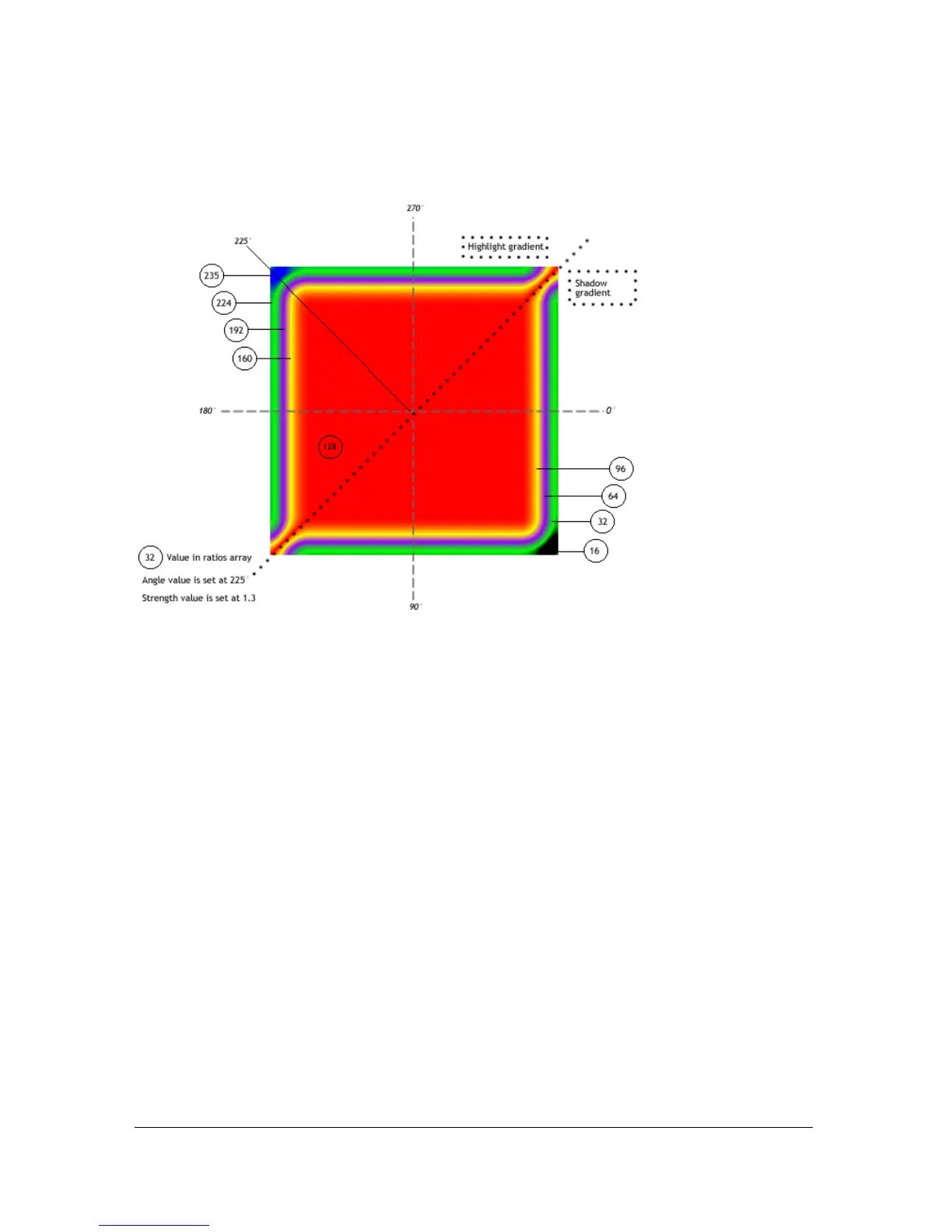
The following figure shows the gradient bevel filter created by the code above, a nine-color
rainbow bevel applied to a red rectangle movie clip:
The dashed line shows how angles are determined. The figure shows how the angle of 225° is
realized on the filter, and also shows each ratio value for each color. Setting the angle at 225°
indicates that the first color in the array begins at 225°, which is in the top left corner (the
highlight). The dotted line shows where the highlight gradient is applied and where the
shadow gradient is applied.
The original movie clip color is pink, but setting the 128 value to red means the 128-pixel
value is the base fill and covers the original movie clip fill. However, when you set the filters
property, the original object is not altered; by simply clearing the
filters property, you can
restore the original movie clip fill.
The properties of all filters affect each other, so if you adjust one property to change the effect
that you’re applying, you might need to adjust another property as well.
The full ActionScript code to create the previous figure is as follows:
import flash.filters.GradientBevelFilter;
// draws a filled square shape
this.createEmptyMovieClip("square_mc", this.getNextHighestDepth());
square_mc.beginFill(0xFF99CC);
square_mc.moveTo(40, 40);
square_mc.lineTo(200, 40);
square_mc.lineTo(200, 200);



 To Next Page