Macurco GD-xx Operation Manual
REV – 2.0.0 [34-2900-0027-6 ] 31 | Page
7.3 Gas Testing
7.3.1 Testing the Fan Relay
Note: The gas concentration to activate the fan relay depends on the setting.
1. Remove the Philips screw on the front of the GD-6. Remove the front cover.
2. Connect the 10% LEL cylinder of Combustible Gas to the regulator. Ensure that the gas used for calibration
matches the gas selected in the GD-6 configuration.
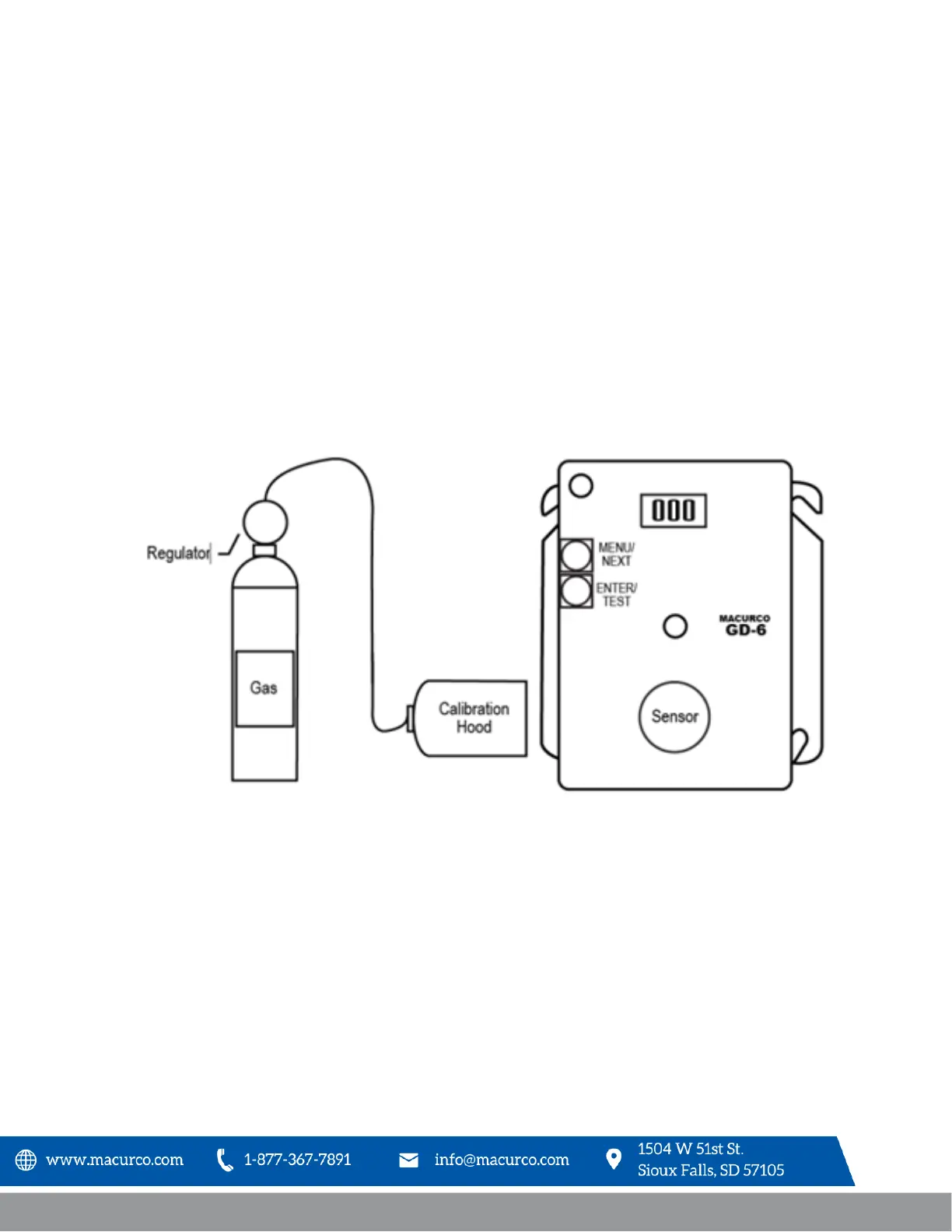
3. Assemble regulator, hose and test hood and place the test hood over the gas sensor.
4. Check the pressure gauge on the regulator. If you have 25-psi or less you will need to replace the gas
canister.
Note: The time to activate the fan relay depends on the delay setting.
Figure 7-1 – Calibration Connection
5. Turn on the regulator to start the gas flow and wait with the gas applied continuously.
6. With the display function turned “On”, the GD-6 will show the current concentration of gas or “0” (zero) in
clean air. When the gas concentration reaches the fan relay setting (10% LEL, default setting) the display will
flash back and forth between “FAn” and “10”. With the display function turned” Off”, the display does not
show the gas concentration, but will show “FAn” as long as the fan relay is activated.
Note: If the Fan relay does not close within 2 minutes, consider these possibilities:
a. Gas cylinder is empty, check the pressure gauge. Replace the gas cylinder if 25-psi or less.
b. Unit needs to be re-calibrated (go through recalibration and re-test).
c. Detector needs servicing (return unit to factory for servicing).


 To Next Page