Need help?
Do you have a question about the MadMapper miniMAD and is the answer not in the manual?
Details core features like supported surfaces, media, and projector.
Describes the 4 supported surface types for video mapping.
Explains supported media files and export process for video mapping.
Details projector connection and maximum supported resolution.
Guides on exporting video mapping projects to MiniMad via SD-card or network.
Explains how to synchronize multiple MiniMad units over a network.
Details the functions of physical buttons in different modes.
Explains how to use a USB keyboard for controlling MiniMad.
Describes controls for the Micromodul8 controller.
Lists OSC commands for controlling MiniMad remotely.
How to use MadMapper's MiniMad Controller module for remote control.
Refers to the dedicated section for TouchOSC control.
Details core features like recording, export, and audio.
Instructions for recording DMX sequences using MadLight Recorder.
How to export recorded DMX sequences to MiniMad.
Explains audio playback options via mini-jack or USB.
Details the functions of physical buttons for MiniMad Light.
Using a USB keyboard to control MiniMad Light functions.
Describes Micromodul8 controls for MiniMad Light.
Lists OSC commands specific to MiniMad Light control.
Using MadMapper's controller for MiniMad Light remote operation.
Refers to the dedicated Touch OSC section for control.
Explains on-screen display information shown on HDMI output.
Overview of the TouchOSC layout for controlling MiniMad Video and Light.
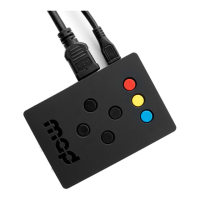
Lists hardware specifications of the MiniMad device.
Details the contents included with the MiniMad package.
Safe procedures for shutting down the MiniMad device.
Guidelines for using and managing the MiniMad's SD-card.
Steps to download and flash the latest MiniMad system image.
Procedure to activate the MiniMad system after flashing the SD-card.
Covers various supplementary topics and behaviors.
Explains MiniMad's behavior during and after power interruptions.
Discusses MIDI controller support and future plans.
Workaround for playing recorded MadMapper outputs on MiniMad.
Recommendation for using industrial SD-cards in demanding environments.
How to perform a system reboot using physical buttons.
Information on how mapping modifications are saved.
Methods for scheduling MiniMad's power-on times.
Troubleshooting steps for issues during MiniMad startup.
Explains the meaning of different LED behaviors.
Procedure to restore the SD-card if the MiniMad fails to start.
 General
| Brand | MadMapper |
|---|---|
| Model | miniMAD |
| Category | Video Card |
| Language | English |

 To Next Page