1.4 INITIAL MODE FOR SERVICE (B MODE)
This system has an Initial Mode for Service for the user by service
shop or Rental Company.
Items and contents for changing are as follows:
㧖The content of setting, once established, will be saved in
memory, requiring no more setting for each work.
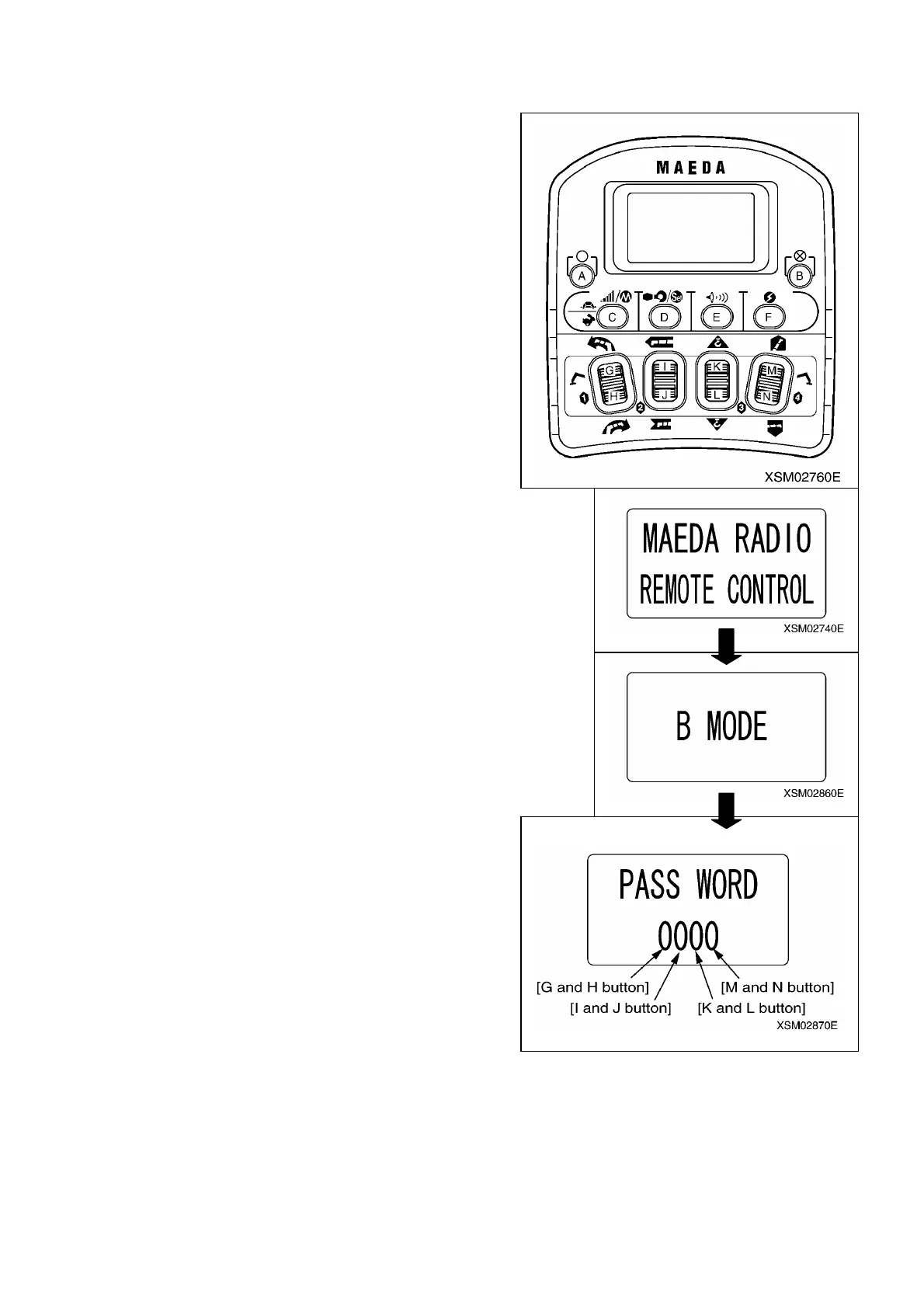
1. Retrieving the screen for initial mode for service:
With the system power remaining turned OFF, while holding H
and N buttons pressed, continue to press F button until the
screen of initial mode for user appears (For about 2 seconds).
After “MAEDA RADIO REMOTE CONTROL” having showed up.
”B MODE” appears, before the prompt for password “PASS WORD
0000” comes up.
Each digit corresponds to buttons as shown above.
Operate each buttons to enter
[2435], before pressing D button.
Note:
㨯 Be sure to turn OFF the main switch at receiver before starting to operate the initial mode.
㨯 Before starting to change the setting, always make sure that “B MODE” has appeared on the LCD.
158



 To Next Page