Page 12
2.2. Battery Replacement (Remote Control and
Total Control)
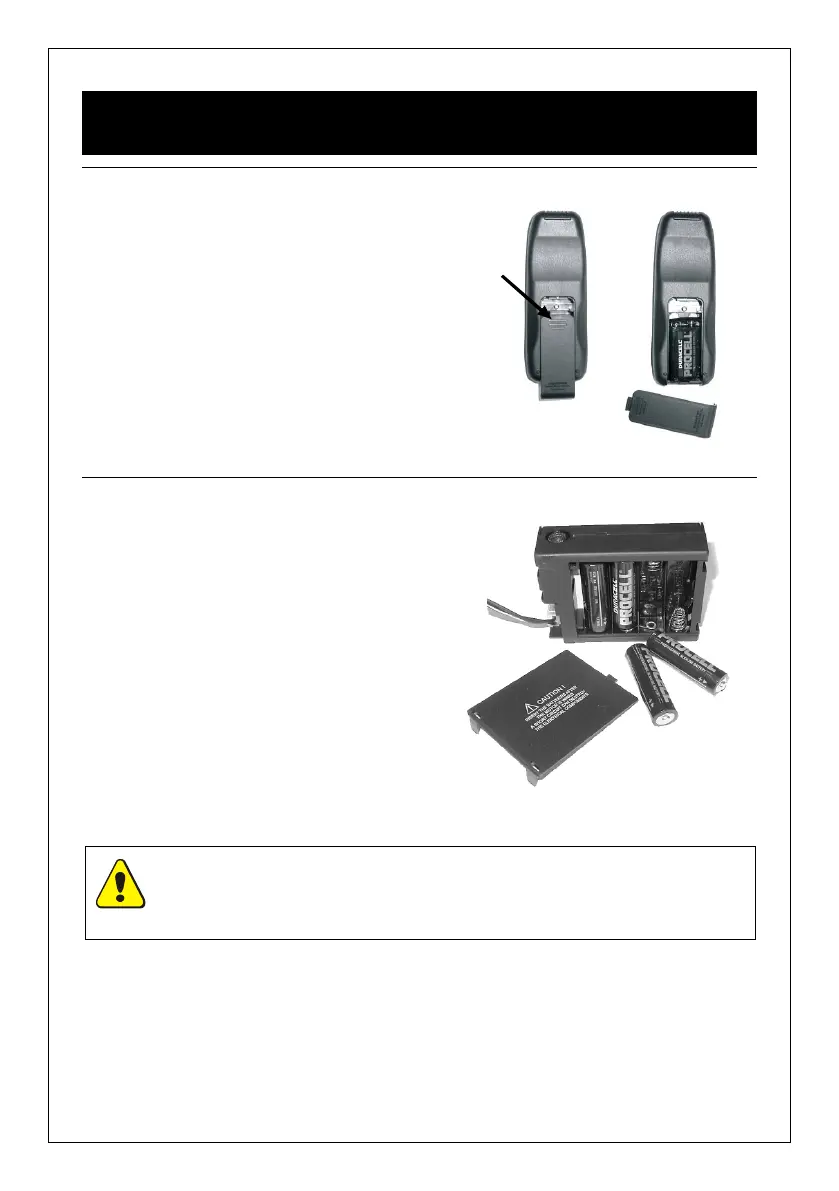
2.2.1. Handset
1. On the reverse of the handset remove
the battery cover by pressing down at
the top of the cover and sliding down.
2. Remove and unclip the old battery and
replace with a new PP3 9V battery.
3. Replace the cover.
Press here and
slide down
Figure 18
2.2.2. Receiver Unit
1. Remove the receiver unit from under the
fire burner (or from wherever positioned
if mounted remotely) and remove the
battery compartment cover (see Figure
19).
2. Replace the old batteries with new ones,
ensuring they are inserted in the correct
polarity.
3. Replace the cover on the receiver unit,
ensuring that it is securely closed.
4. Return the receiver unit to its original
mounting position.
Figure 19
CAUTION: With the exception of battery replacement, the battery holder must be
located within the heat shield at all times.



 To Next Page