16
ENGLISH
BASIC CARE
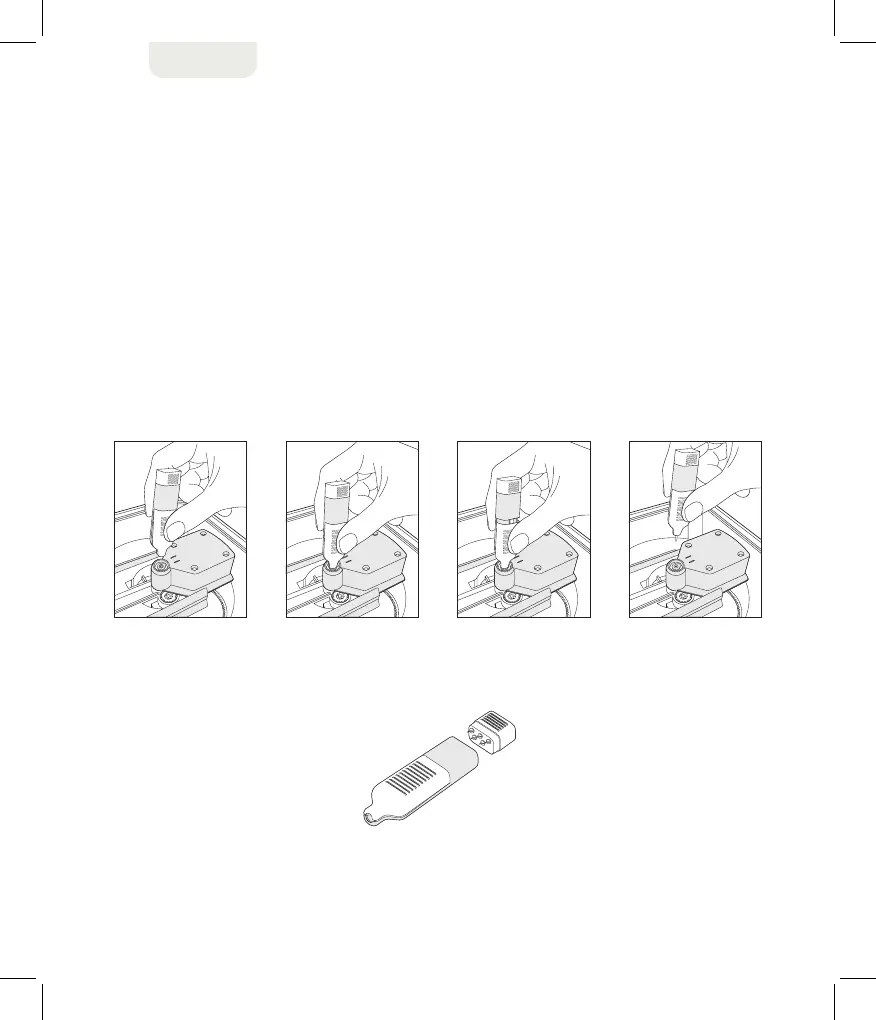
Replacing blades
To remove a used blade from Slice™ unit:
1. Unplug and turn off Slice™ unit.
2. Place Slice™ design cutter on its side or upside-down.
3. Guide the pinching ends of the blade replacement tool to the small, orange blade
inside the round blade encasement, as shown below.
4. Squeeze the tool with your fingers around the orange blade.
5. Hold the blue ribbed side of the blade replacement tool in place and slide the grey side up.
6. Pull blade replacement tool away from the base of unit.
3 4 5 6
blade replacement tool


 To Next Page