Need help?
Do you have a question about the Makita N1900B and is the answer not in the manual?
Guidelines for maintaining a safe and well-lit workspace to prevent accidents.
Precautions related to electrical hazards, including proper plug usage and avoiding wet conditions.
Advice on staying alert, dressing properly, and avoiding accidental starting.
Instructions for proper tool operation, securing workpieces, and maintenance practices.
Key safety measures specific to operating the power planer, like blade security and hand placement.
How to adjust the cutting depth of the planer using the control knob.
Explanation of how to operate the power switch and the lock-on feature.
Step-by-step guide for securely removing and installing mini planer blades.
Explains proper blade setting and illustrates common setting errors and their causes.
Step-by-step guide for performing standard planing operations and achieving desired finishes.
Instructions for making stepped cuts using the edge fence (guide rule).
Guidance on using a sharpening holder for blade maintenance to produce a fine edge.
Procedure for checking and replacing worn carbon brushes to maintain tool performance.
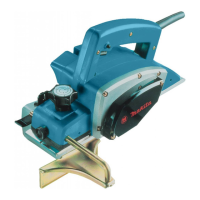
The Makita Power Planer, model N1900B, is a robust and versatile tool designed for planing operations, offering precision and ease of use for various woodworking tasks. This planer is double insulated, enhancing user safety during operation.
The primary function of this power planer is to smooth and shape wood surfaces by removing thin layers of material. It is equipped with an adjustable depth of cut, allowing users to control the amount of material removed with each pass. The depth of cut is easily adjusted by turning a knob located on the front of the tool.
The tool features a switch action with a lock button for continuous operation, providing comfort during extended use. To start, the user pulls the switch trigger. For continuous use, the trigger can be pulled and then the lock button pushed in. To stop the tool from the locked position, the trigger is pulled fully and then released.
Beyond basic planing, the N1900B is capable of shiplapping (rabbeting) and chamfering. Shiplapping involves making stepped cuts along the edge of a workpiece, which is achieved using an edge fence (guide rule). Chamfering, or creating a beveled edge, is performed by aligning the "V" groove in the front base with the edge of the workpiece.
Before starting any planing operation, it is crucial to ensure the tool is switched off and unplugged when making adjustments or checking functions. When beginning a planing operation, the front base of the tool should rest flat upon the workpiece surface without the blades making contact. The tool is then switched on, and the blades are allowed to attain full speed before gently moving the tool forward. Applying pressure on the front of the tool at the start of planing and at the back at the end helps achieve a smooth finish. For easier planing, inclining the workpiece in a stationary fashion can be beneficial. The speed and depth of cut influence the finish quality; a higher depth of cut is suitable for rough cutting, while a reduced depth and slower advance yield a finer finish. The planer is designed to cut at a speed that prevents jamming by chips.
For shiplapping, a cutting line is drawn on the workpiece, and the edge fence is inserted into a hole in the front of the tool. The blade edge is aligned with the cutting line, and the edge fence is adjusted to contact the side of the workpiece before being secured. During planing, the tool must be moved with the edge fence flush against the workpiece side to ensure even planing. The maximum shiplapping depth is 9 mm (11/32"). An optional extension guide can be attached to the fence for longer workpieces.
When chamfering, the "V" groove in the front base is aligned with the edge of the workpiece, and the tool is planed along this line.
The tool can be fitted with optional accessories to enhance its functionality. A nozzle assembly can be attached to minimize chip scatter, creating a cleaner work area. This assembly is installed after removing the chip cover, fitting its pin into the rear cover hole, and securing it with the chip cover screws. A dust bag assembly can also be used for dust collection, improving cleanliness during cutting operations. The dust bag is attached by first removing the chip cover and then installing the dust bag assembly. For optimal performance, the dust bag should be emptied when it is about half full.
Proper maintenance is essential for the longevity and performance of the Makita Power Planer. Always ensure the tool is switched off and unplugged before performing any inspection or maintenance tasks.
One critical maintenance aspect is the removal and installation of mini planer blades. Blades must be handled very carefully, preferably with gloves or rags, to protect fingers. Only the Makita wrench provided should be used for installation to prevent overtightening or insufficient tightening of the bolts, which could lead to injury. When installing blades, the existing blades are first removed, and the drum surfaces and drum cover are cleaned. The new blades are loosely attached to the adjusting plate, which is then set on the gauge base so that the cutting edge of the blade is perfectly flush with the inside flank of the gauge plate. The adjusting plate/set plate is then placed on the gauge base, ensuring the planer blade locating lugs rest in the mini planer blade groove. The heel of the adjusting plate is pressed flush with the back side of the gauge base, and the pan head screws are tightened. It is crucial to check that the blade sits flush with the inside flank of the gauge plate, the locating lugs are in the blade groove, and the heel is flush with the back side of the gauge base to ensure uniform cutting. The heel of the adjusting plate is slipped into the drum groove, and the drum cover is set over the adjusting plate/set plate. The three hex flange head bolts are screwed in, leaving a gap to slide the mini planer blade into position. The blade's lengthwise adjustment must be manually positioned so that its ends are clear and equidistant from the housing and metal bracket. Finally, all three hex flange head bolts are tightened securely, and the drum is hand-rotated to check clearances. Both blades or covers on the drum must always be changed simultaneously to prevent imbalance, vibration, and shortened tool life.
For optional planer blade adjustment, it is important to clean out all chips or foreign matter adhering to the drum or blades before installation. Blades of the same dimensions and weight must be used to prevent drum oscillation/vibration, which can lead to poor planing and tool breakdown. The blade must be mounted so that the cutting edge is absolutely level and parallel to the surface of the rear base for a smooth and even planing surface.
Sharpening the planer blades is another key maintenance task for optimal performance. An optional sharpening holder can be used to remove nicks and produce a fine edge. To sharpen, the two wing nuts on the holder are loosened, and the blades are inserted to contact the sides before tightening the wing nuts. The dressing stone should be immersed in water for 2-3 minutes before sharpening. The holder is then held so that both blades contact the dressing stone for simultaneous sharpening at the same angle.
Regular inspection and replacement of carbon brushes are also necessary. Brushes should be replaced when they wear down to the limit mark. They should be kept clean and free to slip in their holders, and both carbon brushes must be replaced at the same time with identical carbon brushes. To replace them, the chip cover is removed using a screwdriver, followed by the brush holder caps. The worn brushes are taken out, new ones inserted, and the brush holder caps secured.
To maintain product safety and reliability, all repairs, maintenance, or adjustments should be performed by Makita Authorized or Factory Service Centers, using only Makita replacement parts.
 General
| Planing Width | 82 mm |
|---|---|
| Planing Depth | 1 mm |
| No Load Speed | 16, 000 RPM |
| Weight | 2.5 kg |
| Power Source | Corded Electric |
| Rebate Depth | 9 mm |
| Cable Length | 2.5 m |


 To Next Page