28 CG-2 | 1.04.00 www.mc-techgroup.com
19 USE OF THE TEMPERATURE CONTROLLER
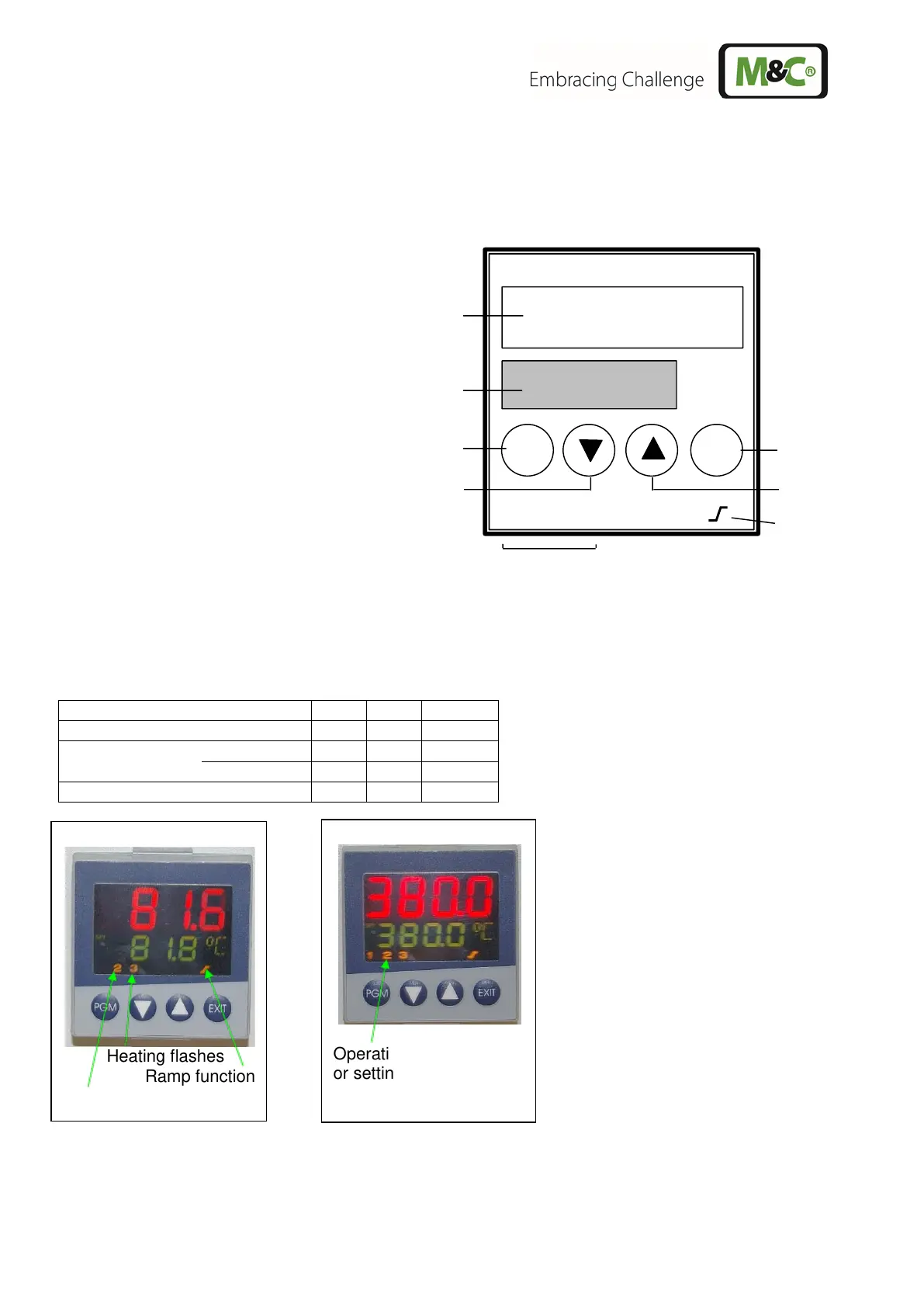
19.1 DISPLAY AND FUNCTION KEYS
Process value display, red
PGM key
- to select the parameters
Decrement key
- to alter values
Increment key
- to alter values
EXIT key
- to quit the levels
LED for ramp/programme function, green
LED for status indication, yellow
- outputs 1 to 3
19.2 OPERATING STATE OF THE TEMPERATURE CONTROLLER
The operating state is displayed via the LED’s 1 to 3 like:
In the event of an alarm, over- or under-temperature alarm, the controller automatically switches to the
state of the self-retaining heating switch-off.
Setting value reached
Operating temperature
or setting value reached
Heating up
Heating flashes
Ramp function
Sensor control



 To Next Page