17DVBT024PRO - ENG
FUNCTIONS
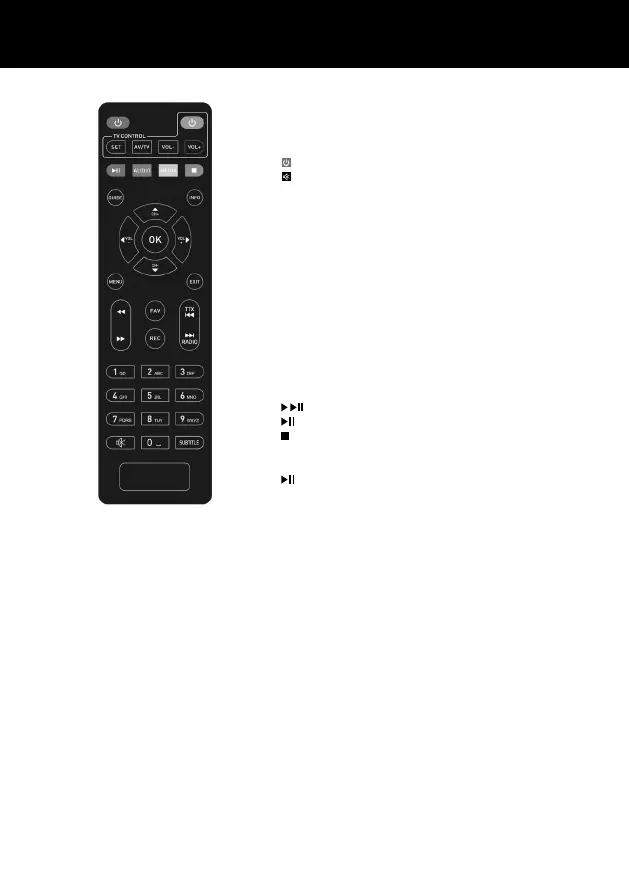
Smart remote control
1. STANDBY : Turn on the product or Standby.
2. MUTE : Mute or unmute the audio output.
3. GUIDE : (Electronic Program Guide) Call up the EPF.
4. INFO : Display information about the current program.
5. TTX : View teletext content.
6. AUDIO : Select audio language or sound mode.
7. REC : Recording and playback of TV shows and movies, etc.
8. SUBTITLE : Select asubtitle language.
9. MENU : Press this button to launch the menu.
10. CH+/- : Navigate through the menu. Select next or previous
channel.
11. EXIT : Press to return to the previous menu.
12. VOL-/+ : Volume up and down.
13. OK : Select the highlighted item.
14. FAV : View or edit your favorite program list.
15. RADIO : Switch between TV and Radio mode.
16. 0-9 (number buttons) : selected menu.
17. - PLAY : Press to resume playback.
18. - PAUSE : Press to pause the current program.
19. STOP : Press this button to stop the current program.
20. TV CONTROL - Buttons for learning from TV Remoter’s
related Button.
21. - When watch TV, it is Timeshift.
How to learn TV Remote’s button.
2 in 1 Smart Remote control instructions for TV setup.
During this phase, position the two remote controls so that their respective IR (infrared) sensors are
facing each other at adistance of about 3 cm.
1. Press and hold the SET button on the Decoder remote control for about 3 seconds until the
red LED stays on stronger, in this phase the decoder remote control is in „Duplication” mode;
2. Press and hold the key on the TV remote control, on the Decoder remote control, the button
you want to Duplicate (for example the On / O button), the red LED will start ashing, in this
phase the Decoder remote control is in „Standby mode;
3. Press and hold on the TV remote control, the key to be duplicated for 2seconds (in this exam-
ple: the On / O key), the red LED will stop ashing, conrming the successful operation and
will remain on indicating that it is still running. „Duplication” mode;
4. Repeat steps 2 and 3 to duplicate other buttons on the TV remote control or press SET to
conrm and exit the procedure.



 To Next Page