22 DVBT024PRO - ENG
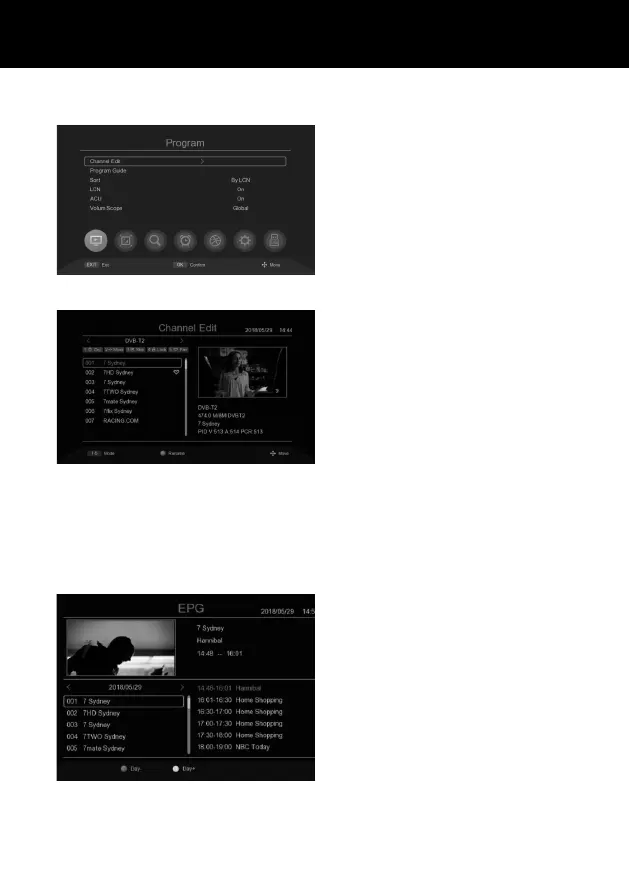
Edit Channel: Edit channel program prefe-
rences.
DELETE: Press [01] to remove the program
from the channel list.
MOVE: Press [02] then press UP/DOWN to
move the program position, when the move
indicator appears, press OK to conrm.
SKIP: Press [03] to select a program to be
skipped in the channel list.
LOCK: Press [04] to request an access code
to watch aprogramme. Lock indicates that
the channel is locked, the default passcode
is 000000.
FAV: Press [05] to select aprogram to be ad-
ded to the favorite channel list. An asterisk
means that the program is afavourite.
RENAME: Press [Green] to edit the program
name. Use the green keyboard to enter
anew name.
ACU: automatic program update if at ON.
PROGRAM GUIDE
EPG: View electronic program guide, this guide shows seven days channel schedule information.
Press the UP/DOWN button to scroll through the list. You can also quickly access the EPG by pressing
the [EPG] button on the remote control.
Sort: Change the order of channels: By
LCN/ONID/TP/Service Name/Service ID.
By LCN: Display by logical channel number.
By ONID: Display by original Network iden-
tication.
By TP: View by Frequency.
By Service Name: Display in alphabetical
order.
By Service ID: Display by Station identica-
tion.
PROGRAMS



 To Next Page