24 DVBT024PRO - ENG
OPTION
Press MENU button, and press “>” the Right cursor on Remoter:
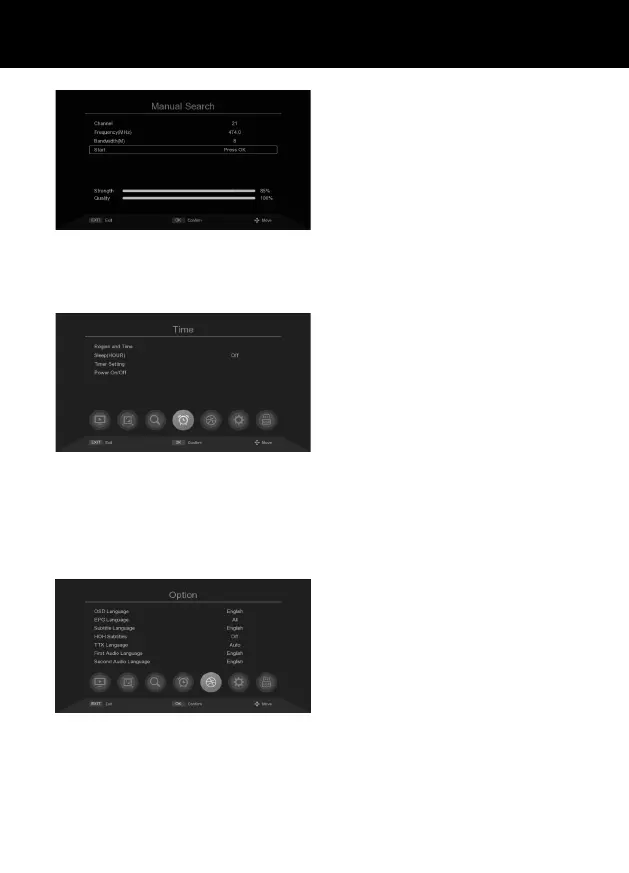
OSD Language: Set the language used
for the system menus and other on-screen
display items.
EPG Language: Set the language in the EPG.
Subtitle Language: Set the subtitle langu-
age.
TTX language: Set the teletext language.
First audio language: Set the rst audio
language.
Secondary audio language: Set the second
audio language.
Digital Audio: Auto/PCM/Bypass.
HOH Subtitle: Hearing impaired subtitle
setting.
Manual Search: Manually add channels to
the channel list without overwriting the exi-
sting channel list.
• Select Manual Search, then press OK.
• In the manual search screen, you can en-
ter the frequency and bandwidth, then
select „Press OK” and press OK to start
the search
TIME SETTINGS
Press MENU button, and press “>” the Right cursor on Remoter:
Region and time: Set your local time zone.
Auto: Get the time zone information auto-
matically from the signal.
Manual: Use the Time Zone setting below.
Time Zone: Set your local time zone. This
option is only available when „Time Shift” is
set to „Manual”.
Sleep: Set asleep timer. The TV will turn o
automatically when the timer expires. Set
this option to „disabled” to turn it o.
Power On/O: Set the time for the device to
turn on or o automatically.



 To Next Page