USER’S MANUAL
22
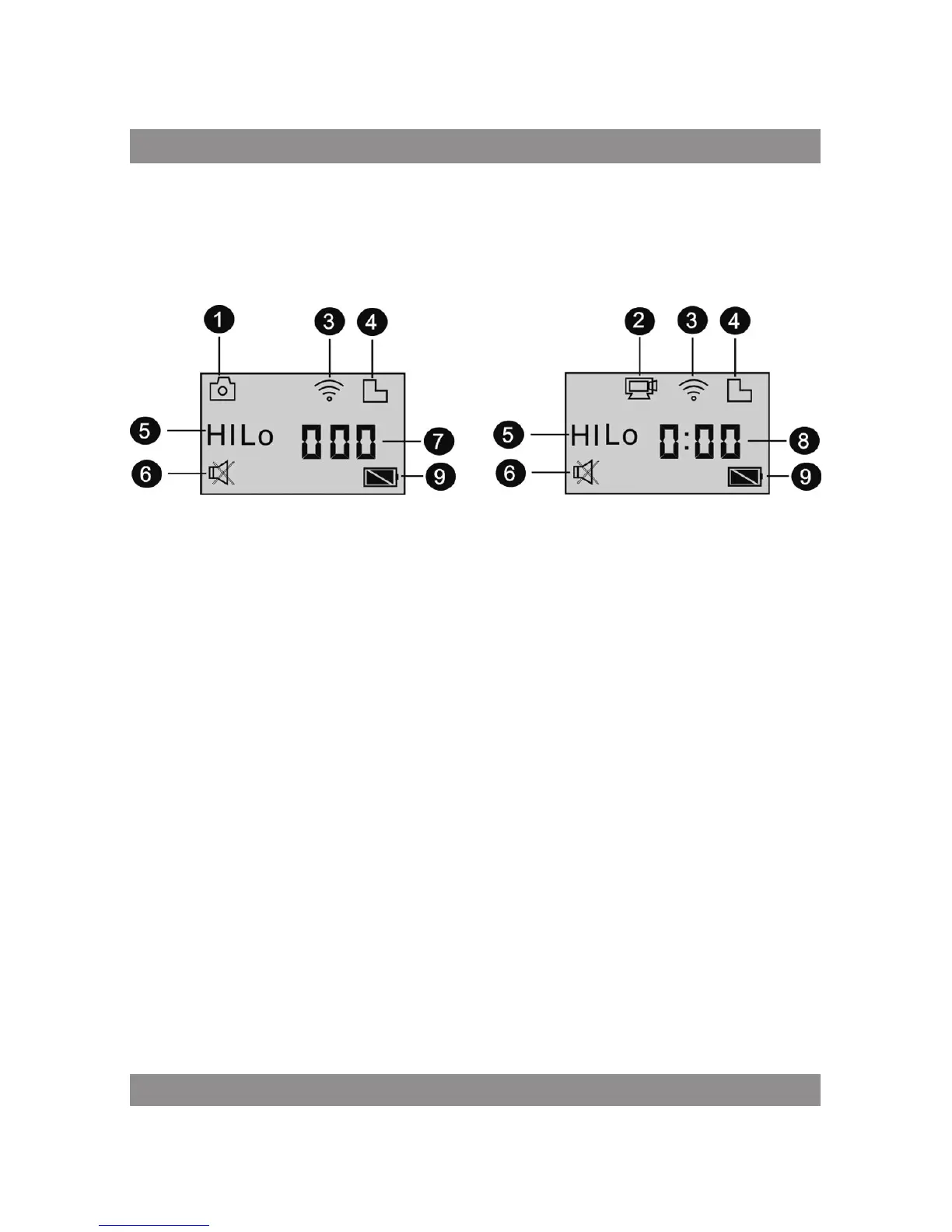
LCD Display
Turn on the Wi-Fi DV, the LCD will display the following status and
settings:
1. Camera mode
2. Video recording mode (default)
3. Wi-Fi icon (display when enabled)
4. Micro SD card icon (display when loaded)
5. Resolution icon:
In camera mode, HI stands for 8 Mega Pixels (3264x2448), and in video
recording mode, it stands for FHD (1920x1080, 30fps);
In camera mode, LO stands for 5 Mega Pixels (2592x1920), and in video
recording mode, it stands for 720P (1280x720, 30fps);
HILO only displays in video recording mode, standing for 720P
(1280x720,60fps).
6. Mute mode, displays when enabled, and disabled by default.
7. Counter, displays up to 999.
8. Timer, displays hours and minutes.
9. Battery icon: current battery level of the camera.
Note:
The above icons may vary according to the status of the DV.



 To Next Page