EasyManua.ls Logo

Marantz 4230 - Audio Adjustment; Automatic Voltage Regulator Adjustment; Dolby Alignment Procedure; Procedure 1

Marantz 4230
38 pages
Print Icon
To Next Page IconTo Next Page
To Previous Page IconTo Previous Page
Loading...
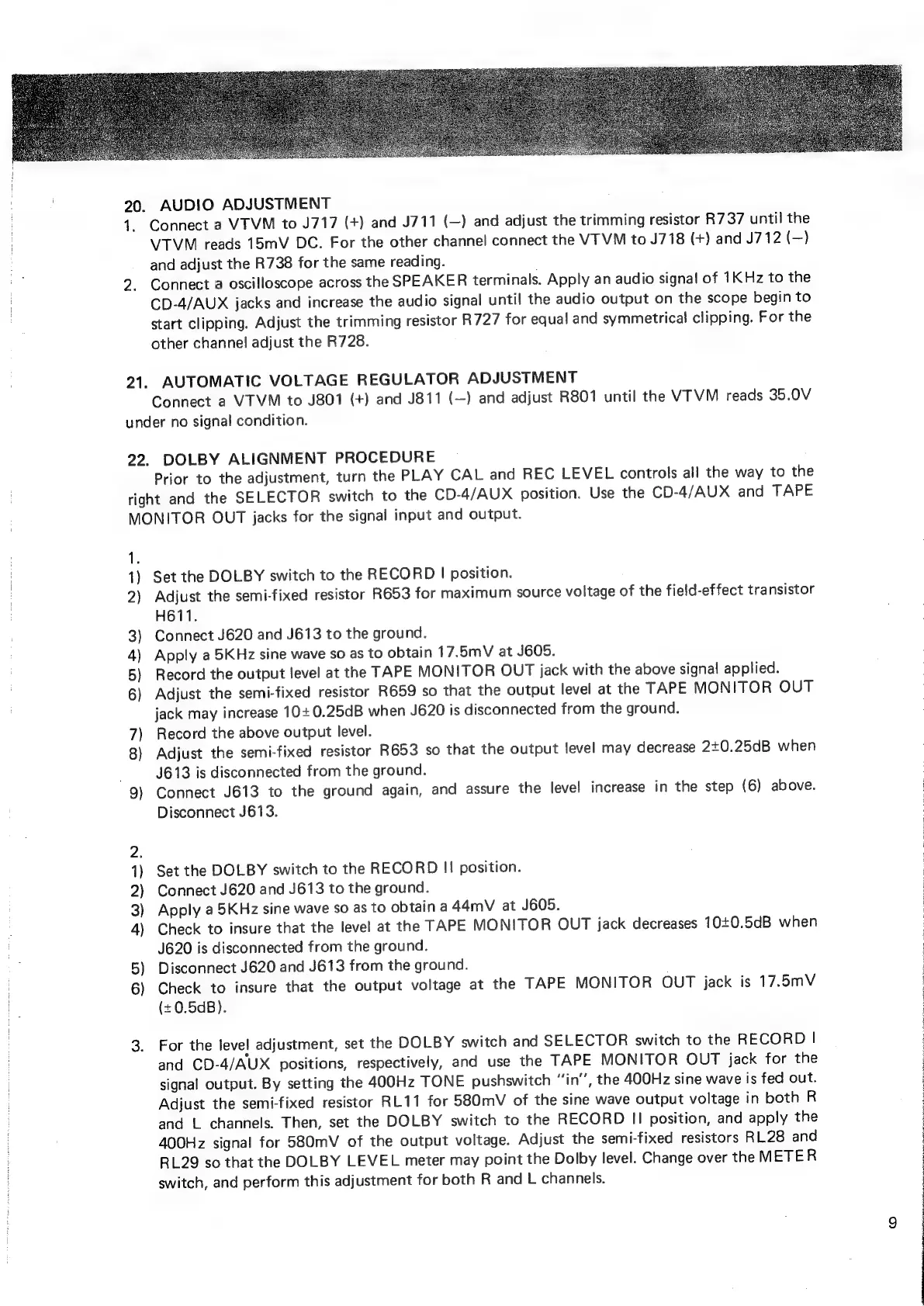
20.
AUDIO
ADJUSTMENT
1.
21.
Connect
a
VTVM
to
J717
(+)
and
J711
(—)
and
adjust
the
trimming
resistor
R737
until
the
VTVM
reads
15mV
DC.
For
the
other
channel
connect
the
VTVM
to
J718
(+)
and
J712
(-)
and
adjust
the
R738
for
the
same
reading.
Connect
a
oscilloscope
across
the
SPEAKER
terminals.
Apply
an
audio
signal
of
1K Hz
to
the
CD-4/AUX
jacks
and
increase
the
audio
signal
until
the
audio
output
on
the
scope
begin
to
start
clipping.
Adjust
the
trimming
resistor
R727
for
equal
and
symmetrical
clipping.
For
the
other
channe!
adjust
the
R728.
AUTOMATIC
VOLTAGE
REGULATOR
ADJUSTMENT
Connect
a
VTVM
to
J801
(+)
and
J811
(—)
and
adjust
R801
until
the
VTVM
reads
35.0V
under
no
signal
condition.
22.
DOLBY
ALIGNMENT
PROCEDURE
Prior
to
the
adjustment,
turn
the
PLAY
CAL
and
REC
LEVEL
controls
all
the
way
to
the
right
and
the
SELECTOR
switch
to
the
CD-4/AUX
position.
Use
the
CD-4/AUX
and
TAPE
MONITOR
OUT
jacks
for
the
signal
input
and
output.
1
1)
2)
3)
4)
5)
6)
7)
8)
9)
1)
2)
3)
4)
5)
6)
Set
the
DOLBY
switch
to
the
RECORD
|
position.
Adjust
the
semi-fixed
resistor
R653
for
maximum
source
voltage
of
the
field-effect
transistor
H611.
Connect
J620
and
J613
to
the
ground.
Apply
a
5KHz
sine
wave
so
as
to
obtain
17.5mV
at
J605.
Record
the
output
level
at
the
TAPE
MONITOR
OUT
jack
with
the
above
signal
applied.
Adjust
the
semi-fixed
resistor
R659
so
that
the
output
level
at
the
TAPE
MONITOR
OUT
jack
may
increase
10+
0.25dB
when
J620
is
disconnected
from
the
ground.
Record
the
above
output
level.
Adjust
the
semi-fixed
resistor
R653
so
that
the
output
level
may
decrease
2+0.25dB
when
J613
is
disconnected
from
the
ground.
Connect
J613
to
the
ground
again,
and
assure
the
level
increase
in
the
step
(6)
above.
Disconnect
J613.
Set
the
DOLBY
switch
to
the
RECORD
I!
position.
Connect
J620
and
J613
to
the
ground.
Apply
a
5KHz
sine
wave
so
as
to
obtain
a
44mV
at
J605.
Check
to
insure
that
the
level
at
the
TAPE
MONITOR
OUT
jack
decreases
10+0.5dB
when
J620
is
disconnected
from
the
ground.
Disconnect
J620
and
J613
from
the
ground.
Check
to
insure
that
the
output
voltage
at
the
TAPE
MONITOR
OUT
jack
is
17.5mV
(+0.5dB).
For
the
level
adjustment,
set
the
DOLBY
switch
and
SELECTOR
switch
to
the
RECORD
|
and
CD-4/AUX
positions,
respectively,
and
use
the
TAPE
MONITOR
OUT
jack
for
the
signal
output.
By
setting
the
400Hz
TONE
pushswitch
“‘in’’,
the
400Hz
sine
wave
is
fed
out.
Adjust
the
semi-fixed
resistor
RL11
for
580mV
of
the
sine
wave
output
voltage
in
both
R
and
L
channels.
Then,
set
the
DOLBY
switch
to
the
RECORD
I!
position,
and
apply
the
400Hz
signal
for
580mV
of
the
output
voltage.
Adjust
the
semi-fixed
resistors
RL28
and
RL29
so
that
the
DOLBY
LEVEL
meter
may
point
the
Dolby
level.
Change
over
the
METER
switch,
and
perform
this
adjustment
for
both
R
and
L
channels.
:
3
7
3
4
3
7
3

Other manuals for Marantz 4230

Related product manuals