10
ENGLISH
PLAYING A SPECIFIC TRACK
SPECIFYING THE NUMBER OF A TRACK TO BE
PLAYED (DIRECT SEARCH)
Select the number of the track to be played directly
by pressing the numeric buttons (0 to 9) on the player
or remote control unit.
To select track number 10 or above, use the numeric
buttons to select the higher digit first and then select
the lower digit.
Once the number of the track is selected, play will
start automatically.
Example: To play track 3
Press the “3” numeric button.
OPEN/
CLOSE
DISPLAY
3
REPEAT
12
1
234
Example: To play track 12
Press the “1” numeric button.
OPEN/
CLOSE
DISPLAY
3
REPEAT
12
1
234
Within 1 second, press the “2” numeric button.
OPEN/
CLOSE
DISPLAY
3
REPEAT
12
1
234
Note:
* If a disc recorded with MP3 files also contains some
data files which are not MP3 files, the track before or
after the number of the selected track may be played.
Direct search is supported only for the album being
played.
BASIC OPERATIONS
PLAYING CDS
OPEN/CLOSE
DISPLAY
3
REPEAT
12
654
AMS
RANDOM
978
PROGRAM
0
A-B
CANCEL
TEXT
TIME
SCROLL/
RECALL
RC7300CD
MENU ENTER
INDEX +
Q. REPLAY
INDEX -
+
PITCH
-
RESET
REMOTE CONTROLLER
DISPLAY
OFF
PLAY/PAUSE
+
OPEN/CLOSE
STOP
EASY JOG
-
PHONES
DISPLAY
LEVELQUICK REPLAY
POWER ON/OFF
CD PLAYER CD7300
1
23456789
0
/
2 3, 4 5
5
3, 4
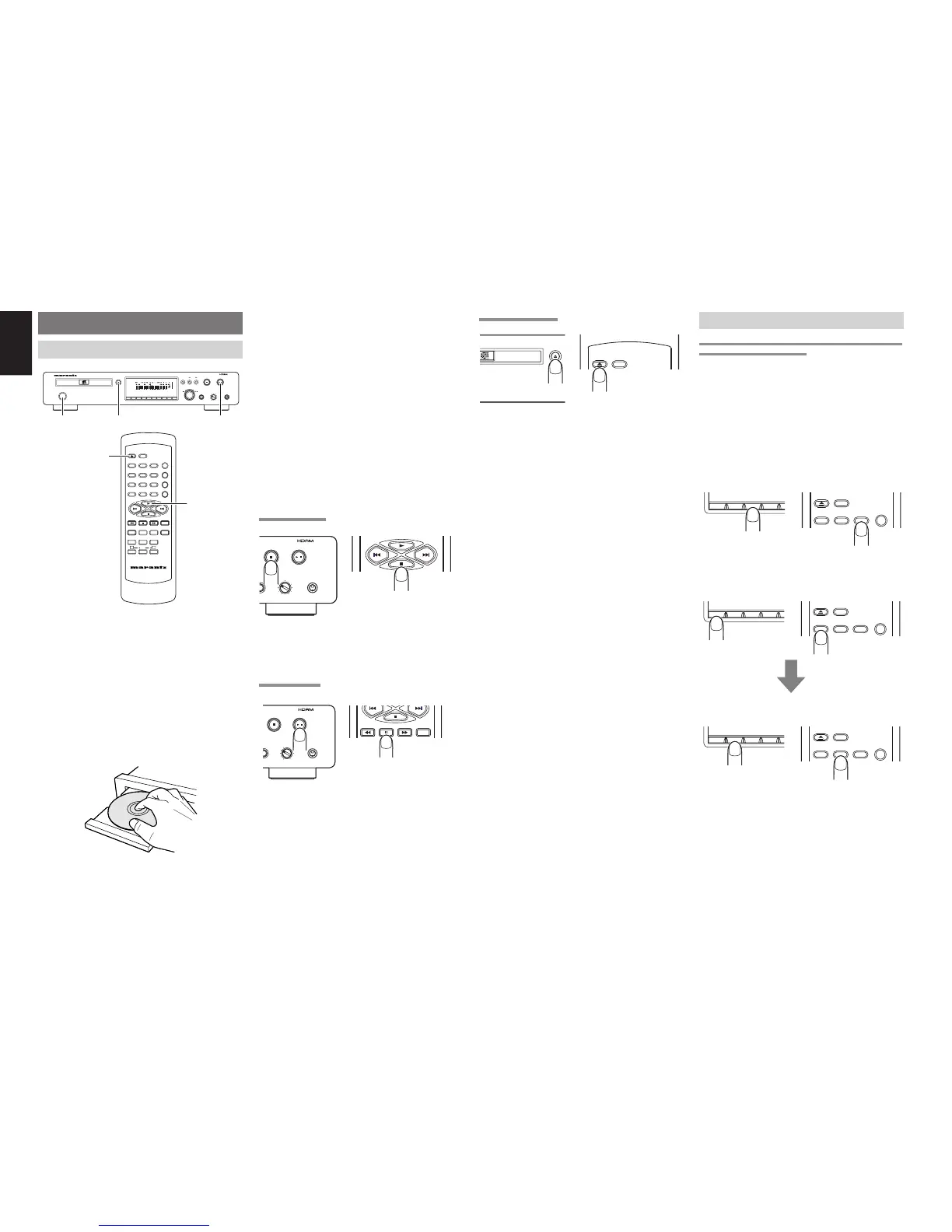
1. Turn on the power of the amplifier to which the
player is connected, and use the input selector
on the amplifier to select “CD” (the player’s input
source which has been connected).
2. Press the POWER button on the player to turn
on the power.
3. Press the OPEN/CLOSE 0 button on the player
or remote control unit. Place the CD to be played
in the extended disc tray while ensuring that the
label with the printed text is facing up.
In the case of a single (8 cm) CD, align it with the
indentation in the center of the tray.
4. Press the OPEN/CLOSE 0 button on the player
or remote control unit to retract the disc tray.
Pushing the front of the disc tray lightly also
causes the tray to be retracted. Once the disc
tray has been retracted, “TOC Reading” appears
on the display, after which the total number of
CD tracks and total remaining time are displayed.
In the case of a disc that supports CD-TEXT, the
album title is displayed, and then the total number
of CD tracks and total remaining time are
displayed.
5. Press the 6 button on the player or 3 button
on the remote control unit to start play. Adjust
the volume level at the amplifier.
STOPPING PLAY
PLAY/PAUSE
+
STOP
-
PHONESLEVEL
REPLAY
/
Press the 7 button on the player or remote control
unit during play.
PAUSING PLAY
TIME
PLAY/PAUSE
+
STOP
-
PHONESLEVEL
REPLAY
/
During play, press the 6 button on the player or 8
button on the remote control unit to temporarily
suspend play.
To resume play from the place where it was
temporarily suspended, press the 6 button on the
player or the 3 button or 8 button on the remote
control unit.
REMOVING THE CD
OPEN/
CLOSE
DISPLAY
OPEN/CLOSE
LAYER CD7300
After play has finished, press the OPEN/CLOSE 0
button on the player or remote control unit to extend
the disc tray, and remove the CD.
After the CD has been removed, press the OPEN/
CLOSE 0 button again to retract the disc tray. The
disc tray should always be retracted when the player
is not in use.


 To Next Page