17
ENGLISH
SETTING THE PLAY
FUNCTIONS
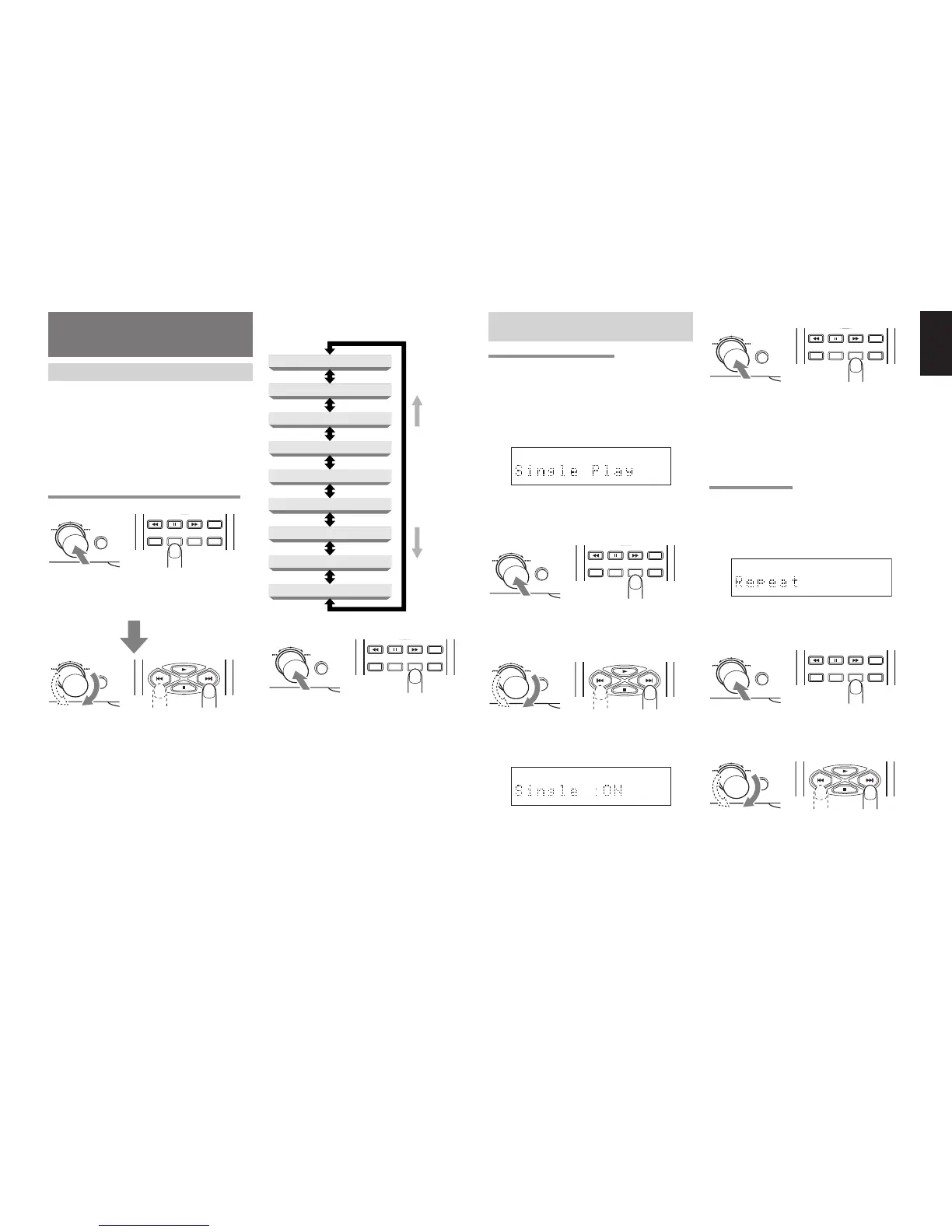
USING EASY JOG
The front panel of the player features the EASY JOG
dial to facilitate a number of different operations to
be performed.
Under normal circumstances, play re-starts at the
start of the previous or subsequent tracks by turning
the dial clockwise or counterclockwise. The dial also
enables the play functions (play modes) to be set
from the menu. The menu can also be operated from
the remote control unit.
SETTING THE PLAY FUNCTIONS (PLAY MODES)
TEXT
TIME
SCROLL/
RECALL
MENU ENTER
QUICK REPLAY
EASY JOG
When EASY JOG is pressed or when the MENU
button on the remote control unit is pressed, the play
function (play mode) setting mode is established.
QUICK REPLAY
EASY JOG
When EASY JOG is turned clockwise or
counterclockwise in this mode, the play function
menu is switched.
The play function (play mode) menu can also be
switched by pressing the MENU button or the 4 or
¢ button on the remote control unit.
Shown below is the play function (play mode) menu
which is switched when EASY JOG is turned.
TEXT
TIME
SCROLL/
RECALL
MENU ENTER
QUICK REPLAY
EASY JOG
At the desired play function (play mode), either press
EASY JOG on the player or press the ENTER button
on the remote control unit to select the mode
concerned.
For subsequent details on the play functions (play
modes), refer to pages 17 to 19.
Single Track Play
Repeat
Program
Delete Program
Random
AMS (Auto Music Scan) Time
Pitch Control
Quick Replay Time
Timer Play
EASY JOG turned
counterclockwise
or
44
44
4 button
pressed
EASY JOG turned
clockwise or
¢¢
¢¢
¢
or MENU button
pressed
VARIOUS PLAY FUNCTIONS (PLAY
MODES)
SINGLE TRACK PLAY (ON/OFF)
This function enables single play searches which
come in handy at such times as practicing musical
performances or using the player at broadcast
facilities.
1. Press EASY JOG and then turn it so that “Single
Play” appears on the main display.
TEXT
12 34 56 78 910 1112 1314 1516 1718
2. Press EASY JOG (or press the ENTER button
on the remote control unit) to select Single Track
Play.
TEXT
TIME
SCROLL/
RECALL
MENU ENTER
QUICK REPLAY
EASY JOG
3. Turn EASY JOG (or press the 4 or ¢ button
on the remote control unit).
QUICK REPLAY
EASY JOG
“Single:ON” and “Single:OFF” appear alternately
on the main display.
TEXT
12 34 56 78 910 1112 1314 1516 1718
4. With “Single:ON” displayed, press EASY JOG
(or press the ENTER button on the remote control
unit). Single Track Play mode is now set, and
“S.PLAY” lights on the display.
TEXT
TIME
SCROLL/
RECALL
MENU ENTER
QUICK REPLAY
EASY JOG
When ON is set, operation stops temporarily at
the start of the track, and play stands by. Play is
started by pressing the 6 button on the player.
When the track concerned comes to an end,
operation stops temporarily at the start of the
next track.
REPEAT (ALL/1/OFF)
This function enables some or all of the tracks on a
disc to be played repeatedly.
1. Press EASY JOG and then turn it so that
“Repeat” appears on the main display.
12 34 56 78 910 1112 1314 1516 1718
2. Press EASY JOG (or press the ENTER button
on the remote control unit) to select Repeat.
TEXT
TIME
SCROLL/
RECALL
MENU ENTER
QUICK REPLAY
EASY JOG
3. Turn EASY JOG (or press the 4 or ¢ button
on the remote control unit).
QUICK REPLAY
EASY JOG
The function is switched through three settings:
“Repeat:ALL” (all-track repeat) → “Repeat:1” (1-
track repeat) → “Repeat OFF” → “Repeat:ALL.”


 To Next Page