16
ENGLISH
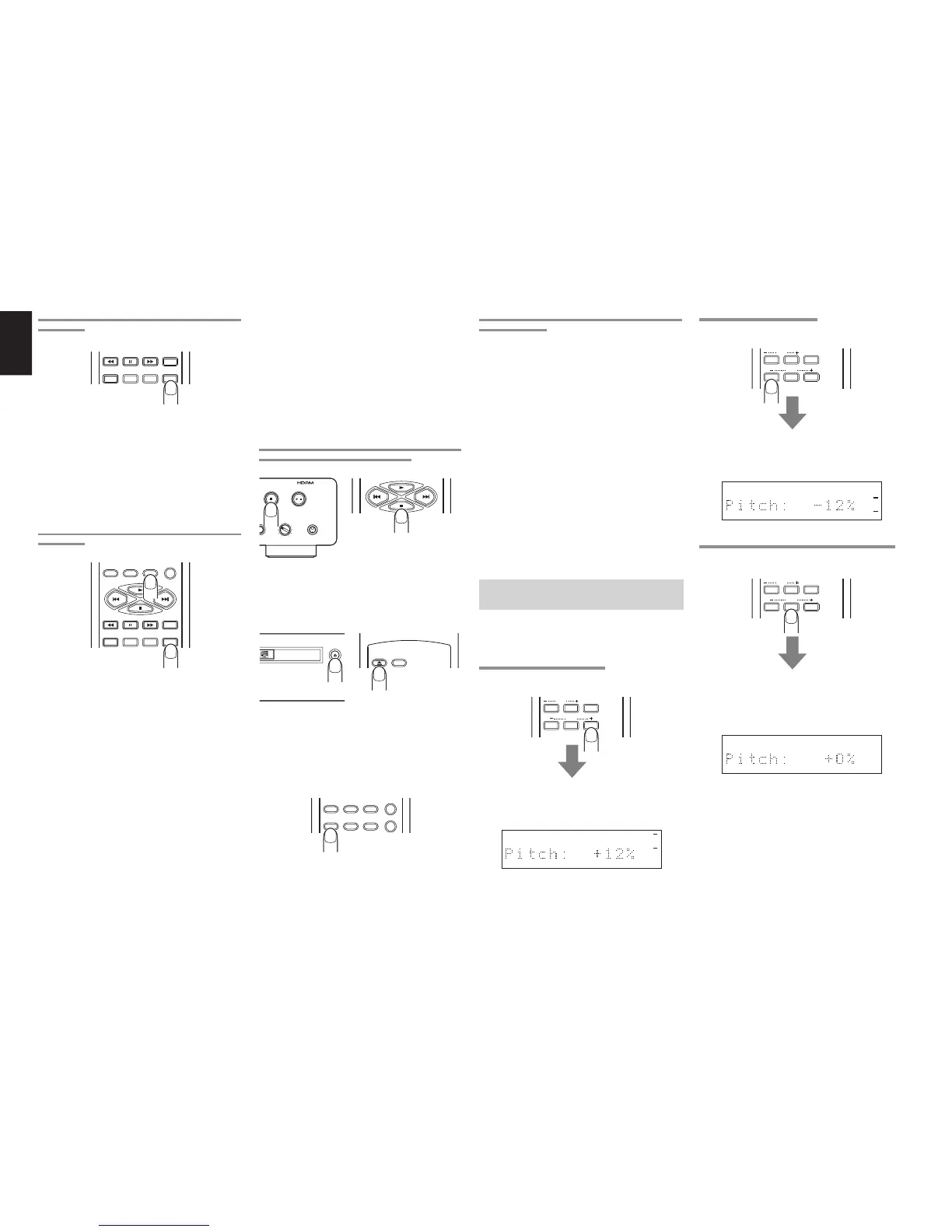
CHECKING THE PROGRAM OR DELETE PROGRAM
CONTENTS
TEXT
TIME
SCROLL/
RECALL
MENU ENTER
During programming operation or program play, press
the SCROLL/RECALL button on the remote control
unit.
With program play, the programmed tracks are
displayed one after the other in sequence on the main
display.
With delete program play, the deleted tracks are
displayed one after the other in sequence on the main
display.
CHANGING THE PROGRAM OR DELETE PROGRAM
CONTENTS
PROGRAM
0
A-B
CANCEL
TEXT
TIME
SCROLL/
RECALL
MENU ENTER
Deleting tracks which were programmed for program
play
When the SCROLL/RECALL button on the remote
control unit is pressed during programming, the
programmed tracks are displayed one after the other
in sequence.
As soon as the track to be deleted from the program
has appeared, press the CANCEL button on the
remote control unit immediately. The number of the
deleted track is cleared from the music calendar on
the display.
Canceling the deletion of tracks which were deleted
for delete program play
When the SCROLL/RECALL button on the remote
control unit is pressed during delete programming,
the deleted tracks are displayed one after the other
in sequence.
As soon as the track whose deletion is to be canceled
has appeared, press the CANCEL button on the
remote control unit immediately. The number of the
track whose deletion was canceled is displayed in
the music calendar on the display.
RETURNING PROGRAM PLAY TO NORMAL PLAY
(CANCELING THE ENTIRE PROGRAM)
PLAY/PAUSE
+
STOP
-
PHONESLEVEL
REPLAY
/
Press the 7 button on the player or remote control
unit twice during program play or once during stop.
The PROG indicator on the display goes off, and the
entire program is canceled.
OPEN/
CLOSE
DISPLAY
OPEN/CLOSE
LAYER CD7300
Alternatively, a program can be canceled when the
disc tray is opened by pressing the OPEN/CLOSE
0 button on the player or remote control unit.
Adding tracks to the program
RANDOM
978
PROGRAM
0
A-B
CANCEL
Press the PROGRAM button on the remote control
unit during stop. The status of the PROG indicator
in the display changes from lighted to flashing, and
more tracks can be added to the program.
PRECAUTIONS FOR PROGRAM AND DELETE
PROGRAM PLAY
∗
The program play and delete program play
functions cannot be used with discs on which MP3
files have been recorded.
∗
When using the numeric buttons to select tracks 1
to 9 on a CD with 10 or more tracks in total, allow
1.5 seconds or so to elapse after the button
corresponding to the number of the previous track
was pressed before pressing the button
corresponding to the number of the next track.
∗
When using the numeric buttons to select track
10 or up on a CD with 10 or more tracks in total,
press the button corresponding to lower digit within
1.5 seconds or so after the button corresponding
to the higher digit was pressed.
∗
When using the 4 and ¢ buttons for
programming, keep pressing one of these buttons
with less than half a second or so in between until
the number of the desired track is displayed.
∗
If the total time for a program exceeds 99 minutes,
the time display will appear as “– – : – –.”
PITCH CONTROL (CHANGING THE
PLAY SPEED)
The play speed (pitch) can be changed across a
±12% range.
∗
Digital signals are not output during pitch control.
INCREASING THE PLAY SPEED
Press the PITCH+ button on the remote control unit.
INDEX
Q. REPLAY
RESET
PITCH
Each time the button is pressed, the play speed is
increased in 1% increments (up to a maximum of
+12%), and it is displayed on the main display.
12 34 56 78 910 1112 1314 1516 1718
REDUCING THE PLAY SPEED
Press the PITCH- button on the remote control unit.
INDEX
Q. REPLAY
RESET
PITCH
Each time the button is pressed, the play speed is
reduced in 1% increments (up to a minimum of -12%),
and it is displayed on the main display.
12 34 56 78 910 1112 1314 1516 1718
RETURNING PLAY TO THE NORMAL SPEED (0%)
Press the PITCH RESET button on the remote
control unit.
INDEX
Q. REPLAY
RESET
PITCH
“Pitch: 0%” appears on the main display.
If the PITCH RESET button on the remote control
unit is pressed again, play returns to the previous
speed setting.
12 34 56 78 910 1112 1314 1516 1718
Pitch control can also be performed using EASY JOG
on the player. (See page 19.)


 To Next Page