EasyManua.ls Logo

Marantz NA8005 - Audio Device Settings (Mac os X Only)

Marantz NA8005
150 pages
Print Icon
To Next Page IconTo Next Page
To Previous Page IconTo Previous Page
Loading...
o
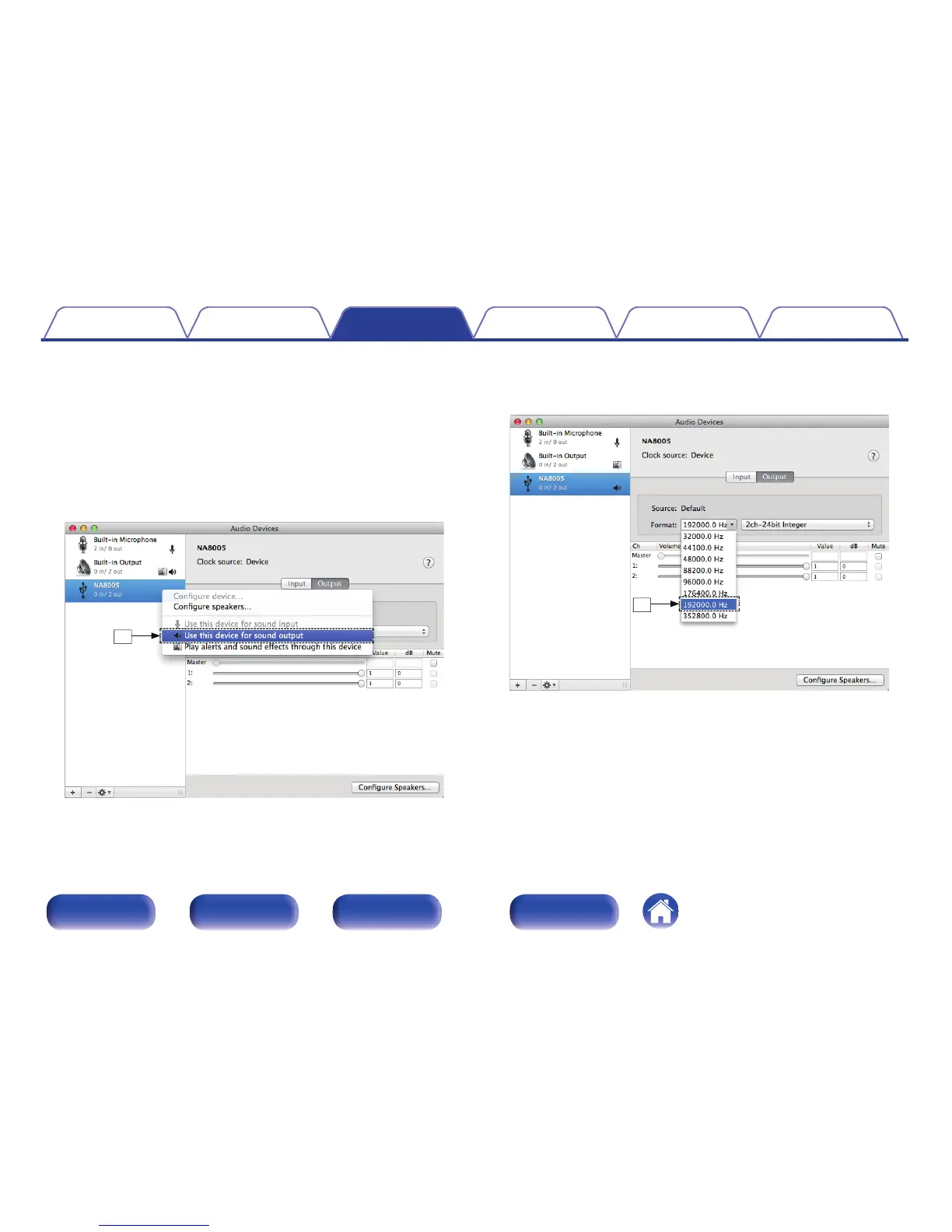
Audio Device Settings (Mac OS X only)
A
Move the cursor to “Go” on the computer screen, and then click
“Utilities”.
0
The utility list is displayed.
B
Double-click “Audio MIDI Setup”.
0
The “Audio Devices” window is displayed.
C
Check that “Use this device for sound output” is checked in “NA8005”.
0
If a different device is checked, select and “Secondary click” on
“NA8005”, and then select “Use this device for sound output”.
.

e
D
Select the “NA8005” format.
0
It is normally recommended to set the format to “192000.0 Hz” and
“2ch-24 bit Interger”.
.
r
E
Click “Quit Audio MIDI Setup”.
Contents
Connections Playback Settings Tips Appendix
82
Front panel Rear panel
Remote control
unit
Index

Table of Contents

Other manuals for Marantz NA8005

Related product manuals