EasyManua.ls Logo

Marantz PM-82 - Tape Deck Operation

Marantz PM-82
26 pages
Print Icon
To Next Page IconTo Next Page
To Previous Page IconTo Previous Page
Loading...
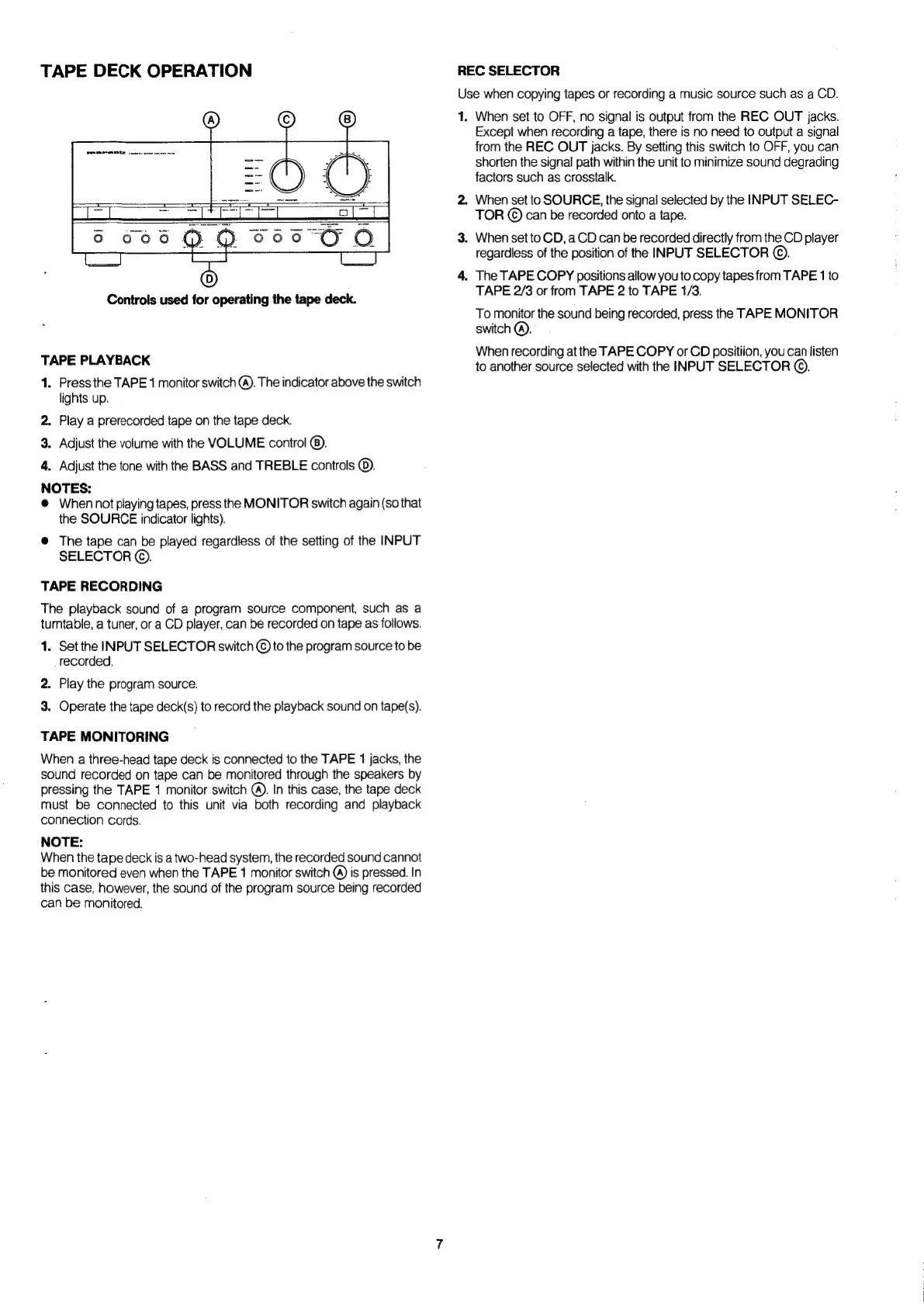
TAPE
DECK
OPERATION
Controls
used
for
operating
the
tape
deck.
TAPE
PLAYBACK
1.
Press
the
TAPE
1
monitor
switch
@).
The
indicator
above
the
switch
lights
up.
2.
Play
a
prerecorded
tape
on
the
tape
deck.
3.
Adjust
the
volume
with
the
VOLUME
control
@).
4.
Adjust
the
tone
with
the
BASS
and
TREBLE
controls
©).
NOTES:
@
When
not
playing
tapes,
press
the
MONITOR
switch
again
(so
that
the
SOURCE
indicator
lights).
@
The
tape
can
be
played
regardless
of
the
setting
of
the
INPUT
SELECTOR
©.
TAPE
RECORDING
The
playback
sound
of
a
program
source
component,
such
as
a
turntable,
a
tuner,
or
a
CD
player,
can
be
recorded
on
tape
as
follows.
1.
Set
the
INPUT
SELECTOR
switch
©
to
the
program
source
to
be
recorded.
2.
Play
the
program
source.
3.
Operate
the
tape
deck(s)
to
record
the
playback
sound
on
tape(s).
TAPE
MONITORING
When
a
three-head
tape
deck
is
connected
to
the
TAPE
1
jacks,
the
sound
recorded
on
tape
can
be
monitored
through
the
speakers
by
pressing
the
TAPE
1
monitor
switch
@).
In
this
case,
the
tape
deck
must
be
connected
to
this
unit
via
both
recording
and
playback
connection
cords.
NOTE:
When
the
tape
deck
is
a
two-head
system,
the
recorded
sound
cannot
be
monitored
even
when
the
TAPE
1
monitor
switch
@)
is
pressed.
In
this
case,
however,
the
sound
of
the
program
source
being
recorded
can
be
monitored.
REC
SELECTOR
Use
when
copying
tapes
or
recording
a
music
source
such
as
a
CD.
1.
When
set
to
OFF,
no
signal
is
output
from
the
REC
OUT
jacks.
Except
when
recording
a
tape,
there
is
no
need
to
output
a
signal
from
the
REC
OUT
jacks.
By
setting
this
switch
to
OFF,
you
can
shorten
the
signal
path
within
the
unit
to
minimize
sound
degrading
factors
such
as
crosstalk.
2.
When
set
to
SOURCE,
the
signal
selected
by
the
INPUT
SELEC-
TOR
©
can
be
recorded
onto
a
tape.
3.
When
set
to
CD,
a
CD
can
be
recorded
directly
from
the
CD
player
regardless
of
the
position
of
the
INPUT
SELECTOR
©.
4.
The
TAPE
COPY
positions
allow
you
to
copy
tapes
from
TAPE
1
to
TAPE
2/3
or
from
TAPE
2
to
TAPE
1/3.
To
monitor
the
sound
being
recorded,
press
the
TAPE
MONITOR
switch
@).
When
recording
at
the
TAPE
COPY
or
CD
positiion,
you
can
listen
to
another
source
selected
with
the
INPUT
SELECTOR
©).

Related product manuals