15
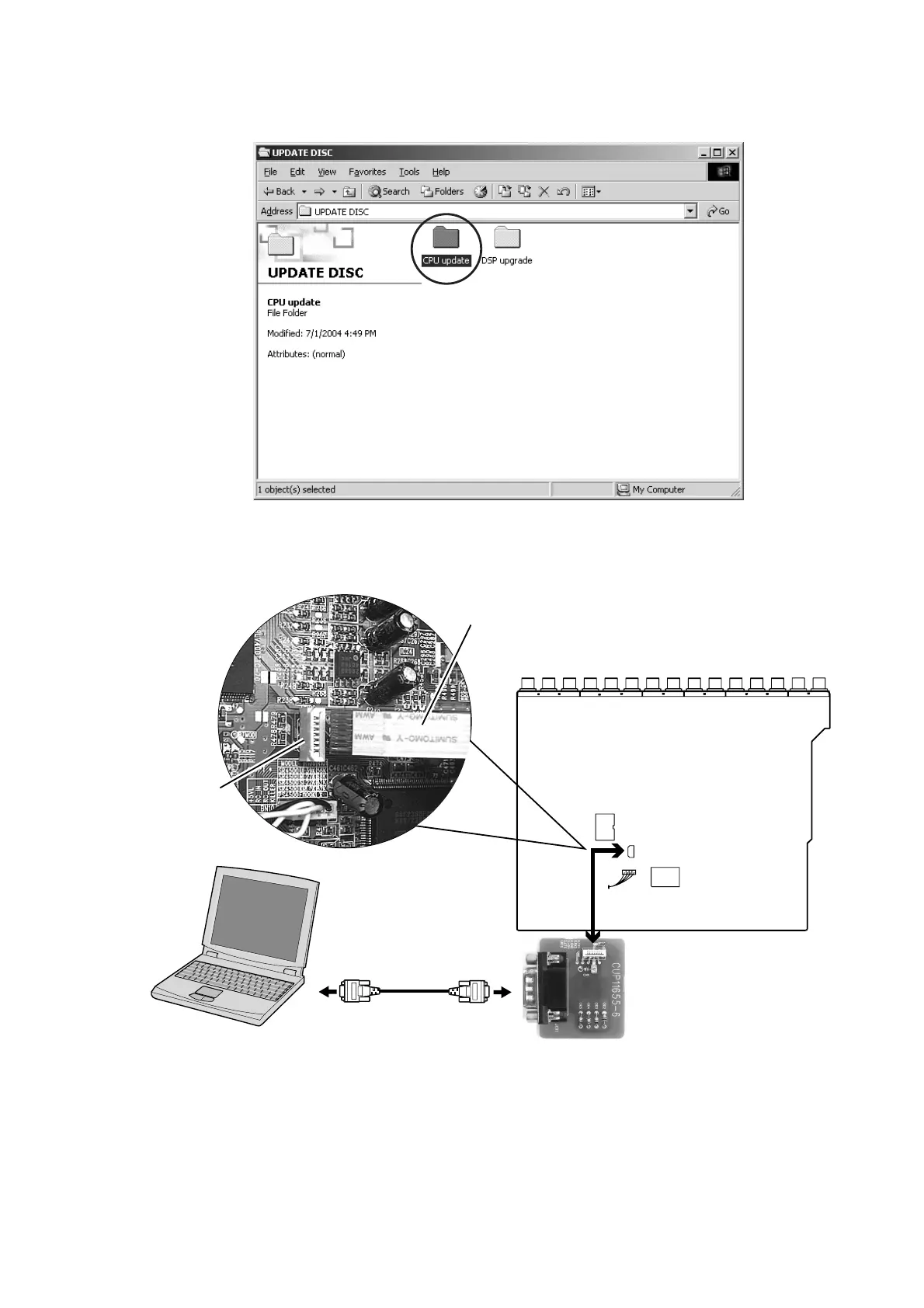
RS232C Dsub-9 pin cable
(female to female/Straight cable)
DATA UPDATE KIT (Part no. : 90M-SR4500JIG)
CN26
INPUT PWB
PC (Windows 98, NT, ME, 2000)
with RS-232C port
DATA UPDATE KIT
cable
CN26
Download Firmware for CPU (Mode 2)
1. Put the "CPU update" folder into anywhere on your PC’s
hard disc.
2. Connect PC and DATA UPDATE KIT with RS232C cable,
connect DATA UPDATE KIT and connector (CN26) with
FFC.
3. Turn on the power of the unit.
Note : When the unit is into boot mode, stand-by LED is
not lights up.
CPU のアップデート方法 (Mode 2)
1. "CPU update"
フォルダを PC のハードディスクにコピーし
ます。
2. RS-232C ケーブルでマイコンアップデートキットと PC を
接続し、
FFC と INPUT PWB のコネクタ(CN26)を接続
します。
3. 本機の電源を入れます。
注記
: 本機はブートモードになり、Stand-by LED は点灯しま
せん。


 To Next Page